User Profile

mokiee
Copper Contributor
Joined 6 years ago


User Widgets
Recent Discussions
Migrate email to a O365 Teams emails
Hi there! I tested out the email migration function and it works well. However, we used to have a shared mailbox, say mailto:info@domain.com, which we now want to use as an O365 Teams shared mailbox so mailto:abc@domain.comand mailto:dev@domain.com can both be part of the group and share the mailbox. How can I migrate that email into the O365 shared mail? Thanks!2.3KViews0likes6CommentsCan't register my domain
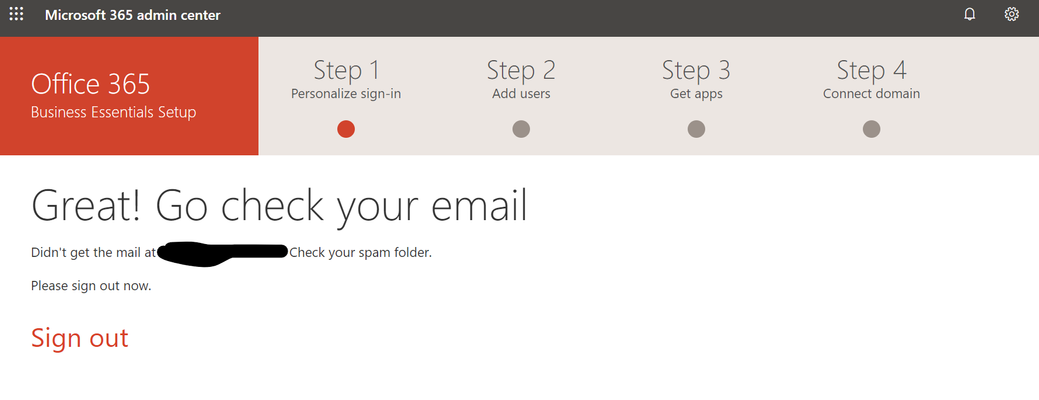
Hi there! I can't seem to register my domain on O365. I get to this screen and the email never arrives in my Zimbra, which I am migrating from. Zimbra is working fine though as I tested sending email to myself. It could well be because of this: While testing the product, a few people signed up for a free O365 personal account with our domain in their signup email: jeremy@domain.com However, we have 47 Business Essentials licences now for the company and we'd like to regain our domain for the company. We are currently just using Teams / OneDrive on the @domain.onmicrosoft.com address, but we would like to use Outlook too for our email. I checked both my current Zimbra mail AND the Outlook.com email I signed up with the same email address. Unfortunately, I don't see the Microsoft email there in either account. Where do I go from here? Thanks!2.2KViews0likes3CommentsTransfering domain.com to domain.onmicrosoft.com account
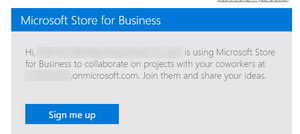
OK, so finally, I got around to trying again. Previously, I got to entering the domain, then the user name and told to wait for an email that never came. This time, the email finally came. As a "you have been invited to join the Microsoft Store for Business" email .. nothing to do with "domain sign up". Signed out of the domain.onmicrosoft.com and into my domain.com account as per instructions. Now it asks to verify my domain with a TXT record. Fair enough, easy to do. However, to do it, I must disconnect from my current host's DNS. Though they are fairly unresponsive knowing that they're going to lose our web and email hosting business, I guess if there is an issue, I can always reconnect it. BUT, I'd like to be pre-informed before I make this move to minimize down time and looking blankly wondering "what next". After the steps listed here, at step 8, when it says "finished", does it port my 49 users from domain.onmicrosoft.com onto the new domain.com account? Or at the very least, will the two domains will join in one organization? https://docs.microsoft.com/en-US/microsoft-365/admin/setup/add-domain?view=o365-worldwide4.4KViews0likes5CommentsO365 Group Email Not Showing Up on Outlook Web
Hello! We use O365 Business Essentials. We have successfully created O365 groups that show up in the groups section in users' Outlook Web mailboxes. Unfortunately, for our largest team (Sales), it doesn't show up. Even though it's listed in the groups in the Exchange Admin and is a Teams group. I tried to search from the group to join on Outlook, but it's not listed as an Outlook group. We need to group access that email sales@mailto:sales@ourdomain.com, preferbly without having to delete and recreate the group. 1. What *might* have caused this, is that I created that group from Teams rather than the Group function from Admin. If so, are there any permissions that need to be set manually that weren't set? 2. I *might* be able to delete it and recreate it in Groups Admin. However I am unsure of how long the sales@ username would be held by the system or would it be released immediately? Also, it's been challenging to convince the the company to move onto Teams. The people finally have posted stuff and might be discouraged if I delete the team and rebuild it. So I'd rather just fix some settings if possible. Thanks!17KViews0likes1CommentRe: Transfering domain.com to domain.onmicrosoft.com account
VasilMichev Thanks for the reply. Even if nothing is automatic, will I at least be able to manage my current mailto:users@mydomain.onmicrosoft.com and mailto:users@mydomain.com from my new mailto:mokiee@mydomain.com account after I verify it? I think from other instructions I will need to manually assign that domain the the user, but I need to know if my new login will show both domains after verification. I used the link sent to me through the "add domain" function on the Admin function of the mydomain.onmicrosoft.com account to add mydomain.com. So I kinda expected it to be already linked somehow to say "your new domain is not yet verified" but give me access to both domains, even if I couldn't assign the mydomain.com to my users yet. It doesn't help that the link to my email doesn't say anything about adding a domain, but signing up for a Microsoft Store for Business. i.e. it says I invited myself to "collaborate on projects" on Microsoft Store for Business. Previously, around a month ago, I wouldn't even get an email from the "add domain" function. Instead, it just seems like a totally separate entity. That's what got me a little worried.4.2KViews0likes1CommentRe: Transfering domain.com to domain.onmicrosoft.com account
VasilMichev Thanks for the reply! I understand what you're getting at. Unfortunately, the person hosting our DNS / website / email right now is unresponsive, knowing that we will not be using his services in the near future. So we have no access to his DNS server right now. Thus we need to "disconnect" because we need to switch to a new DNS / web / email service provider to change the TXT record. We're totally disconnecting from our current host to a new one. 🙂 Once I go through the steps, will my new mailto:mokiee@mydomain.com be connected to my current mailto:mokiee@mydomain.onmicrosoft.com system? Will my current users on mailto:mokiee@mydomain.onmicrosoft.com be ported / combined or otherwise have access to the mokiee@mydomain.com system? It would be a problem if it doesn't since we already pay for the licences on the mailto:mokiee@mydomain.onmicrosoft.com domain and the two systems don't connect. Currently, without verifying my domain with the TXT, my two domains seem like we are two separate organizations. I understand that it could and probably would combine, but I need to be sure that it does.4.3KViews0likes3CommentsRe: Can't register my domain
OK, so finally, I got around to trying again, and this time, the email finally came. As a "you have been invited to join the Microsoft Store for Business" email .. nothing to do with "domain sign up". 😛 Signed out of the domain.onmicrosoft.com and into my domain.com account. Now it asks to verify my domain with a TXT record. Fair enough, easy to do. However, to do it, I must disconnect from my current host. I guess if there is an issue, I can always reconnect it. BUT, I'd like to be pre-informed before I make this move. After the steps listed here, when it says "finished", does it port my 49 users from domain.onmicrosoft.com onto the new domain.com account? Or at the very least, will the two domains will join in one organization? https://docs.microsoft.com/en-US/microsoft-365/admin/setup/add-domain?view=o365-worldwide Thank you!2KViews0likes0CommentsRe: Changed language, but can't change Admin UI Back!
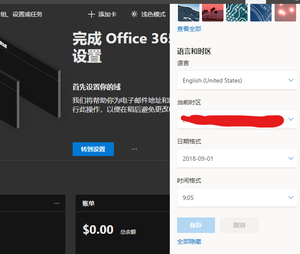
jcgonzalezmartin Thanks for the reply! I ended up noticing it was persistent in Edge on the desktop, but when I loaded it in Chrome on my laptop later on, it was in English. So I presumed the setting was either in LocalStorage or Cookies. I ended up just deleting the cookies for admin.microsoft.com and it is back in English now. Kinda weird that MS handled the language issue differently for Admin than the rest of O365!1KViews0likes0CommentsRe: Migrate email to a O365 Teams emails
VasilMichev Thanks for this! I did change the address of my Teams's O365 group email, mailto:myteam@domain.com to teams.myteam@domaincom but then when I tried to create a shared mailbox with mailto:myteam@domain.com, it says that "The proxy address SMTP:myteam@domain.com is already being used by the proxy addresses or LegacyExchangeDN of ..... Please choose another proxy address." EDIT: figured out that when I changed the PrimarySmtpAddress with the new email, it automatically created an alias with the old one. Trying to figure out how to remove the alias.2.2KViews0likes2CommentsRe: Migrate email to a O365 Teams emails
Thanks VasilMichev ... some of our members jumped on Teams right away and so many of our "shared email mailbox" names are part of the O365 group email that's attached to the team. And we can't change that so if mailto:sales@domain.com is already used as the username an O365 Group for the Sales Team, how do we get mailto:sales@domain.com for the shared mailbox if we can't change the O365 name?2.2KViews0likes4CommentsRe: O365 Group Email Not Showing Up on Outlook Web
Thanks for removing this from the spam filter. I did eventually find an answer to this question. https://answers.microsoft.com/en-us/msoffice/forum/all/some-teams-not-showing-up-in-groups-within-outlook/60dec20a-3e33-4a62-b38d-ccb2e23171ae17KViews0likes0Comments
Recent Blog Articles
No content to show