User Profile

thisisfutile
Copper Contributor
Joined 6 years ago


User Widgets
Recent Discussions
Re: Microsoft's Copilot: A Frustrating Flop in AI-Powered Productivity
November 2025 checking in. Still junk. I went to bing and typed "when I restart my computer, my background color changes to black". Co-Pilot listed 5 suggestions, one was 'Clear Cache'. I clicked both resource links it provided and searched using ctrl+f for the word 'cache', and it didn't exist.561Views0likes0CommentsRe: Outlook 2016 defaults to an end date on recurring appointments now - need "no end date" fix
MaximillianC I'd love to see a class action lawsuit on this one. I promise you, someone, somewhere lost their job (or worse) because of this change. They, like many of us, had no idea this change was implemented. They set a critically important calendar event, made it recur, and without realizing this new configuration, they stopped doing the critically important detail they were supposed to perform. It's been 8 years now and I STILL forget to set this to 'No end date' on some of my reminders. Microsoft's biggest problem is they let their engineers have the final say. A really intelligent engineer figured out how to save the company a few dollars in storage cost and they never considered the life-altering ramifications to their user-base. MS has never been customer-first...and this is just one of thousands (millions?) of examples.1.8KViews2likes0CommentsRe: Registry HKEY_CURRENT_USER\Software\Policies\Microsoft\Office\16.0\Outlook is missing
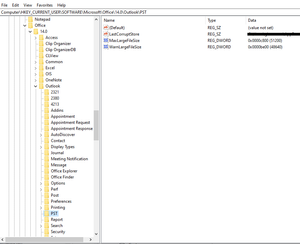
MrDapper Did you edit your image to have less keys (folders) under the 16.0 key and the Outlook key? Here's mine. 14.0 is Office 2010 (which is what I was using at the time of my post). As you can see, it contains a lot more keys than your image. I have a 15.0 in my registry that's as empty as your 16.0. I'm guessing you're in the wrong key. Look at this link to determine which number you should be in: https://www.msoutlook.info/question/200 If you did edit the image, perhaps try to remove the 'MaxFileSize' and 'WarnFileSize' values? I know I didn't need them and my PST's grew past 20GB with no problems.94KViews0likes0CommentsRe: Registry HKEY_CURRENT_USER\Software\Policies\Microsoft\Office\16.0\Outlook is missing
VasilMichev Are you certain? The article demonstrates creating the PST key, not half of the path. I ask because there just happens to be an exact match for this key path if you remove 'Policies' The article refers to HKCU\Software\Policies\Microsoft, but the trail ends there. However, if you go to HKCU\Software\Microsoft, you'll find Office\XX.0\Outlook\PST. Sure feels like a typo. EDIT: Not sure what's wrong with OP's link but the article is located https://support.microsoft.com/en-us/help/832925/how-to-configure-the-size-limit-for-both-pst-and-ost-files-in-outlook EDIT EDIT: I discovered that the 'Policies' key is associated to Group Policy. If you're not using Group Policy, you'll see the same path, just without the word Policies in it.112KViews0likes4CommentsRe: Registry HKEY_CURRENT_USER\Software\Policies\Microsoft\Office\16.0\Outlook is missing
ijduncan I'm sorry, I just now saw this question. After doing a little more research, I discovered the "Policies" in the path is relevant to Group Policy. In my work environment, I don't have a single GP used for Outlook, which explains why this path didn't exist for me. I did follow the instructions using the path posted in my previous comment and it worked. Before we switched over to MS365 this past summer, we were using Outlook 2010 (which is 14.0 in the registry) and I went to several PC's with PST's getting close to 20GB and 2 that were exactly 20GB...(by the way, I have no idea if they were losing archived emails because I think they were at 20GB for a long time but Outlook wasn't throwing warnings to them!) Anyway, I monitored those PC's after implementing the registry key and they all started growing to 20.1, 20.2 etc. TL;DR - Yes, it works, just remove Policies from the path and find your version number of Outlook. I used "MaxLargeFileSize" and "WarnLargeFileSize". HTH! Sorry I'm so late!99KViews0likes2Comments
Recent Blog Articles
No content to show