User Profile

nicolehaugen
 Microsoft
Joined 6 years ago


User Widgets
Recent Discussions
Re: Windows 10 image missing in Marketplace images
Hi Mo- Are you seeing this issue with the marketplace images enabled through Azure Lab Services? Can you share more details on specifically what images you are seeing this with? If your students are blocked, I recommend logging a support ticket. Thanks, Nicole2KViews0likes0CommentsRe: Hadoop on Azure labs
Hi- I haven't had a chance to validate these steps myself, but here are steps that were previously shared with me by gina_cooper that may be helpful here: -anaconda -chrome -java -7zip -visual c++ redistributable 2008, 2010 -mongodb -mysql -hadoop following: https://www.datasciencecentral.com/profiles/blogs/how-to-install-and-run-hadoop-on-windows-for-beginners and https://towardsdatascience.com/installing-hadoop-3-2-1-single-node-cluster-on-windows-10-ac258dd48aef -set JAVA_HOME and HADOOP_HOME in environment variables. JAVA_HOME should go to the jdk and HADOOP_HOME to Hadoop directory (not bin) -set path environment variable to %JAVA_HOME%\bin and %HADOOP_HOME%\bin -Create data/namenode and data/datanode and then change the 4 xml files per the second link using the full directory path to namenode and datanode. -run powershell command as administrator: hdfs namenode –format -if you get an error replace the .jar file: Download hadoop-hdfs-3.2.1.jar file from the following link: https://github.com/FahaoTang/big-data/blob/master/hadoop-hdfs-3.2.1.jar -In powershell then type in %HADOOP_HOME%\sbin\start-dfs.cmd and it works! Please let us know if this helps. Thanks, Nicole1.4KViews0likes0CommentsRe: Azure Lab Services Vorlage veröffentlichen
Hi, It doesn't matter if you close your browser or shut down your physical computer - the publishing job will continue to run and complete without you having to be connected. If you're seeing an issue where publish isn't finishing, please let us know or log a support ticke. Thanks, Nicole1.2KViews0likes1CommentRe: I getting the message I am not authorized to join
Hi Rod - Sorry to hear that you are running into issues with being able to use Azure Lab Services. Can you please provide some more details: * Are you a student or user that is trying to access a lab VM? * Or, are you an instructor\IT admin that is trying to create set up labs? * Can you provide more details on the error that you are seeing? If you are a student or user trying to access your lab VM, please contact your local IT department\administrator that created your lab to report an issue with being able to access or connect to your lab VM - they will be able to help you troubleshoot further. Thanks, Nicole933Views0likes0CommentsRe: Any way to connect USB devices to Azure labs services
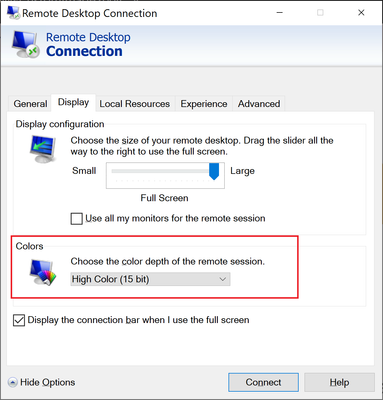
Hi Mark- If you are using Windows, depending on the device, you may be able to do USB pass through by using the RDP settings under the Local Resources tab of the RDP Connection client app. Here is documentation that explains what is supported for device redirection, including USB devices: https://docs.microsoft.com/en-us/windows-server/remote/remote-desktop-services/clients/remote-desktop-app-compare. It's important to note that support varies depending on the type of physical device that you are connecting to lab VMs, as well as the type of USB devices you are using. We also have seen customers use third-party software that provides device redirection solutions. Thanks, Nicole1.8KViews0likes0CommentsRe: Lab Services - VMs not being created in the machine pool
LGoldsborough330 - When labs get stuck in a "creating" state, it often indicates that Azure Lab Services is unable to properly allocate VMs to your lab. I would recommend logging a support ticket so that we can ensure that your subscrition\labs are able allocate the number of VMs for the VM size and region(s) that you need. While I recommend logging a support ticket, another option you could also try is deleting\recreating the lab which may automatically resolve the issue you're seeing. Also, if your lab is large (such 100+ VMs), you may also restructure the lab into several labs that have a smaller number of VMs in each one. For example, instead of having a lab with 100 VMs, you could create two labs each with 50 VMs. These options work best when your labs aren't using VNet peering (which ties you to a specific region) - if you're not using VNet peering, Azure Labs has greater flexibility to allocate VMs to you within any region of your Lab Account's location\geography. Thanks, Nicole1KViews0likes0CommentsRe: Lab Creator and Lab Contributors can't see the Labs
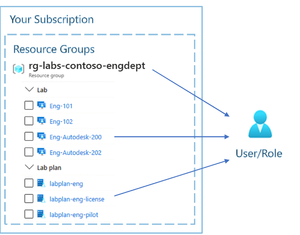
Hi Masih, By default, users can only see the labs that they create. For a user to see another person's labs, they must be assigned as a Contributor\Owner to the lab. Here is more information on this: * https://docs.microsoft.com/en-us/azure/lab-services/administrator-guide#manage-identity * https://docs.microsoft.com/en-us/azure/lab-services/how-to-add-user-lab-owner Note that when you add an Owner\Contributor at the lab level, they must also have Read permission on the Lab Account. Hope this helps. Nicole832Views0likes0CommentsRe: Why does Azure Lab takes a lot of time to start ?
Hi Prazol- Yes, VM start times can fluctuate and can take several minutes to start. If it makes sense for your scenario, one thing we do recommend so that a labs' VMs all start by a certain time, is to use schedules and add a buffer of about 15 minutes to the scheduled start time. I will also mention that improving VM start times is a high priority item on our backlog for the next release of Azure Labs. Thanks, Nicole2.1KViews0likes0CommentsRe: help
Hi Maya, Marcus- For security purposes, when you use the browser, you will see periodically that you are signed out and that the session expires. This is so that you re-authenticate by logging back in with your credentials. However, if you're seeing an issue where the session expires so frequently that it's impacting your ability to even connect to or use a lab, please let us know. Also, I would recommend logging a support ticket. Thanks, Nicole939Views0likes0CommentsRe: How to limit the Lab virtual machine traffic outbound?
HI Hermia, Currently you will need to install 3rd party content filtering software directly as part of the images on the student VMs. Also, you may want to have your student run as a non-admin user so that they can't uninstall or modify the content filtering software. If you're interested in trying this approach, please message me directly. It would be great if we could schedule a short phone call so that we can discuss more details of this option. Thanks, Nicole983Views0likes0CommentsRe: Single Sign-on to Azure lab service
Hi, Which LMS is your customer planning to use? The reason I ask, is that Az Labs is offering a private preview with Canvas integration - here are more details: https://techcommunity.microsoft.com/t5/azure-lab-services/sign-up-provide-feedback-on-azure-lab-services-integration-with/ba-p/2643112. To answer your question, Azure Labs doesn't currently expose a way to achieve SSO like you describe. However, as I mentioned, we are soon adding support for Canvas and we also have plans to support additional LMS in the future. Thanks, Nicole1.2KViews0likes0CommentsRe: Cannot log in through ssh
Hi, Sorry to hear that you are having issues with accessing your lab VM. For issues like this that are impacting students, you will need to contact your teacher and\or your school's IT department. They will be able to help you you resolve this issue. Thanks, Nicole825Views0likes0CommentsRe: My Azure account is not working
Hi all- Sorry to hear that you are having issues with accessing your lab VMs. For issues like this that are impacting students, you will need to contact your teacher and\or your school's IT department. They will be able to help you you resolve this issue. Thanks, Nicole1.2KViews0likes0Comments