User Profile

binodmaharjan_2020
Copper Contributor
Joined 6 years ago


User Widgets
Recent Discussions
Exg 2019 CU15 Error: OWA not login
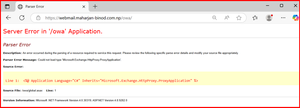
After installation of CU15 upgrade, OWA/ECP virtual directory got misconfigured or corrupted. Task i have tried: Remove Virtual Directory and created new. --- Not resolved. Trying with Upgrade from ISO Exchange setup -- Not resolved. I found article of copymissing.dll script and tried --- Not resolved. I found "C:\Program Files\Microsoft\Exchange Server\V15\Bin\Microsoft.Exchange.HttpProxy.dll" this dll file missing in my path. What shall i check or do to resolve this issue?286Views0likes4CommentsRe: Exchange 2019 SMTP Relay Issue After Adding New Server to Send Connector
Curious_Kevin16, as we already mentioned, SMTP port 25 is blocked by Microsoft. You need to submit a request if you have an eligible subscription. However, if you want to confirm whether the port is open or closed, you can use various port checker tools available online. For example, you can use: https://canyouseeme.org/ https://portchecker.co/63Views0likes0CommentsRe: Exchange 2019 SMTP Relay Issue After Adding New Server to Send Connector
Hi Curious_Kevin16, If I am not wrong, your query is that after adding the Exchange Server on an Azure VM, SMTP was not working, right? This might be due to outbound SMTP connectivity issues in Azure. In an Azure subscription, for Enterprise Dev/Test subscriptions, port 25 is blocked by default. To allow SMTP from an Azure VM, you need a standard Enterprise Agreement or a Microsoft Customer Agreement for Enterprise (MCA-E) subscription.311Views0likes0CommentsHow can we empty Deleted Item Folders from On-premises Exchange server using script?
Scenario: As i am migrating the mailbox, requirement is to empty the mailbox's deleted items folder and instead of doing manually to individual usermailbox, i tried to do from Exchange Management shell using command. Search-Mailbox parameter command is deprecated so i cannot use those command as suggested in the internet related articles. How can i empty deleted item folders from Mailbox server?464Views0likes3CommentsRe: External Mail address is being changed while processed from EOP to internal Zimbra Server.
Hi Lewis-H, As per the last logs, I can clearly see there has been a change in the method of sending emails from office 365 to Zimbra. Due to this alteration, Zimbra’s Anti-spam is rejecting email considering it as a Spoof email ( you can see on a log that it is redirecting as a client domain instead of. Hence if you can just make us clarification on if there is any kind of changes on Exchange online routing. Here I received the email in Zimbra too but just don't know why it is redirecting?3.6KViews0likes0CommentsExternal Mail address is being changed while processed from EOP to internal Zimbra Server.
Co-existence Scenario: Actually I have a Zimbra mail server and office365. All the mail flow is through the Exchange connector. Till 4th March 2020, I have no issue with mail flow between office365 and Zimbra. I have checked the message trace, it seems fine. From 5th March, I have got an error message: Status: Office 365 received the message that you specified but couldn't deliver it to the recipient (xyz@domain.com) due to the following error: ERROR: 550.5.1.0: Sender address rejected: domain.com As per the above error, the address was rejected by the Zimbra Domain server because there was a rule of block own domain if it came from the external organization(For Spoofing). In-depth I dig the log in Zimbra server, I found strange that is External address i.e. Gmail address=my own domain. so it was rejected. Mar 5 19:12:15 mail postfix/smtpd[19367]: NOQUEUE: reject: RCPT from mail-pu1apc01lp2050.outbound.protection.outlook.com[104.47.126.50]: 550 5.1.0 <binod.maharjan+SRS=AIPdn=4W=gmail.com=james.bond@mydomain.com>: Sender address rejected: mydomain.com; from=binod.maharjan<+SRS=AIPdn=4W=gmail.com=james.bond@mydomain.com> to=<binod.maharjan@mydomain.com> proto=ESMTP helo=<APC01-PU1-obe.outbound.protection.outlook.com> how is this happen I am strange, is this issue with Microsoft or else?3.7KViews0likes2CommentsRe: How to delegate admin to employee without access to sensitive data
As per my knowledge, Roles are assigned for those people to whom you delegate tasks. In your case, you want to delegate admin to your employee but also afraid of having access data. There are only two solutions I have seen: 1. Either you provide permission manually to specific sites or else. They will have access only that you assigned. If they require additional permissions they will ask for it. 2. You can assign them as SharePoint Administrator (If Internal Employee). Even SP Admin cannot access any site until they themself become the members/owner of any site. You can keep Notification alerts and search/Investigate Audit logs if any misused.1.8KViews0likes0CommentsRe: Office 365 with AD connect - Migrating user cross forest using Active Directory Migration Tool
HI Marvin Oco After migration of users objects into New Forest, Keep those users into one specific OU and change the attribute by PowerShell. You need to change the Immutable ID of each office365 user. I hope below link will also help you: https://msexperttalk.com/understand-and-modify-office365-users-immutableid/3.1KViews0likes0CommentsRe: On-premise are not receiving email
Hello Yousuf khan, I hope you validated the connector successfully. Just issue might be with Looping the mail from o365 to On-premises. Check with your Default Accepted Domain and keep domain type as Relay. Hope this will solve your problem.5.4KViews0likes0Comments

Recent Blog Articles
No content to show