User Profile

ANAND_SUNKA
Brass Contributor
Joined 6 years ago


User Widgets
Recent Discussions
Custom SITs fine tunned in MIP
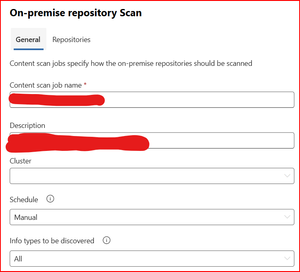
Hello Everyone, Currently working on MS Purview Solutions greenfield deployment project for one of the customer for on-premise data and M365 data. I have created few custom SITs classifiers with regex pattern in the MIP portal almost 3 months ago and it's classifying the data as expected but with some false positives. All of them are fine-tuned to prevent false positives. It's scanning and classifying the newly created M365 data as expected. However it's not reclassifying the previously classified false positive data. How can I forcefully rescan/reclassify the false positive M365 data. I just want to reclassify the data with fine-tuned custom SITs to correctly classify the data before labelling. One more question related to on-prem scanners. I have started the on-prem scanners to scan all the SharePoint sites and Fileshares for any sensitive information. Initially its ran full scan and later it's started as incremental scan. Above scan started before creating the custom SITs and labels. Now I want run a full scan just to classify the data with recommending the labels based on the sensitive data instead of enforcing and applying the label. Can someone throw some light which options need to be select for just recommending the label instead of applying the label. Current configuration as shown below: Any help really appreciated. Regards Anand SunkaMIP on-premise scanner completed and showing lot of errors
Hello All, Please find below details: I have installed 2 MIP scanners in my on-prmise environment and created 2 content scan jobs like 1-for Network shares, 1-for Shrepoint and scan completed. In the reports I can see status as "Failed" and comments as "Protecting empty Office files is not supported, BadInputErro "OpenFile failed, message: 'XMPFiles: No smart file handler available to handle file' "Failed to get metadata, Invalid MS property stream header, "Failed to open/create root storage, not a valid compound file, Problems reading directory "The file has been protected using non RMS technologies Searched the above errors/warnings but didn't find anything. Does anyone has any idea abut above errors. Also I didn't find anything in known errors article. https://learn.microsoft.com/en-us/purview/deploy-scanner#1-determine-whether-files-are-included-or-excluded-for-scanning https://learn.microsoft.com/en-us/azure/information-protection/known-issues Any help really appreciated. Thank you Regards Anand Sunka440Views0likes2CommentsRe: Information Protection Scanner
Hello DoNaNaToR , Please follow the steps mentioned in below article may be helpful especially "Get a Microsoft Entra token for the scanner." https://learn.microsoft.com/en-us/purview/deploy-scanner-configure-install?tabs=azure-portal-only Regards Anand Sunka158Views0likes0CommentsLitigation Hold showing for F1 and E1 licenses
Hello Team, We have one of the customer who has all the mailboxes hosted in Exchange online. I have ran few powershell commands to get the details of Litigation hold, Archive and License details and it showing Litigation hold enabled for F1 and E1 licenses also. As per the MS Litigation hold supports only for E3 licenses. I used this command: "get-mailbox -resultsizeunlimited | select DisplayName,PrimarySmtpAddress,RecipientTypeDetails,HiddenFromAddressListsEnabled,SKUAssigned,DeliverToMailboxAndForward,ForwardingSmtpAddress,ForwardingAddress,LitigationHoldEnabled,LitigationHoldDuration,InPlaceHolds,MailboxPlan,AccountDisabled,ArchiveStatus | Export-csv C:\Userlist.csv" Any help really apprecited Anand Sunka4.7KViews0likes1CommentExchange Online archive license
Hello All, Need clarification on Exchange Online Archive(EOA) license does it include Litigation Hold, Inplace hold. Also what will happen if I apply EOA license on E1 Mailbox. E1: inluding 50 GB archive and 50 GB primary mailbox. Post applying EOA license on E1 license mailbox, does it increase unlimited Archive storage. Also can we put Litigation hold, Inplace hold. Regards Anand S1.8KViews0likes3CommentsExport O365mailbox last login to csv
Hello Everyone, Currently trying to export my tenant mailbox last login details to CSV but somehow last login details are pulled wrongly by script which I was used. Anyone can help me out how to pull mailbox last login to csv for 30 thousand mailboxes and it's a time consuming task. I was going through this article explained about the same. Can someone guide me how to export mailbox last login and never logged mailboxes from last 90 days to csv as I am not expert in scripting or write a PowerShell command. Any help really appreciated. Anand Sunka1.3KViews0likes1CommentMS Graph API explorer export O365 Mailbox last login to csv
Hello Everyone, Just started learning MS Graph API any possibility to export details to csv by using MS graph. Can someone guide me how to export mailbox last login and never logged mailboxes from last 90 days to csv as I am not expert in scripting or write a PowerShell command. Any help really appreciated. Anand Sunka963Views0likes0CommentsMailbox utilization alerts Office 365 F3 mailboxes
Hello All, We are currently looking for F3 mailboxes utilization alerts by PowerShell script only for F3 license mailboxes. Does anyone come across this type of requirement. We have lot of F3 mailboxes where my customer doesn't want to invest in Exchange online archive licenses as it's expensive. Now we would like to create a script which should scan all the F3 mailboxes and sends the alert to users about their mailbox utilization and create some storage by deleting the older emails to prevent bounce back issues. Any help really appreciated. Regards Anand Sunka1.4KViews0likes2CommentsCustom Retention policy and Retention tag
Hello All, We have all the mailboxes hosted in O365 cloud. We are using default MRM policies for all the mailboxes. Now we have created custom retention policies and retention tags as shown below: 1) Created new custom Retention policy as Custom policy 2) Created new custom Retention tag as Move_archive_mailbox with setting of "applied automatically to entire mailbox default" 3) Custom retention policy has custom new retention tag. Applied this policy to few mailboxes and working fine. Now my query is does the custom retention tags are the part of Default MRM policy by default. Any help really appreciated. Thanks and Regards Anand Sunka1.2KViews0likes1CommentExchange Mailbox Export Import PST Migration
Hello All, Below is the Customer's messaging environment: Company-A is already running with on-prem Exchange 2016 with hybrid configurations. Company-B is running with purely on-prem Exchange 2016. Now Company-B is acquired by Company-A. Current status of Company-A Hybrid Configuration: Company-B domain verified and added as accepted domain in Company-A O365 portal. Also Mail flow for Company-A and Company-B MX records pointed to ProofPoint Gateway for all the inbound and outbound mail flow. Company-B will be going to decommission post movement of all the on-prem mailboxes to Company-A O365 EXO. Hence we selected to migration type is Mailbox export to PST, upload PST into Azure Blob storage container, Mapping the PST file and Import PST into O365 mailbox. All the AD accounts will be create in Company-A local AD and sync to Azure AD via AD connect. Current Stage and Future stage: Current SMTP address in Company-B: mailto:email address removed for privacy reasons as primary address Post migrating to Company-A domain: mailto:email address removed for privacy reasons as primary address and mailto:email address removed for privacy reasons as secondary address. We will be going to create a contact for Company-A and will keep it on Company-A mailbox, so that Company-A emails forwarded to Company-B mailbox. We will be going to keep the on-prem mailbox as it is but we will block the Exchange protocols for migrated mailbox. In this scenario we will be having Domain-A and DOmain-B email addresses as mailto:email address removed for privacy reasons as primary address and mailto:email address removed for privacy reasons as secondary address-Post migrating to Company-A O365 EXO. Additionally we will be having on-prem mailbox as mailto:email address removed for privacy reasons as primary address This will be applicable for all the mailboxes, resource mailboxes, Distribution Groups as well. MY CONCERN: When someone from the internet sends email to mailto:email address removed for privacy reasons does it sends directly to Company-B on-prem Exchange or does it send that email directly to O365 mailbox. Any help really appreciated. Anand Sunka1.2KViews0likes0CommentsExchange 2016 Antimalwarescanning Antimalware scanning FIPFS issues
Hi MSFT Exchange Team, Most of the on-premise Exchange 2016, 2019 customers facing suddenly mail flow issues as they cannot send/receive emails. Fix is Set-MalwareFilteringServer -BypassFiltering $True -identity <Server Name>. But disabling or bypassing the Filtering rule is not a good idea or not recommended. Please can you shed some light and share the permanent fix for the same. Regards Anand SSolved6.8KViews0likes5CommentsRe: Exchange 2016 Antimalwarescanning Antimalware scanning
Hi, We also faced the similar issue with Exchange 2016CU20 today early morning. Suddenly it's stopped the mail flow. I was used below command and resolved the issue. Set-MalwareFilteringServer -BypassFiltering $True -identity <Server Name> But it's not good idea to disable or bypass the malware filtering. MSFT should release the fix. Anyways thank you. Regards Anand S3.1KViews0likes0CommentsRe: Advanced Delivery for third party phishing attack scenario
Hi Kazaki82, Thanks for the update in my scenario I was using third party phishing simulation hosted at amazonses.com and it got 2 From addresses where I was blocking only the single from address. That's why the issue was happened. But after whitelisting the second from address my issue was resolved. Yes as you said we can't bypass malware filtering or ZAP as they implemented secure by default. https://docs.microsoft.com/en-us/microsoft-365/security/office-365-security/secure-by-default?view=o365-worldwide Anyways thank you. Regards Anand Sunka10KViews0likes1CommentRe: Advanced Delivery for third party phishing attack scenario
Hi Sundeep_Saini, Thanks for the reply. I have resolved the issue by looking at 5321.fromadress and whitelisted that address and issue got resolved. But now we are facing different issue with url's getting blocked by using ATP policies. I have whitelisted the urls in Advanced delivery as well as in ATP safe links policy. But still no luck. Why does the adavanced delivery urls whitelisted is not working. Any help really appreciated. Regards Anand Sunka10KViews0likes3CommentsAdvanced Delivery for third party phishing attack scenario
Hello MSFT Team, Normally every quarterly we perform the third party phishing attack simulator in the Organization to educate the end user's but this time all the phishing testing emails are getting quarantined by marking as high phishing. After searching on the google found below link to use O365 advanced delivery policy for third party phishing. In the advanced delivery policy we have added: Domain : added sending domain Sending IP : added sending IP Simulation URLs to allow : added simulation URLs as well https://docs.microsoft.com/en-us/microsoft-365/security/office-365-security/configure-advanced-delivery?view=o365-worldwide&source=docs Followed the above msft blog and added the rule successfully but still the testing phishing emails are getting quarantined and marked as high phish. But one thing has been observed that third party phishing simulator is hosted on amazonses.com and sending domain is different but we have added only the sending domain. Do I need to add the amazonses.com domain as well in advanced delivery policy. Please can someone shed some light on it as I searching lot of blogs on advanced delivery policy but found nothing. Any help really appreciated. Regards Anand Sunka11KViews0likes6CommentsHow to export meeting session and user session audio video quality calls details to csv
Hello Everyone, Please can you help me how to export meeting session and user session audio video quality calls details for 2 days or more to csv. I got this url which I am looking for the same : https://github.com/leeford/Get-CSSessions But this commands are depreciated as it's from Skype4rBusiness onliline family. Now if I want to export the similar details from teams to CSV how can we achieve. Any help really appreciated. Thanks and Regards Anand Sunka1.8KViews0likes1CommentRe: Password Expiration with AAD connect Password hash sync
Hilucafabbri365, We have similar issue and it's a major security concern. Now my infosec team wants to get rid of expired passwords should get block. As i said am planning to run below command for entire Organization. Get-AzureADUser -All $true | Set-AzureADUser -PasswordPolicies None Is it going to impact the users which are already logged into the mailboxes, cloud apps, on-prem custom apps when we run the above command. Any help really appreciated.63KViews0likes0Comments
Recent Blog Articles
No content to show