User Profile

orchee
Iron Contributor
Joined 6 years ago


User Widgets
Recent Discussions
Re: The name 'my-keyvault-NNN' is already in use
naveen73 So as Tommykobberoe said, you need global (!) unique name. I've created a quick powershell script to generate random 24 alfa-numeric string, if someone is so unlucky as I was with thinking of unique name. https://gist.github.com/orchee/263679a3bae74d78edcafe3acbc8f1157.5KViews0likes2CommentsRe: Are OneDrive files included in SharePoint Online storage limit?
Jay Carper Are OneDrive files included in SharePoint Online storage limit? - No. Do files in OneDrive for Business count toward the tenant's total Sharepoint Online storage limit? - No. Does that mean that the total storage available in OneDrive for Business for all of the tenant's users is less than 2 TB despite the theoretical 1 TB limit per user? - No. You have to look 1DRV and SPO as two separated services with different limitations that are not combined. https://docs.microsoft.com/en-us/office365/servicedescriptions/sharepoint-online-service-description/sharepoint-online-limits https://docs.microsoft.com/en-us/office365/servicedescriptions/onedrive-for-business-service-description38KViews4likes3CommentsI cannot claim prize for Teams Learn Challenge
It seems that prize cannot be claimed from my amazon account, because of some location restrictions. I did not find any term in challenge that contestants can be based only in US. So if someone from MS Learn team can help, I'll be thankful. If not, I will share the link to prize, to anyone US based in this thread.490Views0likes0CommentsRe: O365 licensing datasource?
PWheeler So there is List License details for users -> https://docs.microsoft.com/en-us/graph/api/user-list-licensedetails?view=graph-rest-1.0&tabs=http If you want to go deeper on usage, then you need to go through usage reports, so just keep your expectations low on more details 🙂2.8KViews1like0CommentsRe: O365 licensing datasource?
PWheeler You can do it by accessing MS Graph: https://graph.microsoft.com/v1.0/subscribedSkus You need to give your account permissions listed https://docs.microsoft.com/en-us/graph/api/subscribedsku-list?view=graph-rest-1.0&tabs=http { "@odata.context": "https://graph.microsoft.com/v1.0/$metadata#subscribedSkus", "value": [ { "capabilityStatus": "Enabled", "consumedUnits": 1, "id": "xxxxx-xxx-xx-xxxxx-xxxxxxxxx-xxx-xxxx-xxx-xxxxxx", "skuId": "xxxxxx-xxxxx-xxx-xxxxx-xxxxx", "skuPartNumber": "O365_BUSINESS_ESSENTIALS", "appliesTo": "User", "prepaidUnits": { "enabled": 1, "suspended": 0, "warning": 0 }, "servicePlans": [ { "servicePlanId": "xxxxxx-xxxx-xxxxxx-xxxx-xxxxxxx", "servicePlanName": "MICROSOFT_SEARCH", "provisioningStatus": "Success", "appliesTo": "Company" }, { "servicePlanId": "xxxxxxxx-xxxx-xxxxx-xxx-xxxxxxx", "servicePlanName": "WHITEBOARD_PLAN1", "provisioningStatus": "Success", "appliesTo": "User" } ] } ] }2.6KViews1like7CommentsRe: My Admin Centre won't let me log out
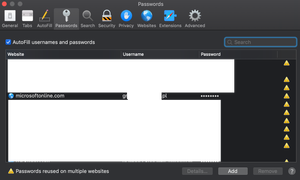
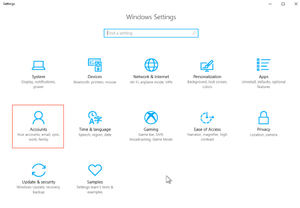
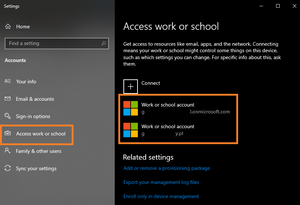
Check your personal account on Windows and check if in Access work/school tab your's friend account might have been linked/connected. I had similar issue with trying to login into my azure devops account, it was automatically connecting through my second account even in InPrivate/Incognito session.9.5KViews0likes8CommentsRe: Setting recurreing tasks in MS Planner
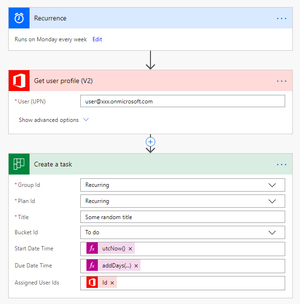
J_Standen1234 This is not supported out of the box. There is still opened suggestion to bring it to Planner -> https://planner.uservoice.com/forums/330525-microsoft-planner-feedback-forum/suggestions/12301668-schedule-reoccurring-tasks However, you can create Power Automate/Flow task to get this feature:1.8KViews0likes0CommentsRe: No Search Results - Outlook 365
ryanl1 you probably need to run and recreate your index from scratch. Here you've got details how to do it: https://support.office.com/en-us/article/Fix-search-issues-by-rebuildling-your-Instant-Search-catalog-213a2728-0ef4-427a-9bb2-aed329a59b172.4KViews0likes3Comments

Recent Blog Articles
No content to show