User Profile

TomResing
 Microsoft
Joined 10 years ago


User Widgets
Recent Discussions
OneDrive 101 at SharePoint Fest Seattle 2019
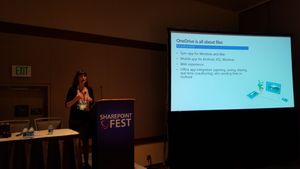
I love SharePoint Fest! Kaarin Shumate and I are presenting OneDrive for Business and Pleasure: Sync, Share, Collaborate, right after the keynote tomorrow morning. Are you at the event? Plan on attending our #ONE101 session or others in the OneDrive track? Let us know in the comments. We'll be updating this post later with links to resources we share during the session. We may even post a selfie :0 Here's a picture of Kaarin presenting. Resources Microsoft Home Use Program OneDrive articles on support.office.com Move files between accounts File types supported for previewing OneDrive for Android, OneDrive for iOS Files On-Demand Admin focused article on Docs.Microsoft.com Move and redirect Windows known folders874Views0likes0CommentsResources for SharePoint Conference 2019 Breakout session brk168
Resources for SharePoint Conference 2019 Breakout session brk168 10 ways modern libraries can make you more efficient : Beyond the basics Presented by Tom Resing Links to help articles Manage large lists Set a reminder flow1.8KViews0likes0CommentsSharePoint 1:1 sessions at Microsoft Ignite
The OneDrive and SharePoint teams are offering a limited number of dedicated 1:1 technical sessions for individual customers attending Microsoft Ignite. Sessions are 45 minutes long. If you are selected, you will meet with one or more experts (Microsoft product team members, consultants, or MVPs) to discuss your goals, get advice on current challenges, and envision how to enhance your solution using capabilities across Microsoft 365. Technical sessions are offered for the following categories. SharePoint and OneDrive Migration — Are you struggling to migrate content from on-premises to SharePoint Online and OneDrive for Business? Need help moving your My Sites to OneDrive for Business? Let us know where you’re stuck and how we can help you move forward so your organization can take advantage of compelling collaboration and information protection capabilities. Moving from classic to modern experiences in SharePoint — The modern SharePoint experience is designed to be compelling, flexible, mobile, and easier to use. Are you ready to move from the classic experience to the modern experience? Are you wondering where to start, or would you like some advice on getting the most out of modern experience features like communication sites, hub sites, or team sites? Let us know how we can help you move forward with your assessment, planning, and implementation. To be eligible to participate, your organization must meet the following criteria: Must be licensed for the capabilities. You plan to implement these capabilities and you need help to move forward To nominate your company or organization for a technical session, send e-mail to o365solutionsessions@microsoft.com by Monday, September 10, 2018, and include the following information: Name of your company or organization. Contact information: name and title or role in your organization. One or two focus area(s) you are interested in and any specific questions you have about that area now. Brief description of your solution goals and the challenges you’d like to discuss in the session (this will help us bring the right expert to your session). Due to a limited number of available sessions for each focus area, not every customer will be accepted. We will review nominations and select those that best fit the focus area and that look like they will lead to a meaningful discussion for both the organization and Microsoft. Information that you share either in e-mail or during a solution session will be treated confidentially. If you are selected, we will contact you with the day and time of your session by September 14, 2018. We look forward to seeing you in September!3.3KViews6likes6CommentsNew help article: Prioritize content management tasks with attention views
Looking to explore the new attention views in lists or libraries or roll them out to others you work with? Check out the newly published support.office.com article Prioritize content management tasks with attention views Let me know what you think of the format and content of the new article. I'll be adding another one on requiring information in a column soon. The easiest way I've found to try out attention views is to add a column that requires information to a library which already has one document in it. You'll see "Files that need attention" in the views menu immediately. You can always remove that column later if you were just adding it to try out attention views.1.7KViews5likes4CommentsRe: New App Launcher cannot have a white Accent color because controls disappear
Thanks for flagging the issue, Dean_Gross. Accessibility is very important. I'll let you know what I find out. Dean_Gross wrote: TomResing this seems to be in conflict with your tweet announcing an award that MS received for accessiblity https://twitter.com/resing/status/968660861899255808. Can you help get this UI issue looked at?3.3KViews0likes0CommentsRe: Limitations of Predictive Indexing
Here's a reply from a product manager working on large list updates: Predictive indexing applies to lists between 2500 and 20,000. End-users may also manage indexes in lists as large as 20,000. If a large number of items is created in a short time, whether by third-party tool or some other means, it's possible that the predictive indexing may miss the chance to manage indexes for the list. After the list has grown larger than 20,000 items, predictive indexing will no longer make changes to it. Predictive auto-indexing is enabled by default. It may be disabled for a specific list in Advanced settings.7.3KViews0likes0CommentsRe: Discover and share new training videos about SharePoint Online
When you're playing a video, click the More Options menu in the bottom right of the video player, (...), then Share > Copy Link to get a link to the video. Add an embed web part and use an iframe to embed the video. For example, here's an iframe for the What is SharePoint Online? video. <iframe src="https://www.microsoft.com/en-us/videoplayer/embed/84b45a7b-7cca-48b5-90a5-6c50a7d6d948?pid=ocpVideo0-innerdiv-oneplayer&jsapi=true&postJsllMsg=true&market=en-us" frameborder="0" marginwidth="0" marginheight="0" scrolling="no" allowfullscreen="" style="width: 980px; height: 550px;"></iframe>6.8KViews1like2CommentsRe: Discover and share new training videos about SharePoint Online
Excellent idea. Thanks for the suggestion! By the way, these aren't in video format, but let me know if they help: Move or copy items from a SharePoint document library Use filters to change your view of files or list items12KViews1like0Comments


Recent Blog Articles
No content to show