User Profile

SebasL
Copper Contributor
Joined 6 years ago


User Widgets
Recent Discussions
Re: Need to fetch VM CPU, Memory & Disk usage that are less than 50%
Hello brijohn , One of the factor is to define what is considered to be a threshold violation. Example: A CPU that reaches 95% over a period of 20 seconds is not necessarily a issue if its average over 1 minute is at 7%. //% CPU usage: Perf | where Computer == "YourVM-Name" | where ObjectName == 'Processor' and CounterName == '% Processor Time' and InstanceName == '_Total' | summarize AvgCPUPct=avg(CounterValue) by bin (TimeGenerated, 5m) | render timechart title = "% CPU usage (bin to 5min)" //Committed Bytes in use % (Virtual + Physical Memory): Perf | where Computer == "YourVM-Name" | where ObjectName == "Memory" and CounterName == "Available MBytes" | summarize AvgAvailableRAM = avg(CounterValue/1024) by bin (TimeGenerated, 5m) | project AvgAvailableRAM, TimeGenerated //Disk Queue Length: Perf | where Computer == "YourVM-Name" | where ObjectName == "PhysicalDisk" and CounterName == "Avg. Disk Queue Length" and InstanceName contains "_Total" | summarize AvgDQ=avg(CounterValue) by bin (TimeGenerated, 5m) | project AvgDQ, TimeGenerated2.8KViews0likes0CommentsAMA to replace MMA by 31 August 2024
We have been told to start using the Azure Monitor agent instead of the Log Analytics agent before 31 August 2024. We are using Microsoft Monitoring Agent (MMA) on Windows 10/11 computers that are not virtual machine. Azure Monitor agent is only available as a virtual machine extension. On hybrid machines, i have read that we need to use Azure Arc to deploy the Azure Monitor agent but that software is not compatible with Windows 10/11. What will be the replacement for us ?10KViews0likes1CommentGetting incremental value from Perf / TCPv4 / Connection Failuers
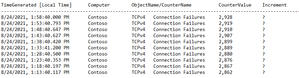
I would like to run a query based on the performance counter ObjectName == "TCPv4" and CounterName == "Connection Failures" This counter displays the TCP Failure number but its particularity is that the counter is incremental. I would like, with my query, to get only the incremental between two data points. Let's say my counter is every 300 seconds (5m), how can I have a column with the value incremented every 300 or 600 seconds? My current query look like this. I've looked to a way of using some kind on Summarize operator without success. Perf | where Computer =~ "MyComputerName" | where ObjectName == "TCPv4" and CounterName == "Connection Failures" | project TimeGenerated, Computer, ObjectName, CounterName, CounterValue thanks!Solved1.6KViews0likes2CommentsQuery using Computer list from Parameter
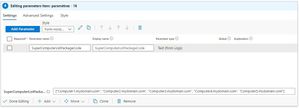
Hello, I have an issue with some code for a Workbook. I would like to run a Query in a Workbook and filter this on a list of computers that would be retrieved in a preceding parameter. This parameter has the variable name {SuperComputerListPackageCode}. I can successfully run the {SuperComputerListPackageCode} query: Its result is: ["Computer1.mydomain.com", "Computer2.mydomain.com", "Computer3.mydomain.com", "Computer4.mydomain.com", "Computer5.mydomain.com"] My stake is the following. In a subsequent request, I run the code: Perf | where Computer in ({SuperComputerListPackageCode}) | distinct Computer and the result gives me an error.Solved1.1KViews0likes2CommentsGetting the rank of a CounterValue
I'm having issues designing a query in Log Analytics. My goal is to get the computer's CPU rank out of 100 by comparing it to other LogAnalytics computers. let CPUavgOfMyComputer = Perf | where Computer contains "myComputerName" | where ObjectName == 'Processor' and CounterName == '% Processor Time' and InstanceName == '_Total' | summarize avg(CounterValue); Perf | where ObjectName == 'Processor' and CounterName == '% Processor Time' and InstanceName == '_Total' | summarize tdigestRes = tdigest(CounterValue), count() | project rank_tdigest(tdigestRes, CPUavgOfMyComputer) * 100.0 / count_ I'm pretty sure my issue comes from my syntax on the rank_tdigest function (TDigest, Expr). Can we use a variable for Expr ?Solved1.1KViews0likes2CommentsUnable to set Custom logs with log path configure to c:\users\%username%\...
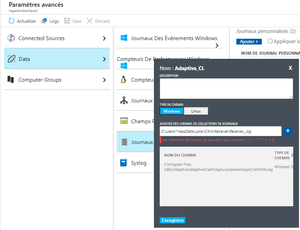
I'm trying to set a Windows Custom Log with a file path in c:\users\%username%\ but the Agent doesn't seem to recognize the %username% Windows variable. Is there any way to set the custom path using Windows 10 Environment variables ? My path are currently defined to : C:\Users\%username%\AppData\Roaming\ICAClient\wfcwin32.log File type: ANSIGroup similar Process name in LogsAnalytics
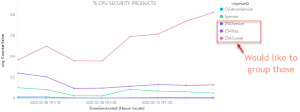
Hi, I am looking for a query where I can get % Process CPU for specific Process. My main concern is that I would like to group some of them. For instance: "ZSAService", "ZSATunnel" and "ZSATray" sould all been group under ZScaler My current query : Perf | where Computer contains "sl2" | where ObjectName == "Process" and CounterName == "% Processor Time" | where (InstanceName contains "Sysmon" or InstanceName contains "CSFalconSer" or InstanceName contains "ZSA" ) | summarize avg(CounterValue) by InstanceName, bin(TimeGenerated, 1d) | render timechart title = "% CPU SECURITE" and the current result:Solved1.7KViews0likes2CommentsRe: Getting incremental value from Perf / TCPv4 / Connection Failuers
Wow thanks! did'nt know about PREV(). that work A1! Perf | where Computer == "Contoso" | where ObjectName in ("TCPv4") and CounterName == "Connection Failures" | order by TimeGenerated asc | extend CounterValue_prevValue = prev(CounterValue, 1) | project TimeGenerated , Computer , ObjectName , CounterName , CounterValue , CounterValue_Incremental=CounterValue - CounterValue_prevValue1.5KViews0likes0CommentsRe: Unable to set Custom logs with log path configure to c:\users\%username%\...
CliveWatson I'm pretty sure that MMA does not collect my log on %username% path because the process MonitoringHost.exe is running as SYSTEM. The wildcard in the path «should» work but Azure won't let me do it. Error: Windows paths cannot contain "\ /: *?"> <| "2.2KViews0likes0Comments
Recent Blog Articles
No content to show