User Profile

JBUB_Accelerynt
Brass Contributor
Joined 6 years ago


User Widgets
Recent Discussions
Re: Data Connector - Analytics Rule
miguelfac Yep! Just make sure you add it to both places. let averageCount = toscalar( CommonSecurityLog | where DeviceVendor == "YourVendor" | where TimeGenerated >= ago(24h) | summarize count() ); CommonSecurityLog | where DeviceVendor == "YourVendor" | where TimeGenerated >= ago(1h) | summarize LogCount = count() | extend isBelowThreshold = iff(LogCount < averageCount * 0.01, 1, 0) | where isBelowThreshold == 13.3KViews0likes1CommentRe: Data Connector - Analytics Rule
JBUB_Accelerynt I made this simpler, that old thing was such a mess lol. This does basically the same thing with the same result. If the logs in the past 1 hour fall below 1% of the prior 24 hour window. You can change the percentage from 1% to 5% by changing the 0.01 to 0.05 to fit your needs. Have fun! let averageCount = toscalar( CommonSecurityLog | where TimeGenerated >= ago(24h) | summarize count() ); CommonSecurityLog | where TimeGenerated >= ago(1h) | summarize LogCount = count() | extend isBelowThreshold = iff(LogCount < averageCount * 0.01, 1, 0) | where isBelowThreshold == 13.4KViews1like4CommentsRe: Data Connector - Analytics Rule
miguelfac Thanks! Add this additional line to the query. | where Code == "1" That makes it so it only returns a result if the code is 1, which is when your logs are below the threshold. Then just select "Is Greater than" 0 or "Is Equal to" 1 for your analytic rule.3.4KViews0likes0CommentsRe: Data Connector - Analytics Rule
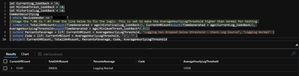
miguelfac I dug this up from when I was a KQL beginner back in 2020. It still works for many of our use cases, though. I made a logging thresh hold because some log sources I would still get heartbeats or something else was "just wrong" with the log source. Alerting on zero logs is easy. I'm not sure if this is elegant or a mess, but it works! 😃 let CurrentLog_lookBack = 1h; let MinimumThresh_lookBack = 1d; let HistoricalLog_lookBack = 1d; CommonSecurityLog | where DeviceVendor == "YourVendorHere" //Chage the *.03 to *.06 from the line below to make the AverageHourlyLogThreshold lower than normal for testing. | summarize Total24HRcount=count(TimeGenerated > ago(HistoricalLog_lookBack)), CurrentHRCount=count(TimeGenerated > ago(CurrentLog_lookBack)), AverageHourlyLogThreshold=count(TimeGenerated > ago(MinimumThresh_lookBack*0.03)) | extend Percentofaverage = iif( CurrentHRCount < AverageHourlyLogThreshold, "Logging has dropped below threshold - Check Log Source", "Logging Normal" ) | extend Code = iif( CurrentHRCount < AverageHourlyLogThreshold, "1", "" ) | project CurrentHRCount, Total24HRcount, Percentofaverage, Code, AverageHourlyLogThreshold Change "YourVendorHere" to your vendor in your logs. The "code" is null if logs are above the set thresh hold and 1 if they fall below. You can use the to generate an alert with a playbook or however you like. Normal Below Thresh Hold (I didn't have a sample so I just changed the thresh hold for an example) Here is the ChatGpt explanation of how it works 😃 1. `let CurrentLog_lookBack = 1h; let MinimumThresh_lookBack = 1d; let HistoricalLog_lookBack = 1d;`: These are variable declarations. The `let` keyword in KQL allows you to create a variable and assign it a value. `CurrentLog_lookBack` is set to 1 hour, `MinimumThresh_lookBack` is set to 1 day, and `HistoricalLog_lookBack` is also set to 1 day. These are used to set the time frames for the queries. 2. `CommonSecurityLog | where DeviceVendor == "YouDeviceVendor"`: This line is querying logs from the `CommonSecurityLog` data source, specifically filtering to only include logs where the `DeviceVendor` is "YouDeviceVendor". 3. `| summarize Total24HRcount=count(TimeGenerated > ago(HistoricalLog_lookBack)), CurrentHRCount=count(TimeGenerated > ago(CurrentLog_lookBack)), AverageHourlyLogThreshold=count(TimeGenerated > ago(MinimumThresh_lookBack*0.03))`: This line is summarizing the data in a few ways. It's getting a count of the logs in the past 24 hours (`Total24HRcount`), the past hour (`CurrentHRCount`), and the average hourly log threshold (`AverageHourlyLogThreshold`), which is calculated as the count of logs over the past day multiplied by 0.03. 4. `| extend Percentofaverage = iif( CurrentHRCount < AverageHourlyLogThreshold, "Logging has dropped below threshold - Check Log Source", "Logging Normal" )`: This line is creating a new column (`Percentofaverage`) that contains a message about whether the current hour's log count has dropped below the average hourly log threshold. If it has, the message is "Logging has dropped below threshold - Check Log Source"; otherwise, it's "Logging Normal". 5. `| extend Code = iif( CurrentHRCount < AverageHourlyLogThreshold, "1", "" )`: This line is creating another new column (`Code`) that contains "1" if the current hour's log count has dropped below the average hourly log threshold, and an empty string otherwise. 6. `| project CurrentHRCount, Total24HRcount, Percentofaverage, Code, AverageHourlyLogThreshold`: This line is limiting the output of the query to just the columns specified: `CurrentHRCount`, `Total24HRcount`, `Percentofaverage`, `Code`, and `AverageHourlyLogThreshold`. In summary, the script is checking whether the number of logs from a "YouDeviceVendor" device in the past hour has fallen below a certain threshold (3% of the number of logs in the past day). If it has, a warning message and code are generated. The final output includes the counts of logs in the past hour and day, the threshold, and the warning message and code.3.3KViews1like7CommentsMacOS CodeSignSummary.md appearing in Applications
On our Mac devices running Defender/ATP there is a CodeSignSummary-*numbers*.md file being created in the Applications folder. The contents of the file is very small and shows wdav.zip and its file properties. Does anyone know why this is showing up?3KViews1like1CommentRe: Searching Historical Logs for Threat Intelligence Matches.
Here is something we made a long time ago but should still work as a template. let dt_lookBack = 7d; let ioc_lookBack = 14d; ThreatIntelligenceIndicator | where TimeGenerated > ago(ioc_lookBack) | where isnotempty(DomainName) | join ( CommonSecurityLog | where TimeGenerated > ago(dt_lookBack) | where isnotempty(DestinationHostName) | extend CommonSecurityLog_TimeGenerated = TimeGenerated ) on $left.DomainName == $right.DestinationHostName | project SourceUserName, DomainName, CommonSecurityLog_TimeGenerated, Description, Activity | extend AccountCustomEntity = SourceUserName | extend HostCustomEntity = DomainName | extend URLCustomEntity = DomainName17KViews0likes0CommentsRe: I am trying to create a watchlist that displays specific alerts from different business units
Just as an example you could do something like below to change the Computer column to all upper case. (ComputerUpper just being what ever you want to name it.) You would need to to the same with your right column whatever that is if it also has lower case letters. You can use toupper or tolower, as long as both columns end up uniform. Replacing the == with =~ wont work as the join only supports equalities. Heartbeat | extend ComputerUpper = toupper (Computer) | lookup kind=leftouter _GetWatchlist('DEV1') on $left.ComputerUpper == $right.SearchKey | project UNIT, ComputerUpper4.7KViews0likes5CommentsRe: Performing a join using "contains"
I think the query made for Zscaler might do what you are looking for. Just replace the ThreatIntelligenceIndicator and Common SecurityLog tables with the fields you need, then project the matches. The query is projecting fields from each table. Let me know if you need a hand! let dt_lookBack = 7d; let ioc_lookBack = 14d; ThreatIntelligenceIndicator | where TimeGenerated > ago(ioc_lookBack) | where DomainName contains "." and DomainName !contains ".storage.googleapis.com" and DomainName !contains ".office.com" | join ( CommonSecurityLog | where TimeGenerated > ago(dt_lookBack) | where DestinationHostName contains (".") | extend CommonSecurityLog_TimeGenerated = TimeGenerated ) on $left.DomainName == $right.DestinationHostName | project SourceUserName, DomainName, CommonSecurityLog_TimeGenerated, Description, Activity | extend AccountCustomEntity = SourceUserName | extend HostCustomEntity = DomainName | extend URLCustomEntity = DomainName1.5KViews0likes2CommentsRe: Cannot add Taxii Connector to my workspace
The image posted is not very clear but double check your entries. Make sure there are no spaces or characters other than - in the name. URL and collection info should be as below. Also try setting the collection to once a day and see if that changes anything. https://limo.anomali.com/api/v1/taxii2/feeds 1076KViews1like2CommentsMDATP apt-get install fails Ubuntu 21.04
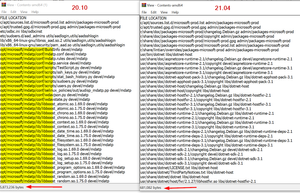
We are trying to install and test MDATP on Ubuntu 21.04. The installation fails at the install. If I swap with any other package the install starts fine. After digging into the files it looks like maybe MDATP is missing from the Contents-amd64.gz at https://packages.microsoft.com/ubuntu/21.04/prod/dists/hirsute/ Note the size difference from 20.10 to 21.04 Also, the 21.04 contents contains zero references to MDATP or the opt folder $ sudo apt-get install mdatp Reading package lists... Done Building dependency tree... Done Reading state information... Done E: Unable to locate package mdatp10KViews0likes3CommentsRe: Where does the MaliciousIP field come from in this query?
We have looked into this somewhat as well. If you pull up the log table for something like CommonSecurityLog/Zscaler/WindowsFireWall) you will see that MaliciousIP (and Mal Lat/Long/Country) are already in those tables. You will need to make sure those boxes are checked in the Columns Drop down in the results. When you do see them almost all of them are empty. It seems that those boxes DO get filled in as the logs come in and match a corresponding Malicious entity that exists in the tables of ThreatIntelligenceIndicators or are a part of the Threat Intel Data Connector, or even part of the "under the hood" threat intel that MSFT provides. I think there is a bit of "under the hood" stuff going on as logs come in, which makes this different than say a lookback on DNS requests compared to Domains in the TIindicators. I have not checked if the MalciousIP table columns exist before Threat Intel is turned on - but might fun to check when spinning up your next instance.2.1KViews0likes1CommentRe: 365 Defender integration with Azure Sentinel not working
Hello Yash, Have you checked to see if you have any alerts in protection.office.com? The connector only receives a log entry for an actual alert. Also - Prerequisites To integrate with Microsoft Defender for Office 365 (Preview) make sure you have: Workspace: read and write permissions are required. Tenant Permissions: required 'Global Administrator' or 'Security Administrator' on the workspace's tenant. License: required Microsoft Defender for Office 365 Plan 2 (included with the Office 365 E5, Office 365 A5, and Microsoft 365 E5 licenses, and available for purchase separately) Thank You Jon Bub Arbala Security5.6KViews1like10CommentsRe: Another TAXII Query
JKatzmandu We have support tickets open with MS on the similar issue. I don't think it's a TAXII issue. It's a TI logging issue. We can generate new IOCs in the TiIndicators via the api, but they dont always show up in the logs. Something is not working for sure.1.6KViews0likes2Comments
Recent Blog Articles
No content to show