User Profile

Pbala
Copper Contributor
Joined 6 years ago


User Widgets
Recent Discussions
News articles are not displaying in Chorological order under "See All"
Hi, For our Retail HUB site, the news articles are not displaying in chronological order in "See All" and /retail/_layouts/15/news.aspx page. It is missing pages posted from today until September 6 and some past news articles. Troubleshooting steps I did: 1. All news pages are published with Promoted 2. 2. No issues showing these pages on the News Webpart. 3. Reset the Library search. I reached out to support and no help, as they mentioned it is a know issue but this works fine in another site collection, which is not a HUB. -Can being a HUB site be a issue? I tried to make it a non hub site but did not see any difference. - See the file naming convention(attached image), could that be a problem? Any help is appreciated. Thanks Pbala726Views0likes0CommentsHighlight Content webpart date filter
On the classic page, I used Content query search to display a single image based on start and end date and display templates. Images are preloaded with set start and end dates and the query displays the single image dynamically. ListID:{e94b2f22-f404-xxxxxxxx} -Filename:Thumbnails.aspx RefinableDate01<={Today} RefinableDate02>={Today} How do I achieve the same results in the Highlight Content web part or is there any other way to do it on the Modern SharePoint page. Thanks for your guidance.648Views0likes1CommentRe: Insert script in the header of the Modern page- SharePoint Online
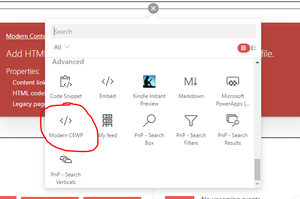
Marco Friedmann I used the Modern CEWP to insert script. It worked great for me. https://spjsblog.com/modern-cewp/ Once you install in your environment, it will be available as a below when u add a webpart. And add your code here... Hope this helps.11KViews0likes0CommentsHighlight Content webpart date filter
Hi, On the classic page, I used Content query search to display a single image based on start and end date and display templates. Images are preloaded with set start and end dates and the query displays the single image dynamically. ListID:{e94b2f22-f404-xxxxxxxx} -Filename:Thumbnails.aspx RefinableDate01<={Today} RefinableDate02>={Today} How do I achieve the same results in the Highlight Content web part or is there any other way to do it on the Modern SharePoint page. Thanks for your guidance. Pbala.1.4KViews0likes0CommentsChange Publishing site collection name
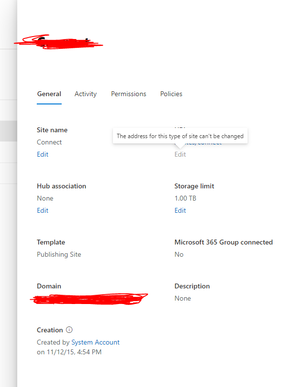
Hi, We are in the process of upgrading our Intranet to Modern SP. I created a new Modern Site Collection and moved the content over and now I am trying to rename the old publishing site collection (intranet) and it shows " This type of site cannot be changed". I don't have retention enabled. The goal is to change the Publishing site to ( intranetarchive) and the new site Modern SP site to intranet. How can I achieve this? Any help is appreciated. Thanks Pbala1.1KViews0likes1CommentUnable to add Enterprise Keywords - SharePoint Online
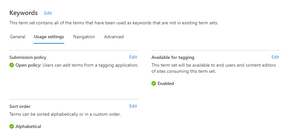
Hi, My term store submission policy for "Keywords" is set to open but my user is unable to add enterprise keywords. When she types in the Enterprise Keyword column, she gets a message stating "Not found". Any help is appreciated. Thanks686Views0likes0CommentsSharePoint Online Rest API call returning Empty
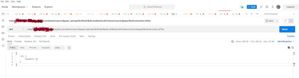
I am trying to get all the files in a document library placed in a subsite. The document library is called WorkInstructions. Using Bearer access token. Below is the API call using : https://tenant.sharepoint.com/teams/manu/mfgoper/_api/web/GetFolderByServerRelativeUrl(%27/teams/manu/mfgoper/WorkInstructions%27)/Files I can get the item count just not the data. Any help is appreciated.1.2KViews0likes1CommentInsert script in the header of the Modern page- SharePoint Online
Hi, We are redesigning our intranet and upgrading to the Modern SharePoint site. One of the requirements is to insert a script in the header and div tag on the homepage. How do I go about setting this ? The script and HTML tag are only loaded on the homepage, we don't plan to use them on other pages. It is a social feed from Curalate (Approved Instagram images). Any help is appreciated. ThanksSolved13KViews0likes8CommentsNeed help, SharePointOnline, ListView Web Part issues with JSLink .
Hi, This is working for me for the last 4 years and suddenly having this issue. One list- Tools and 2 views (Business Systems) and Inquires. Both have their own JSlink. I add the list webpart to the page, set the view (Business Systems) and add JSlink. Now as soon as I add another webpart, it default takes the first webpart view and style. I want to set this with totally different view (Inquires) and Jslink. I did not create the JS and hence not sure how to fix this. Any help is much appreciated. Below is the JSlink ( BusinessSytem) and Inquires. Any help is appreciated. Thanks JsLink-BusinessSystem.js (function () { var overrideContext = {}; overrideContext.Templates = {}; overrideContext.Templates.Header = overrideHeader; overrideContext.Templates.Item = overrideTemplate; overrideContext.Templates.Footer = overrideFooter; overrideContext.ListTemplateType = 100; SPClientTemplates.TemplateManager.RegisterTemplateOverrides(overrideContext); })(); function overrideTemplate(ctx) { var titleLink = ctx.CurrentItem.Link; if(titleLink.indexOf('href') != -1) { titleLink = $(titleLink).attr('href'); } if (ctx.view !='{AC67F030-0CEF-4C9C-986D-8CCAD2E85BC0}'){ if (ctx.CurrentItem.Group_x0020_Number == '1') { return "<div class='linkColumnOne'><a href='" + titleLink + "' target='_blank'><img src='" + ctx.CurrentItem.Picture1 + "' /></a></div>"; } if (ctx.CurrentItem.Group_x0020_Number == '2') { return "<div class='linkColumnTwo'><a href='" + titleLink + "' target='_blank'><img src='" + ctx.CurrentItem.Picture1 + "' /></a></div>"; } if (ctx.CurrentItem.Group_x0020_Number == '3') { return "<div class='linkColumnThree'><a href='" + titleLink + "' target='_blank'><img src='" + ctx.CurrentItem.Picture1 + "' /></a><div>"; } } else if (ctx.view !='{333399BC-515F-47F5-A379-094D2FB395C9}') { if (ctx.CurrentItem.Group_x0020_Number == '1') { return "<div class='inquiriesC1'><a href='" + titleLink + "' target='_blank'>" + ctx.CurrentItem.Title + "</a></div>"; } if (ctx.CurrentItem.Group_x0020_Number == '2') { return "<div class='inquiriesC2'><a href='" + titleLink + "' target='_blank'>" + ctx.CurrentItem.Title + "</a></div>"; } } } function overrideHeader() { if (ctx.view !='{AC67F030-0CEF-4C9C-986D-8CCAD2E85BC0}'){ var cssId = 'jsLink-BusinessSystems'; if (!document.getElementById(cssId)) { var head = document.getElementsByTagName('head')[0]; var link = document.createElement('link'); link.id = cssId; link.rel = 'stylesheet'; link.type = 'text/css'; link.href = '/sites/sitecollection/Style Library/Web Parts/jsLink-BusinessSystems.css'; link.media = 'all'; head.appendChild(link); } return "<div class='businessSystemsContainer'><div class='columnOne'></div><div class='columnTwo'></div><div class='columnThree'></div>"; } else if (ctx.view !='{333399BC-515F-47F5-A379-094D2FB395C9}') { var cssId = 'jsLink-InquiriesReports'; if (!document.getElementById(cssId)) { var head = document.getElementsByTagName('head')[0]; var link = document.createElement('link'); link.id = cssId; link.rel = 'stylesheet'; link.type = 'text/css'; link.href = '/sites/sitecollection/Style Library/Web Parts/jsLink-InquiriesReports.css'; link.media = 'all'; head.appendChild(link); } return "<h2 class='inquiriesHeader'>Inquiries</h2><div class='inquiriesReportsContainer'><div class='inquiriesColumnOne'></div><div class='inquiriesColumnTwo'></div>"; } } function overrideFooter() { if (ctx.view !='{AC67F030-0CEF-4C9C-986D-8CCAD2E85BC0}'){ $('.columnOne').append($('.linkColumnOne')); $('.columnTwo').append($('.linkColumnTwo')); $('.columnThree').append($('.linkColumnThree')); return "</div>"; } else if (ctx.view !='{333399BC-515F-47F5-A379-094D2FB395C9}') { $('.inquiriesColumnOne').append($('.inquiriesC1')); $('.inquiriesColumnTwo').append($('.inquiriesC2')); return "</div>"; } } JsLink-Inquires.js (function () { var overrideContext = {}; overrideContext.Templates = {}; overrideContext.Templates.Header = overrideHeader; overrideContext.Templates.Item = overrideTemplate; overrideContext.Templates.Footer = overrideFooter; overrideContext.ListTemplateType = 100; SPClientTemplates.TemplateManager.RegisterTemplateOverrides(overrideContext); })(); function overrideTemplate(ctx) { var titleLink = ctx.CurrentItem.Link; if(titleLink.indexOf('href') != -1) { titleLink = $(titleLink).attr('href'); } if (ctx.CurrentItem.Group_x0020_Number == '1') { return "<div class='linkColumnOne'><a href='" + titleLink + "' target='_blank'>" + ctx.CurrentItem.Title + "</a></div>"; } if (ctx.CurrentItem.Group_x0020_Number == '2') { return "<div class='linkColumnTwo'><a href='" + titleLink + "' target='_blank'>" + ctx.CurrentItem.Title + "</a></div>"; } } function overrideHeader() { var cssId = 'jsLink-Inquiries'; if (!document.getElementById(cssId)) { var head = document.getElementsByTagName('head')[0]; var link = document.createElement('link'); link.id = cssId; link.rel = 'stylesheet'; link.type = 'text/css'; link.href = '/sites/sitecollection/Style Library/Web Parts/jsLink-Inquiries.css'; link.media = 'all'; head.appendChild(link); } return "<div class='inquiriesContainer'><div class='columnOne'></div><div class='columnTwo'></div>"; } function overrideFooter() { $('.columnOne').append($('.linkColumnOne')); $('.columnTwo').append($('.linkColumnTwo')); return "</div>"; }567Views0likes0Comments

Recent Blog Articles
No content to show