User Profile

PS_83
Brass Contributor
Joined 9 years ago


User Widgets
Recent Discussions
Entra joined Win 11 Pro can't setup PIN
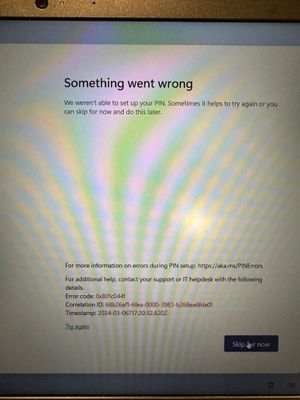
I onboarded a new user a few weeks ago who recently came into the Corp office and requested to set up the PIN as an alternative to using her email password to sign in. PIN is the only option as she does not have an IR camera or fingerprint scanner on that device. I attempted a few times but kept receiving the error below. For more information on errors during PIN setup: https://aka.ms/PINErrors For additional help, contact your support or IT helpdesk with the following. details. Error code: 0x801c044f Correlation ID: 68b26af1-6fea-0000-3983-b268ea6fda01 Timestamp: 2024-03-06T17:20:32.620Z That specific error is not listed on this page however https://learn.microsoft.com/en-us/windows/security/identity-protection/hello-for-business/hello-errors-during-pin-creation Any tips on resolving this? The laptop is brand new and she's only been using it for a few weeks.Solved2.7KViews0likes1CommentSend to OneNote Outlook addin gone
I have a user that was using the “send to OneNote” button in Outlook on her old machine but when we migrated her to a new one it was gone and not listed under add-ins. I think it’s because she had the OneNote desktop app on the old machine and the new one only has the new app. Is there is a way for me to get the desktop version installed? She’s a 365 business user.2.1KViews1like4CommentsPrivate emails not being shown in Outlook client
I came across a known bug that just started affecting us is probably affecting others but they may not have noticed yet. When external senders send emails with the sensitivity set to “private”, they do not appear in Outlook under the shared mailboxes. The only way we found this out was that a user who was a member of a shared mailbox opened a ticket with us saying that the unread count was incorrect. After we logged into her OWA and opened the shared mailbox via the web, it showed all the emails that were not in Outlook. After looking at the missing emails in OWA we noticed the emails marked “This message has been marked as Private.” Are the ones missing. In our case the sender was using Mimecast which is the same as the Spiceworks link below. That lead me to Googling and it’s been a known issue for some time but I couldn’t find a good solution, so I opened a 365 case and they confirmed there is no known fix for this which shocked me. Here are a few links to other having that problem: https://office365.uservoice.com/forums/273493-office-365-admin/suggestions/19281592-allow-to-see-private-emails-in-shared-mailboxes-in https://community.spiceworks.com/topic/2200361-shared-mailboxes-outlook-and-private-messages The only workaround that seems promising is this one here which involves converting the shared mailbox to a standard mailbox with a license, logging into it directly and adding the “members” as delegates with the check box the allow delegates to see private items checked, then convert back to a shared mailbox. http://theblutree.co.uk/office-365-emails-marked-as-private-are-not-appearing-in-a-shared-mailbox/ The MS tech said that there will be an official fix when the issue get’s enough votes here so please vote https://office365.uservoice.com/forums/273493-office-365-admin/suggestions/19281592-allow-to-see-private-emails-in-shared-mailboxes-in46KViews1like4CommentsRe: Trusted Platform Module has malfunctioned, error code 80090016
I've been using these steps to clear the TPM error's https://docs.microsoft.com/en-us/windows/security/information-protection/tpm/initialize-and-configure-ownership-of-the-tpm To clear the TPM Open the Windows Defender Security Center app. Click Device security. Click Security processor details. Click Security processor troubleshooting. Click Clear TPM. You will be prompted to restart the computer. During the restart, you might be prompted by the UEFI to press a button to confirm that you wish to clear the TPM. After the PC restarts, your TPM will be automatically prepared for use by Windows 10.117KViews0likes2CommentsWeb clipper not working for full page
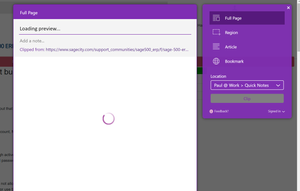
I've noticed that the web clipper stopped working in Chrome for some time now. I've tried also in incognito mode but it's not working in there either. The article clip function seems to work but there are times when I want to use the full page option. here is what I keep getting when trying to do a full page clip365 cutover migration checklist
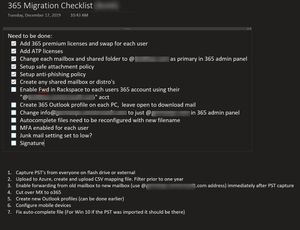
So I've completed a 365 migration a few months ago and wrote out the steps above. Everything went pretty smooth except that it took almost two weeks for the 365 import tool to complete. Now that I'm aware it will take that long it's no big deal. I just wanted to post here to see if I left anything out?826Views0likes0CommentsInstant search not working on shared folder in non-cached mode)
I have user who’s running Outlook 2016 x64 bit (neweset version, just checked it for updates) that has a single shared mailbox in his Outlook (online mode) and instant search stopped working as of today. There is nothing left to be indexed even though that wouldn’t affect and online shared mailbox and running an advanced search does seem to work fine. He mentioned it was working yesterday. Any suggestions on what to check? Everything seems ok. I’ve tried switching the search drop down from current mailbox to current folder but it makes no difference.620Views0likes0CommentsTrusted Platform Module has malfunctioned, error code 80090016
"The server message is “Keyset does not exist Keyset does not exist” I have a user that just received this error this AM. So far I’ve tried the steps here but nothing has worked. I think I’ll need to create him a new Windows profile but he’s a regional user and he’s at the airport which will make things more fun. Disabled Bitlocker and cleared the TPM Renamed the folder here “C:\users\$dir\AppData\Local\Packages\Microsoft.AAD.BrokerPlugin_cw5n1h2txyewy” Uninstalled the TPM driver Disabled MFA for his 365 account I’ve come across the two posts here but is there anything else I can do remotely once he is able to get his laptop connected other than creating him a new profile? I don’t mind doing that but he’s traveling all day/night and I won’t have access to his machine for long. He’s going to be using a hotspot. https://www.askwoody.com/2019/patch-lady-seeing-outlook-authentication-issues/ https://social.technet.microsoft.com/Forums/en-US/f4742bab-4e27-4963-a151-2349a234132b/outlook-365-2016-trusted-platform-module-error-code-80090016?forum=outlook&fbclid=IwAR26JQicLlG49zmWcB2FyqEqZy1i2Z1FQEHts5yTQhJndX6duzIYkxWk9fQ Also, what would cause this out of the blue? It’s a new Dell Latitude that I set up for him two days ago???Solved129KViews2likes14CommentsRe: Does a shared mailbox need at least one member?
Paras Dodhia I understand how to use them but sometimes there are scenario's in where a user leaves the company and we want to convert his mailbox to a shared mailbox but the staff cannot decide who should be a member of that mailbox. So my question is, if we have a shared mailbox with zero members will it be deleted after a certain time period if there are no members?1.8KViews1like1Comment
Recent Blog Articles
No content to show