User Profile

nmitchell20
Copper Contributor
Joined 6 years ago


User Widgets
Recent Discussions
Re: Issue with Column Default Value Settings
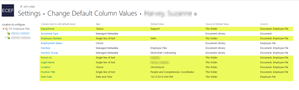
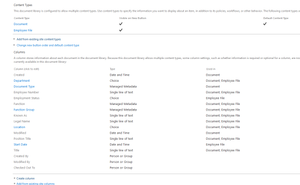
ChrisWebbTech Please find below a screenshot of my library settings which shows the 2 content types and also the columns. The following screenshot shows me assigning the default values in the library settings. However whenever i drop a document into the folder within the library, the columns are not populated I really appreciate your help with this.23KViews0likes7CommentsRe: Issue with Column Default Value Settings
ChrisWebbTechHi Chris. I have not turned on the Metadata and Navigation filtering feature in this instance so have not applied column default values at a content type level. I have tried this previously but it still did not work. Currently the document content type is the default content type for the library. Should I enable the Metadata and Navigation filtering feature again and troubleshoot again from there? Thanks23KViews0likes9CommentsIssue with Column Default Value Settings
We are having an issue with Column Default Values in our Document Library. The Document Library is in a Modern Team Site within SharePoint Online. Also we are using 2 different content types in our library. One folder and one document content type. We can set the default values for folders within the library settings, however when we upload a document to the folder it does not apply the values to the columns. Have tried multiple file types, column types and libraries. Any help would be extremely grateful 🙂Solved24KViews0likes13Comments
Recent Blog Articles
No content to show