User Profile

slaimer
Copper Contributor
Joined 6 years ago


User Widgets
Recent Discussions
Access EntraID-joined Windows Server SMB share as "SYSTEM" from Windows365
Hello, is it somehow possible for a Windows365 machine to reach a SMB share (configured with Authenticated Users Read on Share+NTFS) on a EntraID-joined Windows Server as the machine itself (SYSTEM)? Specifically there is a scheduled task that runs as SYSTEM on the Windows365 machine that should update a software from the share. The users itself access the share without problems with their EntraID identity. Traditionally in an AD environment this was possible, as long as the share allows the Computer Objects to access it (Domain Computers, Authenticated Users), like it is always configured on netlogon/sysvol for the computer GPOs to be applied.435Views0likes1CommentRe: Least privileged role for the "Suspend user in AAD" action
Hi Dean I wouldn't have guessed this role, especially since none of the actions in https://learn.microsoft.com/en-us/azure/active-directory/roles/permissions-reference#security-administrator seem to allow actions against users. We will weigh which role to use, but will probably stick with authentication admin for now. Are there any plans to integrate these AzureAD (and Active Directory/MDI) response permissions into Defender RBAC? Best regards2.2KViews0likes0CommentsLeast privileged role for the "Suspend user in AAD" action
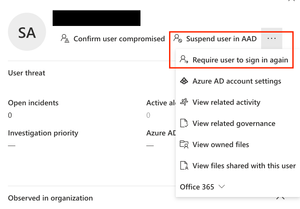
Hello, we try to find the least privileged role for our SOC members to be able to have the "Supend user in AAD" and "Require user to sign in again" action available in the user page of Microsoft 365 Defender. For now we've seen it available only to Global Administrators. We are using the new Defender RBAC for all three products (Endpoints, Email and Collaboration, Identity) The permissions and roles in the Microsoft 365 Defender RBAC are configured like this for our SOC group: Security operations -> All read and manage permissions -> All Scopes So far we tried adding the SOC members to the following Azure AD roles: - "Security Operator" does not show this actions for AAD users (but it shows the similar actions for Active Directory Users when you have MDI configured: "Disable user in AD", "Enable users in AD", "Force password reset") - "Authentication administrator" does not show this actions for AAD users, but if we go to the users page in Azure AD (via "Azure AD account settings" link), the options to disable or re-authenticate the users account are obviously available because of this role Is there a role except Global Admin for this feature to be visible? Or will this feature and AzureAD Identity Protection in general be better integrated in future enhancements of Microsoft 365 Defender RBAC?2.4KViews0likes2CommentsSafeLinks results in Microsoft 365 Defender incidents
Hello, in Microsoft 365 Defender we receive an incident "Initial access incident on one endpoint reported by multiple sources" with alerts about ZAP'd emails and a "Suspicious URL clicked" alert generated by Defender for Endpoint. The "Suspicious URL clicked" alert is marked "via safelink" so SafeLinks has checked the URL and returned the information to Defender for Endpoint. But is there any way to be sure, based on the information in the Defender portal, that SafeLink has also definitely blocked access to the website? The displayed result is only "Detected." In today's case, I saw connections from the browser to Safelinks IP addresses after the click event, and no more after that. So I can assume that the link was blocked or the user did not proceed, but I can't be sure without asking the user.SolvedApprove pending actions in Microsoft 365 Defender
Hello, we are managing Sentinel deployments for customers. The Sentinel deployments are managed via Azure Lighthouse, so we see all deployments/incidents in one place. This way we also never login directly to the customers tenant. Microsoft 365 Defender integration with Sentinel is enabled to synchronize incidents/alerts/events. The incident sync works fine, but we face the problem on how to approve investigations (as we do not login to the customers security.microsoft.com). Is there a way to approve Microsoft 365 Defender investigations (especially MDO) directly from Sentinel with a playbook? RegardsSolved2.3KViews0likes3Comments
Recent Blog Articles
No content to show