User Profile

SergeiBaklan
Diamond Contributor
Joined 10 years ago


User Widgets
Recent Discussions
Re: How can I display negative values for time in calculation results
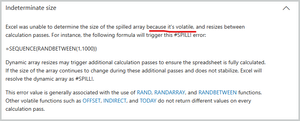
As a comment, spreadsheets (not only Excel, - Google Sheets, Rows, etc) typically don't work with durations, only with time. And, as was mentioned, there is no such thing in this world as negative time. Thus workarounds - show "time" as decimal number, as text, etc. One more. NOW() returns datetime, not time. Like15Views0likes0CommentsRe: Formula help
Carl, formulae could be in column A =LET( MatchRow, SMALL( FILTER( SEQUENCE( ROWS(KeyLog)), ( KeyLog[ID] = $D$6 & "") * ( KeyLog[Out, In, Lost, Found, Defective] = "Out") * ( KeyLog[Column1] = "") ), ROW(A1)), KeyType, INDEX( KeyLog[Key Type], MatchRow), KeyNum, INDEX( KeyLog[Hard Key or Swipe Key Num], MatchRow), IFERROR( IF(KeyType = "Hard Key", "V" & KeyNum, KeyNum), "" ) ) In column B =IF(A8="","", LET( KeyNum, $A8, ID, $D$6 & "", LogKeys, KeyLog[Hard Key or Swipe Key Num], LogIDs, KeyLog[ID], LogTypes, KeyLog[Key Type], LogStatus, KeyLog[Out, In, Lost, Found, Defective], LogDates, KeyLog[Date], LogRooms, KeyLog[Room], MatchRows, FILTER( SEQUENCE( ROWS(LogKeys)), (LogKeys=KeyNum)*(LogIDs=ID)), LastRow, IFERROR(INDEX( MatchRows, COUNT(MatchRows)), NA()), Room, IF( ISNA(LastRow), "", INDEX(LogRooms, LastRow)), Status, IF(ISNA(LastRow), "", INDEX(LogStatus, LastRow)), DateVal, IF(ISNA(LastRow), "", INDEX(LogDates, LastRow)), Type, IF(ISNA(LastRow), "", INDEX(LogTypes, LastRow)), IsAB, IF(Room="", FALSE, OR( RIGHT(Room)={"A","B"})), Description, IF(Type="Swipe Key", IF(IsAB, "Combined Main & BDRM Door Swipe Key", "Main Door Swipe Key"), IF(IsAB, "Combined Main & BDRM Door Hard Key", "Main Door Hard Key") ), IF(Description="", "Unknown -", Description & " - " & Status & ", " & TEXT(DateVal,"m/d/yy")) ))6Views0likes0CommentsRe: #Name? error in a formula adjusted for circular reference
#NAME? error means you reference on something what Excel is not able to recognize, more details is here How to correct a #NAME? error - Microsoft Support It doesn't matter did you enable iterative calculation or not. Quite often that happens due to typo. Here it could be strange "İ" in front of INDEX. perhaps something else.32Views0likes0CommentsRe: Percentage HELP!
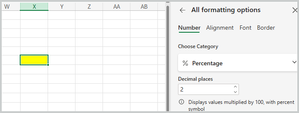
In addition, it is assumed initially the cell is in General format. If you manipulate with the cell which is already in Percentage format result could be bit different. Let assume you have blank cell with Percentage format applied and when we type 0.0929 here, result is15Views0likes1CommentRe: Cannot Create a Scatter Plot with Two Variables
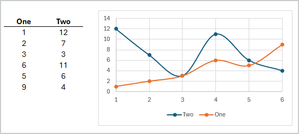
All depends on goals. In general you may plot two scatter series based on two columns, but X-axis with that will be sequential integer numbers. Other word points numbers. For that select default series was added automatically, edit it and delete X range Next manually add another series but for another column to have Next, adjust cosmetics.8Views0likes0CommentsRe: Formula help - why doesn't this work for January dates please?
I'm sorry, but formula doesn't ignore texts. ISNUMBER(text) returns zero, but MONTH(text) returns #VALUE!. If multiply zero on (#VALUE!=12) result will be #VALUE!, and SUMPRODUCT with at least one element with error also returns an error.40Views0likes1CommentRe: COUNTIF not working
Dates in Excel are actually integer numbers starting from 1 which 01 Jan 1900. Applying format like "dd-mmm-yyyy" doesn't change cell values. For example cell formatted as 25-Nov-2025 still has as value integerr number 45986. Applying of any format doesn't change the value, only the way how we see it in the cell. Thus COUNTIF() counts nothing on text "Nov". Altenatively you may use =SUMPRODUCT(--(MONTH(D:D)=11))87Views1like1CommentRe: Building relationships in data model to leverage power pivot - circumventing unique key ID issue
I don't remember when TREATAS was introduced in Excel, relatively long ago. However, it's still highlighted by red (as not recognized) in formulae. But it works if to enter it. Usually TREATAS has better performance and easier to use, at least for me.12Views0likes0CommentsRe: Formula help
Tried to structure your formulae a bit, but without the sample failed to understand what could be wrong =IFERROR( LET( IsD, TRIM('Key Log'!$A$4:$A$309) = TRIM($D$6), IsK, TRIM('Key Log'!$C$4:$C$309) = TRIM($K$15), Include, IsD * IsK, KeyTypes, FILTER('Key Log'!$F$4:$F$309, Include ), KeyNums, FILTER('Key Log'!$K$4:$K$309, Include ), keyNum, INDEX(KeyNums, ROW(A1) ), IF( INDEX(KeyTypes, ROW(A1)) = "Hard Key", "V" & keyNum, keyNum ) ), "") =IF(A8="","", LET( FilteredRows, FILTER( SEQUENCE(ROWS('Key Log'!$A$4:$A$309)), ('Key Log'!$A$4:$A$309=$D$6) * ('Key Log'!$C$4:$C$309=$K$15) ), RowNum, INDEX( FilteredRows, ROW(A1) ), Room, INDEX('Key Log'!$C$4:$C$309, RowNum), Status, INDEX('Key Log'!$E$4:$E$309, RowNum), Type, INDEX('Key Log'!$F$4:$F$309, RowNum), DateVal, INDEX('Key Log'!$D$4:$D$309, RowNum), IsAB, OR( RIGHT(Room)= {"A","B"} ), DoorDesc, IF(IsAB, "Combined Main & Room Door", "Main Door"), KeyDesc, IF(Type="Swipe Key", "Swipe Key", "Hard Key"), DoorDesc & " " ) )22Views0likes2CommentsRe: How does Excel calculate named formulas and materialized named ranges?
IMHO, your entire named function will be treated as volatile. You may with file provided by Charles Williams within this Volatile Excel Functions -Decision Models post. However, variant 1 and 2 shall be calculated differently. LET() evaluates each internal name, independently will it be used later or not, and on next steps uses result of such evaluation. I guess next steps shall not trigger of OFFSET recalculation within LET for named result. Thus version 1 calculates it once, version two - twice.73Views1like1Comment


Recent Blog Articles
No content to show