User Profile

KumarAneesh
Copper Contributor
Joined 9 years ago


User Widgets
Recent Discussions
Re: Disable Onedrive for specific users
Did ur test user have ODB prior to these changes? If yes, is he able to access ODB from browser even post changing the site collection admin ? I have tested this and it is working seamlessly for me. Their offline files on the sync client will be accessible but they can't sync changes to ODB.94KViews0likes0CommentsRe: Disable Onedrive for specific users
This is possible from SPO perspective via User Profiles. From SharePoint Admin Center > User Profiles > Manage User Permissions. Remove the 'Create Personal Site' permission for Everyone Except external users. Instead add a Security group with users which will have ODB access and assign it Create Personal Site permsisions. From now on, clicking on OneDrive shall redirect the users to Delve instead of ODB. To remove onedrive client sync as well, delete the Mysite of the user via powershell or change site admins. Hope this helps!94KViews0likes2CommentsRe: Get-SPOSite / LastContentModifiedDate - Details
Hello Stefan, This shows the date and time in UTC format (probably the reason why it shows midnight for you) when the content of the site was last changed. So any site activity that makes a change in the content database add to this. Ref: https://msdn.microsoft.com/en-us/library/microsoft.sharepoint.spsite.lastcontentmodifieddate.aspx Hope this helps!10KViews0likes3CommentsRe: How to migrate MySites from Sharepoint 2013 to Sharepoint 2016
Hello Luis, There are a couple of other prerequsites before migrating Mysites to 2017. Please refer to the below link for detailed instructions. https://technet.microsoft.com/en-us/library/dn479424(v=office.16).aspx Hope this helps!4.4KViews1like0CommentsRe: Open Term Set returns 'The given term is not valid' when term is added in Managed Metadata column
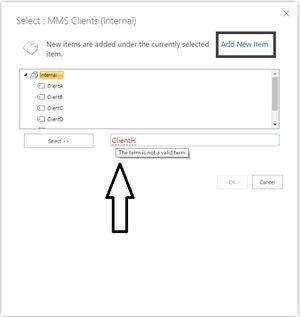
Hello Jacques, Please check the below image and confirm if you are facing the issue. Did you check the behavior using the Add New Item link at the top. If this doesnt help, can you attach a snapshot?5.8KViews1like2CommentsRe: Unable to receive onpremise exchange email or external domain emails
You need to setup connectors between Office 365 and your email servers. Please refer to the below link for details. https://technet.microsoft.com/en-us/library/dn751020(v=exchg.150).aspx Additionaly utilize the below tool to test mail connectivity. https://testconnectivity.microsoft.com/ If you are still facing issues, please share the NDR message you are getting if any?3.7KViews0likes0Comments
Recent Blog Articles
No content to show