User Profile

BenStegink
Iron Contributor
Joined 10 years ago


User Widgets
Recent Discussions
Re: transfer Domain godaddy to microsoft 365
I've never tried to move it back to godaddy, so maybe? Without diving in and looking through everything it's hard to say why it's having issues. Lately I've also gone the route of defedering from GoDaddy first as well (see the posts further below)...that gives you a lot more control over it so you can force things to go quicker rather than waiting for GoDaddy. You still have the goofy domain, but once your deferderated you're in complete control.2.3KViews1like2CommentsRe: Production Capabilities no longer supported (NDI) on Apple Silicon?
I've been seeing this for a while as well. Tried resetting the cache, and uninstalling/reinstalling as was mentioned and that didn't work for me either. Would love some additional insight as well as to if I have something wrong on my end or if this is currently broken in Teams for mac.6.9KViews0likes0CommentsRe: Security Defaults and Break Glass Account
John Twohig you’re 100% in noticing this contradiction with security defaults and break glass accounts in the documentation from Microsoft . Unfortunately, like you noticed, there isn’t any way to use security defaults and have a break glass account that’s excluded from MFA that I’m aware of.5.3KViews1like1CommentRe: transfer Domain godaddy to microsoft 365
So, this is an older post, but had this topic come up again the other day and found some steps that made this even easier. You can actually defederate your domain from GoDaddy to regain complete/normal control of the tenant. This way you can release your custom domain, move it to a new tenant, or actually just keep your tenant, but purchase your license from Microsoft or another CSP without dealing with all the GoDaddy stuff. Only downside if you keep the tenant after you defederate is the goofy URL. Anyways....all that aside, if you're looking to get away from GoDaddy check this out (this isn't my post or site...just one I stumbled across) - https://tminus365.com/defederating-godaddy-365/43KViews1like1CommentRe: need Help migrating users mailbox from Go-daddy-M365 to Microsoft 365
So I found a little nifty trick with this the other day where you don't actually need to migrate from GoDaddy M365 -> M365. You can defederate your tenant from GoDaddy and regain complete control of it, go in and purchase your license from Microsoft, and then cancel them with GoDaddy. When I last did this, I still didn't actually keep the tenant around, but based on what I read it should work. It at least makes it much easier to get your custom domain out of that tenant and into your new tenant. Here is the process I found (and tried) for defederating from GoDaddy - https://tminus365.com/defederating-godaddy-365/ All that aside, if you do still go the migration route, I've never seen it done in a staged manner, I've always had to do it in one shot.1.3KViews0likes0CommentsIssues with Modern Attachments (and Add-Ins) in Outlook for Mac
Anyone else having problems where they can't attach a file in Outlook 2016 for Mac 15.30 (fast insider build). Outlook either hangs or crahes. When I reopen it, ofter time modern attachments are no longer working and Outlook is back to standard attachments. Eventually it comes back...sometimes after a reboot, sometimes after closing/opening outlook sometimes, before I've even had to wait for an update. This also goes hand in hand with the new updates to Add-Ins for Outlook. If Modern attachments isn't working neither are they and vise versa. Open support issue with MS via the help menu in Outlook for Mac, but guess what...if Add-Ins don't load, neither does the ability to continue the conversation within the help menu. So while I have a dialog open to try to get support on the issue, I can't back to it 🙂 Just curious if anyone else has seen similar behavior or has any ideas what might be going on. ~BenRe: SharePoint Online - Cannot move folder to a different site
LethalDose Thanks! I opened a ticket a few days ago as well as I have 3 tenants that all have this issues. Definitely seems to be a lot more than 100 tenants with the issue, but glad they are aware of it and working on fixing it. Even with the open ticket I wasn't made aware that a fix is in progress.8.4KViews0likes0CommentsRe: Using "Move To" to move large number of files/folders (more than 500 MB) from OneDrive to sharepoint
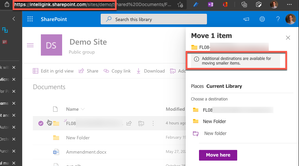
john john and ChrisWebbTech it still seems to be the case that this "sometimes" applies. In two different tenants I've been replicate an issue where: - One of my site collections I can't copy/move a folder with files totaling over 500MB between sites - Same tenant, different site, I can move the identical folder between sites just fine I've downloaded the folder with all the files to move it between sites/tenants to run my tests. I just can't figure out a consistency of when it happens. The closest I've been able to come is site collections created from the classic site template, but even that isn't 100% consistent. Notice the URLs...same tenant, one is /sites/demo one is /teams/demo47KViews0likes2CommentsRe: Move Mailbox from Outlook to Office 365 (in bulk)
_capan_ there are a few options you have available. You could just save those .pst files. Connect all the users exchange to Office 365, import the PST files and just let Outlook upload the imported mail to Office 365. Another option is to use network upload to upload all the PST files to Azure and import them to Office 365 from there - https://docs.microsoft.com/en-us/microsoft-365/compliance/use-network-upload-to-import-pst-files?view=o365-worldwide A third option is to use something BitTitan to migrate the mail from one mailbox to another. It can connect to your existing host over POP3, connect to Office 365 and just copy the mail. This is usually my preferred approach, but it does cost a little bit, although for what you get an the time it saves, it's well worth it in my opinion - https://www.bittitan.com/migrationwiz/mailboxes/1.4KViews0likes0CommentsRe: transfer Domain godaddy to microsoft 365
alesrs emails in Exchange, files in SharePoint, if you are using Teams and want to retain conversations. The last time I did one of these, as soon as that domain was removed from GoDaddy, everything you had in Microsoft 365 w/ GoDaddy was deleted. You couldn't "move" your domain to Microsoft 365 natively and then slowly move content over... There are a variety of ways to move everything over and several tools depending on what you want to do. But the process should be 1. Get a new Microsoft 365 environemtn 2. Copy everything from GoDaddy -> New Microsoft 365 3. Move you domain from GoDaddy -> Microsoft 365 (at which point in time all your content you have in GoDaddy is deleted) Again, maybe they've made it easier since the last time I did it, but the above has been my experience And everyone else....PLEASE stop buying Microsoft 365 from GoDaddy. They completely ruin it...frankly, I'm shocked Microsoft still allows them to do this...67KViews1like8CommentsRe: DLP policies take too long to tag new files uploaded to OneDrive
Odenkazgot it. As for OneDrive, I'm not sure on a time frame there. I haven't seen anythign on this fucntionality being extedned into OneDrive as well unfortuantely. If I can get some information or can find a time frame I'll let you know.3.6KViews1like3CommentsRe: DLP policies take too long to tag new files uploaded to OneDrive
You can enable sensitive by default for your tenant - https://docs.microsoft.com/en-us/sharepoint/sensitive-by-default This will mark files as sensitive immediately at upload and only remove DLP once deemed safe. It doesn’t speed up processing as now you may need to wait in order to share. But it will prevent data leakage from occurring before DLP has a chance to process the files.3.7KViews2likes6CommentsRe: New Buisness - New Domains & New Sharepoint Sites, But Seperate
ShaneITAutomate Not a problem. Just a few things to be aware of: 1. If you are having external users that are employees, you still need to license them according to Microsoft Terms of service. You cant' have employees as "free" external users 2. Multiple browsers/Office 365 tenants, use Profiles in Chrome or the New Edge. It'll make your life way easier 🙂 3. Nope, in and Office 365 tenant you get https://company.sharepoint.com. Everything else has to be under /sites/ or /teams/. You can't have multiple top-level domains for SharePoint in a single tenant.1.4KViews0likes0CommentsRe: Problems when using Office 365 through multiple partners
Using an Office 365 tenant purchased from GoDaddy is riddled with weird things like this. My best advice is to migrate to a new tenant purchased from Microsoft (or someone other than GoDaady). I’m not aware of any fixes or even if these are considered bugs. It’s just the cost of purchasing Office 365 from GoDaady unfortunately.853Views0likes0CommentsRe: New Buisness - New Domains & New Sharepoint Sites, But Seperate
There isn’t any way to setup a new SharePoint instance with a different domain in the same Office 365 tenant. Even though you may have several different domain in the tenant. You only have one instance of all the services. Exchange, SharePoint, Azure Ad, etc. At this point in time, if they need there own instance of everything it will have to be a new instance/tenant in Office 365. In theory, at some point in the future you *might* be able to come closer to accomplish this with information barriers. But for now, that o my gets you part way there.1.4KViews0likes2CommentsRe: transfer Domain godaddy to microsoft 365
If you contact godaddy (like they are telling you) godaddy will remove the domain and you can almost immediately add it to a Microsoft tenant. I’ve done it multiple times and it take maybe 10-20 minutes on the phone. Just be aware, when godaddy removes it, it will DELETE the tennant from godaddy, so make sure everything is migrated out of godaddy before making the switch. As an additional note...everyone PLEASE stop getting Office 365 from godaddy, it only leads to messes in the future 🙂68KViews6likes23CommentsRe: Migration of Intermedia Mailbox to office 365
I just did one leveraging bittitan...super smooth. 1. Stand up O365 tenant 2. Add users 3. Configure setting, do pre-stage migration 4. Update DNS 5. Monitor both mailboxes, make sure all mail starts coming into O365 6. Wait 48-72 hrs to insure dns updates 7. Do final migration19KViews1like0Comments
Groups

M365 Admin Roundtable
Pull up a seat at the roundtable! Join other Microsoft 365 admins to talk shop, troubleshoot, and trade tips on Microsoft 365 tenant management and administrationRecent Blog Articles
No content to show