User Profile

kdrew098
Copper Contributor
Joined 6 years ago


User Widgets
Recent Discussions
What's wrong with my SQL statement?
I am trying to recover a database for a customer who has been depending on MS Dynamics for a long time. His Server 2003 data drive failed irrevocably, but he had a recent backup of his Server Essentials 2005 database. His C drive held the programs. The object is to get his MS Dynamics working again so that he can add the transactions for the last month and then export all required tables to the company that's putting his company in the cloud (I don't know what the final interface might be but probably not Dynamics.) On another computer, as a test, I recovered the .BAK file to a 2012 Server Essentials - but without reference to his original programs. So, I know that his tables and views exist (I am not a SQL Developer but a generalist, so his 200 tables are not something I know how to deal with). Anyway, after creating a data drive and putting back all folder items backed up, I tried running the RESTORE command and got several errors. I'm going to skip the first try or so, because I've been figuring this out with the help of others. So, I used the following: RESTORE FILELISTONLY FROM DISK='D:\One Stop Backup\OSD_NOv8-2022.bak' Results GPSOSDDat.mdf D:\ONE STOP\MSSQL\GPSOSDDat.mdf GPSOSDLog.ldf D:\ONE STOP\MSSQL\GPSOSDLog.ldf Now I adjusted the script (I also created the folder D:\ONE STOP\MSSQL): RESTORE DATABASE [OSD] FROM DISK = 'D:\One Stop Backup\OSD_Nov8-2022.bak' WITH MOVE 'GPSOSDdat.mdf' TO 'D:\ONE STOP\MSSQL\GPSOSDDat.mdf', MOVE 'GPSOSDLog' TO 'D:\ONE STOP\MSSQL\GPSODLog.ldf', REPLACE, STATS=10 GO Result: Msg 3234, Level 16, State 2, Line 1 Msg 3013, Level 16, State 1, Line 1 The item 'GPSOSDLog' is the only item I made up in order to stay with the formula I found on this forum. It seemed that the formula used the name of the .LDF file without the extension. I don't know if this makes a difference. Also, it seems like the errors are about "Line 1" and OSD is the name of the database according to the dropdown in SQL Server Management Studio. Any ideas as to what the problem might be?612Views0likes0CommentsRe: Do I need to uninstall and reinstall the SQL Server engine?
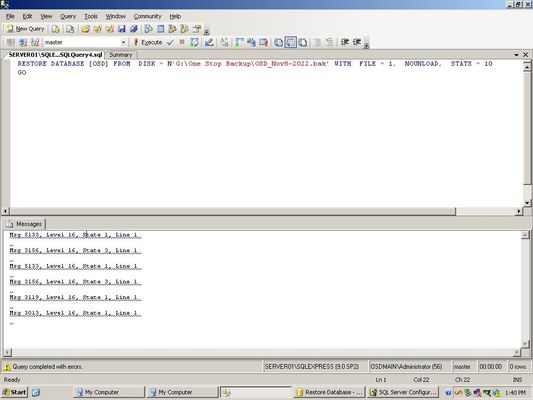
This is from the picture. Based on that, someone sent me a link that got me closer. I'll put in the new code after that. It gets me a new error but I know I'm closer because I now have used the RESTORE FILELISTONLY query to get the actual names of the .mdf files. I'm still getting errors - but they are new errors. RESTORE DATABASE [OSD] FROM DISK = N'G:\One Stop Backup\OSD_Nov8-2022.bak' WITH FILE = 1, NOUNLOAD, STATS = 10 GO (Messages) Msg 5133, Level 16, State 1, Line 1 Msg 3156, Level 16, State 3, Line 1 Msg 5133, Level 16, State 1, Line 1 Msg 3156, Level 16, State 3, Line 1 Msg 3119, Level 16, State 1, Line 1 Msg 3013, Level 16, State 1, Line 1 ---------------------------------------------------------------------- Next attempt: RESTORE FILELISTONLY FROM DISK='D:\One Stop Backup\OSD_NOv8-2022.bak' Results GPSOSDDat.mdf D:\ONE STOP\MSSQL\GPSOSDDat.mdf GPSOSDLog.ldf D:\ONE STOP\MSSQL\GPSOSDLog.ldf I created those folders on the D drive to match the above Now I adjusted the script: RESTORE DATABASE [OSD] FROM DISK = 'D:\One Stop Backup\OSD_Nov8-2022.bak' WITH MOVE 'GPSOSDdat.mdf' TO 'D:\ONE STOP\MSSQL\GPSOSDDat.mdf', MOVE 'GPSOSDLog' TO 'D:\ONE STOP\MSSQL\GPSODLog.ldf', REPLACE, STATS=10 GO Result: Msg 3234, Level 16, State 2, Line 1 Msg 3013, Level 16, State 1, Line 11.5KViews0likes0CommentsDo I need to uninstall and reinstall the SQL Server engine?
Sorry this is long, but I need to show some context so people will understand that the object of this is for the user to get back to using Dynamics GP 10.0 with the original database. I have an occasional customer who has been using Microsoft Dynamics GP with SQL Server Express 2005 on a Server 2003 to run his small distribution business. I have been asked to come out and fix this old relic now and then (I recently needed to replace his DIMMs.) His software is installed on his C drive (RAID1) while his data has been kept on his D drive (RAID5.) His RAID5 drive was apparently running on two drives with one marked as missing and now one of those drives failed. Luckily, he had a recent backup of the D drive. I have replaced the RAID drives and put back his files from the backup. I also restored his database on SQL Server Express 2012 on my laptop just to make sure we had his data. He needs this to run on his server so we can access the data through Dynamics GP. By the way, he was in the middle of moving all this to the cloud with some other company, but he needs to export certain tables from Dynamics to them (I'm not a SQL Server developer so this giant jumble of tables aren't very helpful - I exported some "Views" to CSV for him but there's quite a bit else I can't deal with.) So today, on the server, I ran his SQL Server Management Studio and though I could not connect to the non-existent database, I chose Object Explorer and then right clicked Database in the left menu and then chose Restore database. His database was listed in the dropdown and I selected it. I played around in there trying to figure out how to connect to the BAK file I had copied to the new RAID5 drive but then figured I had to use the SCRIPT button. Amazingly, the script filled itself in with the correct path to the external drive that contained the backup! The problem is that it executes with errors. See attached image. Does this mean that I need to reinstall SQL Server Express 2005? Is this going to break anything? Any advice would be appreciated before I press on.1.7KViews0likes2CommentsRe: Weird forwarding activity
VasilMichev Thank you for your help. We created an test message aimed at the target at Email address removed and got the usual result of the message being redirected on our contoso2.com Exchange server. We traced it and got the following result: (the company name is changed of course) Message sent to contoso2-com.mail.protection.outlook.com at 104.47.57.110 using TLS1.2 with AES256 This was followed by a response saying it had been submitted Finally a third response saying: Message received by: DM6PR05MB5244.namprd05.prod.outlook.com And of course, the email message is listed in the sender at contoso1.com as having been sent to the owner of contoso2.com and not the ap address. This seems to be happening on the senders side of this communication but I don't undestand why.1.1KViews0likes0CommentsWeird forwarding activity
We have a weird problem. It was reported that our client's email is acting strange. There are two companies involved that are actually connected but have separate Exchange accounts. Suddenly, if someone sends an email from anyone from any contoso1.com address to mailto:Email address removed the email is immediately redirected to the CEO: mailto:Email address removed (it's the CEO's named account.) After checking all accounts for forwarding rules (including on the admin level) and finding nothing, we tried sending from a contoso1.com account (online) to mailto:Email address removed we were shocked to see that although we typed mailto:Email address removed in the SEND box, it immediately showed up in the SENT folder as having been sent to mailto:Email address removed! There is no indication in the SENT mail message of the address we typed, only the CEO's address! Anyone have a clue? Thanks for any help!1.2KViews1like2Comments
Recent Blog Articles
No content to show