User Profile

reachrj
MCT
Joined 6 years ago


User Widgets
Recent Discussions
Re: M365 Copilot Mood Assessment Feature
At this point, we do not have any tool or feature to provide M365 Copilot Sentiment analysis. However, you can refer to Connect to the Microsoft Copilot Dashboard for Microsoft 365 customers | Microsoft Learn to leearn more how we can get the sentiment analysis with surveys.152Views0likes0CommentsRe: Copilot for Word
What Copilot itself has to say "you can regenerate content multiple times if you’re not satisfied with the initial results. There isn’t a strict limit on the number of times you can ask Copilot to create new content. Each time you click “regenerate,” Copilot will attempt to provide a different version based on your initial request. However, it’s important to note that while Copilot aims to generate varied content, the diversity of the outputs can depend on the specificity and complexity of your request. If you find that the regenerated content starts to feel repetitive, you might want to adjust your initial prompt or provide more specific instructions to guide Copilot towards the desired outcome."551Views1like0CommentsRe: Skilling goals for Copilot for Microsoft 365
Check this out Free Masterclass - https://www.netcomlearning.com/webinar/Microsoft-365-Copilot-Masterclass-Unleashing-Productivity-with-AI?utm_source=Microsoft-365-Copilot-Community&advid=1593 https://learn.microsoft.com/en-us/training/paths/craft-effective-prompts-copilot-microsoft-365/ https://learn.microsoft.com/en-us/training/modules/create-images-with-generative-ai/1.3KViews0likes0CommentsRe: Possibility to disable Co-pilot for recorded calls?
You can use the Meeting options of the specific meetings, and select Copilot to be available “Only during the meeting” from the dropdown menu. This is will enable Copilot only when the meeting is active. Once it is completed, Cannot use Copilot. Note that if transcription is enabled, then the content (transcription) will be available in Recap tab399Views0likes1CommentRe: CoPilot outlook email results capped at 10 - Limitation or bug?
Yes, Copilot has RAG limitations. Please refer to this post https://www.linkedin.com/posts/mahmoudhamedhassan_microsoftcopilottips-modernworkplaceai-copilotformicrosoft365-activity-7229097710270746624-swyY?utm_source=share&utm_medium=member_desktop3.3KViews0likes1CommentRe: Copilot cannot access OneDrive for Business files
Few things to check here. 1. Are you the owner of the file? 2. Was it from another organization and you have downloaded/saved it in your One-Drive? 3. Was it shared from another user, team or org? If shared, do you have correct permissions to access the files? 4. I assume you are using the Copilot Chat in Teams to retrieve the file. How about you open the file and ask Copilot within the respective app some questions about the file?3.3KViews0likes1CommentRe: Is there a refund for copilot for microsoft 365?
Check this out https://support.microsoft.com/en-us/account-billing/how-to-get-a-refund-on-a-microsoft-subscription-67dca30b-b323-44d5-acc2-e02f9902c472 But please check with your local region for the Copilot related refund process.1.2KViews0likes0CommentsRe: enabling copilot
Licensing seems to be correct. Then please check the M365 Apps Update Channel. Copilot is available in Current Channel and in Monthly Enterprise Channel. https://learn.microsoft.com/en-us/copilot/microsoft-365/microsoft-365-copilot-requirements#update-channels1.4KViews0likes1CommentRe: Copilot doesn't index documents of another org in the company
Copilot will return information only from the sources for which the user have access to, like SharePoint files, OneDrive etc. So, if Copilot is not returning then check whether the user has access. Also, it cannot index other organization's data.Re: enabling copilot
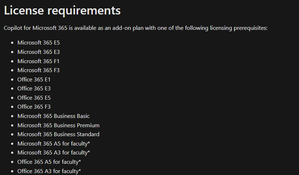
If you are using your Active Directory ID and O365 E3, the correct Copilot is license required is "Copilot for Microsoft 365" from your tenant. Note that Copilot Pro is for personal accounts like email address removed for privacy reasons, email address removed for privacy reasons While Copilot Pro is our best experience for individuals, Copilot for Microsoft 365 is our best experience for organizations1.4KViews1like1CommentRe: Copilot for M365
Rajeev185018 If you are looking to use Copilot at work, then you need to purchase "Copilot for Microsoft 365" as add-on on top of any one of your business licenses. If you are looking to use Copilot for your personal Microsoft account, then you need to purchase "Copilot Pro" license. Hope this clarifies.647Views0likes0CommentsRe: How can I join Microsoft
First thing to do is apply for open positions at Microsoft for Copilot related opportunities. Second, When you are invited for interview understand the role from the JD clearly and make sure you prepare very well for each of your rounds. Do not go with one size fits all approach. Third, Ask questions if doubtful before answering. Do not assume and be practical. Use your own experiences to curate your answes. Wish you good luck! You can still contribut to Microsoft community with your Copilot knowledge by blogs, videos, Linkedin etc where your skill set can be utilized by community members.737Views1like1CommentRe: Measuring benefits of implementing Copilot
Copilot for Microsoft 365 is a task based AI application and it is not like a RPA solution. If you want a measurable value, it will be mostly on the time saved for the specific tasks. For any user persona in any organization, the value is realised on how well and more users are using Copilot. For example, for me Teams Meeting Recap or creating documents saves me atleast 30 mins each time.2KViews0likes2CommentsRe: Using personal copilot pro through a work Office 365 account - possible?
Copilot Pro license will not work with your Work account. For the office applications (Word, PowerPoint, Excel), you can still login with your personal account but it will not able to use the Org data for your Copilot. Also you cannot use it in Work Outlook and Teams as well.4.8KViews0likes0CommentsRe: I couldn't find the Copilot icon in my M365 office
michael1900 You already meet one of the requirement - M365 Business Standard Requirement Microsoft Copilot for Microsoft 365 will follow the standard practice of deployment and updates for Microsoft 365 Apps, being available in all update channels, except for Semi-Annual Enterprise Channel. Preview channels (also known as Microsoft 365 Insider) include Current Channel (Preview) and Beta Channel. Production channels include Current Channel and Monthly Enterprise Channel. Copilot is available in Current Channel and in Monthly Enterprise Channel. For Copilot to work in Word Online, Excel Online, and PowerPoint Online, you need to have third-party cookies enabled. So, once you have your Copilot for Microsoft 365 license assigned within 24-48 hours (Semantic Indexing) you should be able to see the Copilot icon in your apps .1KViews0likes0Comments
Recent Blog Articles
No content to show