User Profile

Reylin4
Brass Contributor
Joined 7 years ago


User Widgets
Recent Discussions
PowerApps. Need help with using Collect for a very large Sharepoint List
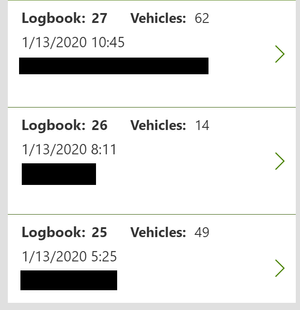
Hello, I created an App to help workers in accessing and adding to a very large Sharepoint List. I organized the data by creating a new field in the list (Logbook ID). Everytime a worker creates a new Logbook ID, they can easily create new list entries with the same ID so they are able to access that set of entries easily through the app. The problem is that we ran into an issue where the app wasn't showing the whole list. I think this is because GroupBy is not a delegating function. But I am using GroupBy in order to show the logbooks at the beginning so people can access the list via the Logbook ID. Number of Vehicles is basically how many list entries are in the same Logbook. My code for dealing with the SharePoint list uses ClearCollect in order to use any function I need within the app. ClearCollect( colDatabase, 'Vehicle Entry Log' ); ClearCollect( colVehicleLog, GroupBy( SortByColumns( colDatabase, "Created", Ascending ), "LogbookID", "Title" ) ); Question 1: Is there a way to use GroupBy and other non-delegating functions in the app while still accessing the entire SharePoint List (instead of the app only collecting the first 500 entries, which is the limitation we have right now). If Not, Question 2: Is there a way to collect the most recent 500 entries within the list? We can deal with not being able to deal with older list entries, we just need it to collect the most recent items instead of oldest-to-newest.How do I duplicate videos so I can trim them (to make video clips)?
We upload long hours of video footage to channels in Microsoft Stream. Sometimes people need specific portions (clips) of the video to view and share. We can do this by using the Video trimming feature to create those short Video clips. How do you do this without losing the original video? We want to keep the original long video on the channel, and we want to have the small video clips taken from that video on the same channel. So far the only method of doing this is to download the original, then re-upload it multiple times and trim those copies. This method takes very long and uses a lot of bandwidth. Is there a way to duplicate videos on a channel? Or better yet, is there a way to make video clips from a larger video WITHOUT losing the original larger video?Re: Changing Notification Settings for all users on a Team
VasilMichev No way at all? I'm sad to hear that. It would be okay if the default was that everyone receives notifications for all replies in a channel, but this is not the case... which is a problem for us. I will let my team know. Thank you for telling me~179KViews8likes6CommentsChanging Notification Settings for all users on a Team
Is there a way to change the notification settings for everyone that is part of a Team Channel? In other words... we have a channel in our Teams chat that we want everyone to receive notifications for whenever there is a reply in that channel. I don't mind using PowerShell or whatever I need to use in order to achieve this. We just want everyone on the team to receive notifications for all replies in a channel. Background: We attempted to migrate a client group to Teams in order to enable functionality with our Office 365 setup. We have an app for them to use, and we have a Site that we share files on, etc. This group of people are newer to technology, so having everything be user-friendly is a must. The problem came up that nobody was receiving notifications for replies in the Team channels. They are only used to SMS text messaging and group texting, so they want to use the channels similarly to group texts. The group ended up switching back to texting because its easier for them to use. We need them to switch to Teams, so we want to fix this issue for them and make things as easy as possible.Solved204KViews9likes41CommentsRe: Need help with Groups in SharePoint, please
ChrisWebbTech A new event starts and we need to start a group for that event. The group will then inherit permissions for the event site/subsite (still figuring out which is best), and they will inherit permissions for specific folders located in a different site that they aren't part of. Is this possible and how do you do it? We have attempted to use groups for this but it hasn't seemed to work how we want it to, we probably aren't doing it right. Is there a way to automate this process so a new group is automatically created when there is a new event, and we can add 30-100 members to this group easily (through a command with a list, maybe)? Sidenote: Because there is a limit to how many groups people can be apart of, I think we will delete the groups after a year; so there shouldn't be an issue there. The majority of users won't need access to an event after that long, and the people who will need access should be admins of those sites.1.3KViews0likes0CommentsNeed help with Groups in SharePoint, please
Hello SharePoint community! My Background: I'm fairly new to SharePoint and Office 365, I've been cramming as much information as possible in the past few days. I've also been learning PowerShell as rapidly as possible. All of it is very big to take in, this is such an interesting part of the Software world. I'm newly hired to a tech company that is working on a PowerApp with Office 365 (mobile app) that interacts with SharePoint. It lets users file reports that get turned into documents hosted by SharePoint Sites. The users are generally older folks who are fairly new to technology, so the app has to be as user friendly as possible. My Situation: I'm tasked with finding out a way to automate permissions for users and groups for SharePoint. When there is a new event, we have 30-100 users (new and existing users) who need access to a SharePoint Site and specific Subsites and Folders. I need to be managing these permissions with a co-worker, and we desperately need a way to automate this process. So far my co-worker who is the creator of the app/site has been managing this by herself, which has been a lot of work. She's had to go into each site/folder and add/change permissions for each individual user. I am tasked with learning groups so we can automate this process. So far what I know is that there are different kinds of groups, such as Security groups, Teams groups, Assigned groups, Dynamic groups, and Distribution lists. My Questions: How do I use Groups in order to best manage large amounts of users; make sure they have the right permissions to access the right Sharepoint Site, subsites, and folders? How do I automate this process as much as possible so we can manage users in bulk? For Example: An Event Leader gives us a list of 20 new users and 50 existing users to be added for a new Event. They all need permissions for a new set of folders created for that event, as well as existing folders. My Limitations: We are not able to buy expensive Azure licenses for hundreds of people in order to use Dynamic groups. I know Azure AD is involved with the security side of Microsoft products, but I'm still new so I don't know how everything works exactly. Closing Statement: I am someone learning PowerShell and Office 365, so every bit of help is appreciated. I am willing to troubleshoot, research, and learn whatever I need to in order to best complete the task. Thank you all for your time ❤️ Edit: Fixing typos Update for Clarification: All of the files and folders are confidential and should only be accessed by the users involved with the specific event related to those files and folders. A user should not be able to access files and folders off events/groups that they're not apart of.1.4KViews0likes2Comments
Recent Blog Articles
No content to show