User Profile

Vertebre85
Iron Contributor
Joined 7 years ago


User Widgets
Recent Discussions
Re: Why are calendars shown with different laguages in O365 Outlook (desktop version)
I would say try to replace the language via pwoershell. I found an article for a sharedmailbox to change to Danish... https://w365.dk/index.php/2021/07/28/change-language-of-a-shared-mailbox-in-exchange-online/1.6KViews0likes1CommentRe: Document Collaboration AutoSave issue
I don't think you can change that, the autosave allow real time collaboration. Can you specify which type of document? Docx or Doc, or something else. issue on desktop app or web app? Do you use extra app (Mendeley or other plugin in your instance?) If in the web, same behavior whatever the browser?1KViews0likes1CommentRe: A user has been automatically modifying files in Sharepoint .
Could you clarify the file format? Some exotic file format are not supported and it's the behavior observed. It erased and recreate a new file, without increasing the file version. We have that behavior with delphi application that use custom extension....308Views0likes0CommentsRe: Why are calendars shown with different laguages in O365 Outlook (desktop version)
Do this command in powershell: Connect-ExchangeOnline Get-Mailbox <email of other user> | Get-MailboxRegionalConfiguration Result wil ldisplay probably "en-GB". To change it: Get-Mailbox <mail of the user> | Get-MailboxRegionalConfiguration |Set-MailboxRegionalConfiguration -Language en-BE Replace the user and replace the value in language by what you need, I don't know the value but probably something similar to "dk-DK"? Wait a bit for replication, usually it was modified in the outlook of other people the next day for my tenant1.4KViews0likes3CommentsRe: Permissions
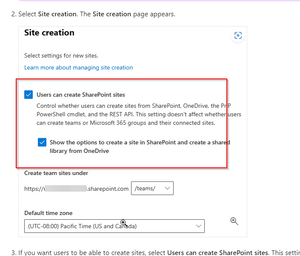
alexwiw To prevent users to create Sharepoint site linked to office 365 and only allow some of them to create, create a group of users and grant the right to only that group of user to create group. https://learn.microsoft.com/en-us/microsoft-365/solutions/manage-creation-of-groups?view=o365-worldwide Now, you can also block the creation of all sharepoint sites and grant the "sharepoint admin role" to user who should do it. Check also this article https://learn.microsoft.com/en-US/sharepoint/manage-site-creation?WT.mc_id=365AdminCSH_spo1KViews0likes2CommentsRe: Accès sharepoint externe
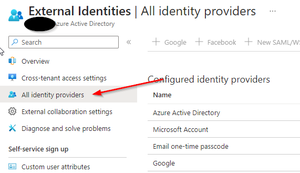
OlivierT185 Si il s'agit de Sharepoint online, il n'y a en gros que si l'on crée des utilisateur interne où l'on peut gérer les mots de passes. Si le "OTP" (one time pass code) pose un problème, je conseillerai plutot de faire le setup des "external identities" par exemple dans mon tenant, j'ai activé une sorte de federation avec google, les comptes gratuit microsoft et azure active directory. Dans ce cas, tt les utilisateurs qui rentre dans une de ces categories utilise leur mot de passe et ne doivent pas en créer un autre qu'ils doivent retenir en plus. (petit plus: si le compte est desactivé dans l'autre entreprise l'empechera de se logger aussi). dans les autres cas de figures ( petite entrprise avec son propre serveur mail), la on bascule vers le OTP Il y a aussi une federation possibleavec facebook workspace, ainsi que des possibilités de faire des connections personalisé (plus d'info sous B2B)671Views0likes0CommentsRe: SharePoint online backup tool which will cover all the scenarios
john john Hi. I've investigated several backup solution. after evaluation I've tested Veam and avepoint. Veeam for me was not sufficient as it has altered some metadata and was not possible to restore stuff from term set at time of evaluation. Term store and metadata were the keypoint for me. Here i will just mention the point for avepoint. Point 1: yes it's capable with small remarks. During restoration, it restore the default view of sharepoint. So if you have modify the custom view, it didn't restore it correctly. Therefore, in my case, i create completely new view and delete the default one. No issue for my restauration. I didn't test the workflow 2013 as we prefer to get rid of it. Same for custom page layout with wiki. Point 2: definitively, it's the only one that I found that was capable of doing it Point 3: no clues, i'm using microsoft search service now and I don't know. I think point 4: yes Point 5: yes, just use the correct options in the restore (by default complete site) Point 6: yes (need in fact to contain a member at least with a licence, which is usually the case if it's created by internal user) Point 7: didn't test and didn't investigate point 8: yes, I'm using custom content type Point 9 yes Point 10 and 11: yes, if you select the office 365 backup solution and configured it. Small note, if you want to backup the term store, it's not possible to backup the planner. It's one or the other. Point 12. Yes. You will need to create a new site (can't create itself a new site). + some issue to activate site collection feature for new site. In my case, i create the new site, activate the site collection feature and then restore it to the new site. I think you may face issue if the app store is a site dedicated one and not a central one. You will need to have the SSPKG somewhere else and restore it yourself. i'm using this service without any other options. I request to have the backup in another datacenter than the one we think we are, which is possible https://www.avepoint.com/products/cloud/backup/microsoft-office-365-backup. Demo is also possible (skip randomly some item and only 5 types of items)1.4KViews0likes0CommentsRe: Using SharePoint's search bar to search for metadata tags?
Quite old topic. Search in Sharepoint can be really complex. Tip If you create site column within the sharepoint site, it's easier to search than to create "library" column. When columns are created you can play with the search schema to add your column in the search result. For example, i've created a managed property in the admin GUI that refer to several site columns from different sharepoint sites. Using the aliases i can search then ONLY for the metadata and not in the content or file name. It's working on the main sharepoint page but also on a site or library level.38KViews1like0CommentsRe: Changing the choices of a column depending on the folder
Estelle_I Like that i didn't see any. Personally, i'm not in favor of folder, i'm using a flat structure, it avoid duplicate file and i use the metadata to filter. In your case, I will probably still use the content type and customize with site column ( so I can copy paste file with metadata if i change location within the site) and use several libraries. Or playing with the termset as metadata. you make a structure tree with the term set and put "communication" as non-selectable and behind put your 2 options. You set the column as mandatory. In that case you don't play with content type3.1KViews0likes1CommentRe: Changing the choices of a column depending on the folder
Hi So far as I know it's not possible with out of the box option. you can probably play with some customization to hide the menu based on the location (but in my opinion i wouldn't do it as change on sharepoint can appear and your customization may suddenly stop working) If you expect that the list might become long ( more that 5000 documents), took the opportunity to instead split in different library3.1KViews0likes3CommentsRe: Chiffrer les messages sur Outlook
basilenkonla Bonjour Vous voulez dire que vous utiliser l'option "do not forward" et ou "encrypt only" de outlook? https://support.microsoft.com/en-us/office/encrypt-email-messages-373339cb-bf1a-4509-b296-802a39d801dc Si oui , verifiez que les prerequis sont bien completer pour l'encryption des messages internes: presrequis: Il faut activer Azure right management et configurer l'encryption dans exchange https://docs.microsoft.com/en-us/microsoft-365/compliance/set-up-new-message-encryption-capabilities?view=o365-worldwide Eventuellement nettoyer vos rules portail ensuite, il faut configurer le portail https://docs.microsoft.com/en-us/microsoft-365/compliance/add-your-organization-brand-to-encrypted-messages?view=o365-worldwide Au minimum activer le OTP pour les utilisateurs qui n'ont pas outlook ( possibilité apres de faire sign in avec gmail yahoo...) https://docs.microsoft.com/en-us/microsoft-365/compliance/manage-office-365-message-encryption?view=o365-worldwide#manage-the-use-of-one-time-pass-codes-for-the-office-365-message-encryption-portal914Views0likes0CommentsRe: Baby steps approach to migrating to SP online
kevjackson I just finish to migrate 1.6TB of data with sharegate. With this tools you can do also remaping if needed, preserve or reset the permission. If you plan to do the remapping, i really advise you to do it by chunk indeed. Dependeing of your source structure, you can do it per folder or per department. Don't do it for example accross several folder with for exemple item modified between date 1 and date 2, it's difficult to reconcile after if your project take a long time.1.5KViews0likes0CommentsRe: Change the language of some - or all - Sharepoint Online sites
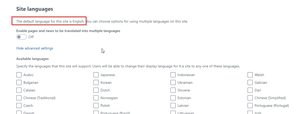
tcboeira Hi I totally understood, I was in the same situation. For the site First work around, you can remove all display language and select only portuguese For the mailbox, that could be changed for your user. You need an exchange admin right, you connect to powershell and you adapt it Get-Mailbox <UPN> | Get-MailboxRegionalConfiguration |Set-MailboxRegionalConfiguration -Language en-BE Adapt the upn and the language code ( probably then "pt-br" You can also change some regional setting like the date format Get-Mailbox <UPN> | Get-MailboxRegionalConfiguration |Set-MailboxRegionalConfiguration -DateFormat "dd/MM/yyyy" You can do a loop then to change it in batch For onedrive In my case, i've added a alternate display language I've connected with SPO service Then I grant myself site collection administrator role Set-SPOUser -Site "<url of onedrive space>" -LoginName "<my own UPN>" -IsSiteCollectionAdmin $true I create a CSV file with all the url of onedrive site (one column) Then I run the script: Add-Type -Path "C:\Program Files\Common Files\Microsoft Shared\Web Server Extensions\16\ISAPI\Microsoft.SharePoint.Client.dll" Add-Type -Path "C:\Program Files\Common Files\Microsoft Shared\Web Server Extensions\16\ISAPI\Microsoft.SharePoint.Client.Runtime.dll" #Authenticate to Site $Username = Read-Host -Prompt "Please enter your username" $Password = Read-Host -Prompt "Please enter your password" -AsSecureString $site1 = import-csv -Path "<path of file>\book1.csv" foreach($column in $site1) { $site = $column.site $Context = New-Object Microsoft.SharePoint.Client.ClientContext($Site) $Creds = New-Object Microsoft.SharePoint.Client.SharePointOnlineCredentials($Username,$Password) $Context.Credentials = $Creds $web = $Context.Web $Context.Load($web) $Context.ExecuteQuery() # please refer to https://technet.microsoft.com/en-us/library/cc287874(v=office.12).aspx for all locale Ids $web.IsMultilingual=$true $web.AddSupportedUILanguage(1033) $Context.Web.Update() $Context.ExecuteQuery() } Don,t forgot to remove the site collection admin right after (replace true by false) The script was not done by me, i adapt it but i don't remenber the source... This is several steps i've implemented to adapt a bit 2 year ago7.5KViews0likes0CommentsRe: Change the language of some - or all - Sharepoint Online sites
tcboeira Hi When a site is created, it's too late to change language. You can only act on the display language, but onedrive and sharepoint, when created can't be changed. personal experience, our setting was in French and after verification with microsoft support, i had to recreate some of them. For any new sharepoint site, you can define the language on the Admin of office 365 or more easily, you create with PNP powershell and add the "LCID" parameter New-PnPSite -Type TeamSite -Title <name> -Description <sometext> -Lcid 1033 I prefer the powershell option to create new site, as i'm sure which language is the default. To chagne the default language for onedrive site creation, you need to contact microsoft for new account.8.2KViews1like2CommentsRe: Usage Analysis SPO Intranet
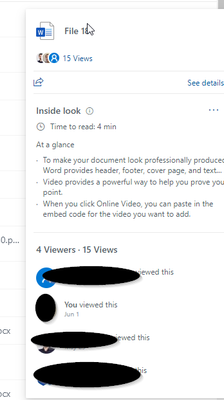
Can you then clarify which analytics you want to see? YOu can also use the microsoft usage report (https://docs.microsoft.com/en-us/microsoft-365/admin/usage-analytics/usage-analytics?view=o365-worldwide ) to see more. If you want to agregate and have usage PER file, it's more an access report and/or audit log that you need than a classic usage view.1.4KViews0likes0Comments
Recent Blog Articles
No content to show