User Profile

Mike999
Brass Contributor
Joined 7 years ago


User Widgets
Recent Discussions
Suggestion: search articles in a different language
Say I am reading a news article in my native language (Dutch) but would like to search for similar articles in the English language, i.e. articles in English newspapers. Currently I would copy paste the header into Google Translate and copy paste that back into the search box. Suggestion for a translate parameter. Like: Dutch text blah blah translate:en34Views1like0CommentsRe: 'Update your sign-in technology before September 16th, 2024 to maintain email access'.
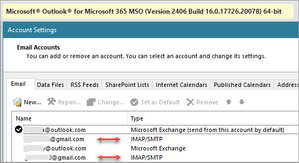
Teresa_Cyrus MMany thanks for the above. On my desktop I use Microsoft 365 subscription based. Outlook for desktop includes both Outlook.com accounts, using Exchange and Gmail accounts using SMTP. AFAIK they can not use Exchange. Question: how am I supposed to proceed? Allow me to ask one further question. What am I supposed to do with the Outlook app on Android? Will that automatically be updated? Thank you.128KViews1like6CommentsRe: Cookies of 'Bookmarked' sites - protect against accidental delete.
Dennis5mile Wow! THANK you. Obviously I was not aware of this feature. Going to check it out soon. [Off-topic] Reason to check this out was / is the slow shutdown of my PC. OTOH when I disable all startup services (msconfig > [Services] > Hide all MS services and uncheck the rest, then shutdown is fast, so it probably is some service that is causing the slow shutdown. But at some point I thought of Edge and synchronizing history, cookies and all (?) Then this question came up. Anyway, thanks again!6.3KViews0likes0CommentsCookies of 'Bookmarked' sites - protect against accidental delete.
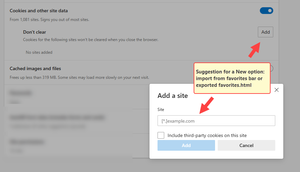
Idea - whether workable or not, I don't know. It would be nice if Edge would have an option to 'protect' deleting of cookies of domains that are related to bookmarks. Those should be considered as 'important' (else such sites wouldn't haven been bookmarked) hence cookies it should not be able to delete such cookies in a 'simple way'. Delete in 2 steps: delete bookmark and then the relating cookies. Over time I have a lot of cookies and want to delete most of them. Whilst using a 3rd party cookies-manager I basically can delete all cookies. However, I want to keep the important ones, the ones relating to the bookmarks.Solved6.4KViews0likes3CommentsBookmarks - suggestion an option for a 'one-way' sync
Maybe I am overlooking that option, but I wish there would be one for a one way sync of bookmarks, with my desktop as a base, i.e. the bookmarks of Microsoft Edge on portable devices to be a 'mirror' of the ones on my desktop PC. The other day, when setting up my account on my Microsoft Surface, I got a boatload of old bookmarks on my desktop. Don't know what happened, I am sure there is a logical explanation, but it was a mess and I had to spend quite some time on cleaning up and re-arranging. (I know, the best way is to disable sync then) One way sync would solve this.405Views0likes0CommentsMy wish: Save as dialog: search using FAT to find the right folders
When saving an Excel (or Word) document, I would like to type the folder name in the search box and an incremental search is performed listing all folders within parent folder that has been set in the application options. Indexing FAT. For example: Excel > Options > Save > Default file location is set to Z:\XLS When I perform a File > Save as... I would then enter, for example, "Books" Then all folders within any sub folders with the word Books in the name to be listed, so I could pick the right one without waiting.328Views0likes0CommentsEasy add URLs to New Tab and increase the number
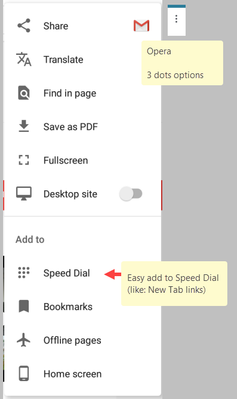
Sometimes other browsers may have some handy solutions for a specific matter. Within Opera, after opening a website, the dropdown after 3 dots in the r-hand top corner shows an option to 'Add to Speed Dial' (like: New Tab within Edge). This way a site is quickly added to the Speed Dial, no fuzz. Also the speed dial is not limited to 9. I believe it would be nice to have something similar within Edge. No criticism, but just a positively meant suggestion.500Views0likes0CommentsRe: Clearing Browsing Data on Close
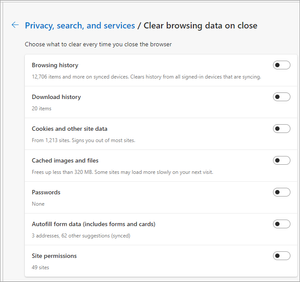
LegacyOfherot Thanks for the reply. Well, it was just an idea only and one might consider it. Personally, what I like this method because it is simple, i.e. just File>Exit. That's it. No special settings, no extra clicks, no nothing. I can't think of a more user-friendly way. I am sure there are many more good ways to take care of browser data, many of them may have been suggested in this thread. The only reason for suggesting this option is because of its simplicity. Anyway, thanks again.5.4KViews0likes0CommentsRe: Clearing Browsing Data on Close
Elliot Kirk Opera on Android (sorry to mention it hear) has two ways of closing, 1. Simply close (X in the right top corner), which is not the same as 2. File > Exit with an optional pop-up, offering to close all tabs and clearing browsing data and history, both matters being optional as well. This way users have maximum flexibility on what(not) to keep. Maybe something to consider?5.4KViews0likes3CommentsSuggestion - option to add a sidebar?
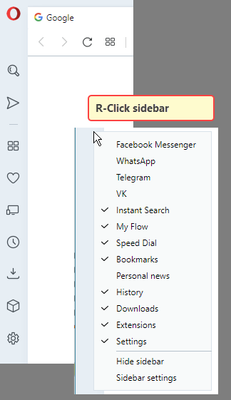
Before I was using Opera. Opera has an option to display and configure a sidebar. Occasionally when the the browser gets a little of screen, there is hardly any place to grab the browser and drag it back to the middle of screen, especially when many tabs are open, i.e. there is hardly any free space to grab the tab bar at the top. With Opera I could often grab the sidebar and move the browser around. Personally, I think it is quite handy. Again, it is an option. Vainly searched whether this idea has been submitted before.2.3KViews0likes2CommentsRe: Issues installing Office 365 on pc with/without Edge Chromium
HotCakeX Sorry for the delay. I was busy installing software. As for the above: you are most probably right HotCakeX I honestly did not expect this to happen. Have reported it to Start10 (Stardock) Again, many, many thanks for all your help! Truly appreciated.2.6KViews0likes1CommentRe: Issues installing Office 365 on pc with/without Edge Chromium
HotCakeX and msekmfb1 Thanks for the tip. This morning I gave it again a try and installed Office 365 on my laptop, with... Edge Chromium. Again Outlook, Excel were launched as online. Then, indeed, I went on to search for the .exe files. They were there in ..\Root\Office16 folder. Pinned them to the start menu. It is working fine now. Thank you both for the tip! Have to confess, did not think of this solution. Instead I gave it another try and another try, assuming I was doing something wrong in the setup. Still though ... even though the issue is solved now, with your help and this r-click pinning to start workaround, it remains strange nonetheless. I know people who are not familiar with forums, hence they would not be able to solve this. They expect the software to work properly 'out of the box'. Again, many thanks!2.6KViews0likes5CommentsRe: Issues installing Office 365 on pc with/without Edge Chromium
HotCakeX I don't get any errors, nothing. The install goes fine, both on 'old' Edge and 'new' Edge. Installed Office quite a number of times. The only difference is, with 'old' Edge I get the 'normal' Office 365. With Edge Chromium I get the 'online version', so without the toolbar, with the file menu etc. I don't know why this, spent quite some time on figuring this out. Maybe it is me only, but it is weird. After resetting the laptop, Office install went fine, i.e. I get the normal version (with the toolbars).2.6KViews0likes8CommentsIssues installing Office 365 on pc with/without Edge Chromium
Over the last two days I have been trying to install Office 365 on a clean laptop, with only Edge Chromium. Each time I ended up with the online version of Office (so, with OWA). Installed over and over, each time restoring a Windows image. I followed the exact procedures. Going into my account, start install from there, and so on. I installed Office half a dozen times(!) Then I gave it a try and installed Office on a clean VM version. Windows 10 x64 running on VMware Workstation. Clean: no applications at all. The VM version included the previous Edge version, not the Chromium based one.... The install went fine. So, it must be Edge Chromium. On my laptop I did a reset, removing all settings. Office install went fine! A search on Edge Chromium and Office 365 shows quite a number of hits. I have no time to read all that. Fact is, I could only get the online version of Office when Edge Chromium is installed. Again, I tried half a dozen times, including using the offline installer, each time on a clean system. Don't know if this was to be expected and should have been aware of it.2.8KViews0likes10CommentsRe: blocking ads without third-party extensions.
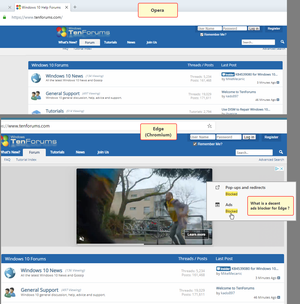
HotCakeX Sadly one has to spend time on finding a solution to block ads, i.e. spend time on comparing ad blockers, reading reviews, checking comments on forums, etc. I have been using Firefox many, many years. However, at one point in time I switched to Chrome as I almost spent more time on trying so solve issues with FF than using it. I had to use an ads blocker with Chrome (uBlock Origin). On Android Chrome was terrribly slow and I changed to Opera - being a fast browser, also on Android. I am quite happy with Opera, but wasn't aware that it was bought by some Chinese company a couple of years ago. So I was pleased with Edge Chromium. Microsoft does need to improve the ad blocking part though. Have to use yet another extension... BTW: Probably I am not the only one wishing to use the same browser both on desktop PC and their Android device. This in order to sync data. Hence, if Edge for Android is being used, one also needs an Android extension that blocks ads . =2.9KViews0likes1Comment
Recent Blog Articles
No content to show