User Profile

markoshea
MVP
Joined 9 years ago


User Widgets
Recent Discussions
Microsoft 365 Business Tech Video Series
Hi all Just posting to advise that there's a series of 13 videos on Microsoft 365 Business that have just been uploaded to YouTube https://www.youtube.com/watch?v=bj6ns8btJBU&list=PLz6RgUKX11CVqgDEtUVDktPpmUBBr8Ogx In the lead up to Ignite I'll be publishing some blog posts digging in to some of the extra topics we didn't have time to cover in this series, as well as any news or updates since the content was locked in and recorded. I'll add them to this conversation as I publish them to make it easier to follow if you are interested. For those of you who will be at Ignite let me know, there's always that chance of being able to organise an impromptu meetup. regards Mark1.1KViews1like0CommentsRe: Azure AD P1 and Autopilot question
KVS If you aren't enabling other AADP P1 scenarios, I think this would work for the enrolment, but longer term hopefully there are other things in P1 that you can leverage which means it will be rolled out for everyone. Normally I would recommend creating groups based on licensing, but in your case I think the slight delays of the dynamic groups being updated when licenses are reassigned might be a problem, so I would just stick to assigning users to the groups.6.3KViews1like0CommentsRe: Azure AD P1 and Autopilot question
Hi VK 1) The AAD licenses would be assigned to users, not devices. Licenses can be reassigned, but you would need to ensure that users aren't leveraging any other capabilities of AADP P1 prior to the licenses being revoked and then losing those features as well. 2) The biggest initial benefit you get by adding AADP P1 to Autopilot is that the devices will automatically enroll with Intune after performing the AAD Join, rather than it being an extra manual step. This means that if a device reset is performed, and the AAD P1 license isn't assigned to the user, the device will be AAD Joined, but not Intune managed until that is addressed separately. 3) https://docs.microsoft.com/en-us/azure/active-directory/hybrid/how-to-connect-device-writeback has more details, but two of the main scenarios are WHfB with hybrid certs. and CA via ADFS. Others may have some additional use case scenarios6.5KViews1like2CommentsRe: Microsoft 365 Business & Windows 10 Pro upgrade rights
Hi Peter Was this a reference to https://docs.microsoft.com/en-us/microsoft-365/business/support/microsoft-365-business-faqs? Looks like they finally got the updated version up, there were quite a few changes that the April 2018 release made to Microsoft 365 Business that were updated on the docs site. The message I've always seen and had drilled in to me that this was a 7/8.x Pro to 10 Pro upgrade, and that it specifically was not a Home to Pro upgrade. I've pasted the text from an older version of the FAQ pdf, which gives some additional context because the asterisk in your post might have referred back to something which was a bit clearer. I went back through the docs article history on GitHub and only saw references that do support Pro to Pro. There was definitely some confusion about what the Pro/Business upgrade was or what it included, so you aren't alone in your thoughts. ---------------------------------------- Customers that wish to experience the complete capabilities of Microsoft 365 Business must be running Windows 7, 8.1 or 10 Pro* on their existing desktops. Customers who use on-premises Active Directory must switch to cloud identity and management as part of their deployment. Existing Windows 10 Pro PCs should be running Creators Update if they have not already done so. *Devices running Windows 7 or 8.1 Pro are eligible for an upgrade to Windows 10 Pro within the Microsoft 365 Business preview.9.6KViews0likes1CommentRe: Intune included in Azure AD for Office 365?
Hi Emy A very small subset of Intune MDM functionality is included with Office 365 plans with mailboxes. Two useful pages to look at are https://support.office.com/en-us/article/Capabilities-of-built-in-Mobile-Device-Management-for-Office-365-a1da44e5-7475-4992-be91-9ccec25905b0 and https://support.office.com/en-us/article/choose-between-mdm-for-office-365-and-microsoft-intune-c93d9ab9-efb2-4349-9b93-30c30562ee22 . They should help to clarify what you are seeing and what you can do with the Office MDM capabilities.5.6KViews1like1CommentRe: Microsoft 365 licensing Help
Hi Brian M365B isn't licensed for full Intune functionality, the FAQ includes some of the details https://o365pp.blob.core.windows.net/media/Microsoft%20365%20Business%20Partner%20FAQ.pdf but I'm sure we'll see it get updated over time. Next week I'll get a chance to spend some time with one of the PMs and will get some clarification on some of the specific questions I've got on this well. ----------------------------- Does Microsoft 365 Business include the full capabilities of Microsoft Intune? Microsoft 365 Business includes a robust set of mobile app management capabilities powered by Microsoft’s MDM solution (Microsoft Intune). These are a subset of features, specifically chosen to meet the needs of SMBs and organized to be easily managed via a simplified administration experience. If a company requires the full capabilities of Intune, they can purchase a qualifying plan separately. Does Azure Active Directory P1 come with Microsoft 365 Business? No. Microsoft 365 Business is built on technology from across Microsoft and while it shares some features with Azure Active Directory, it is not a full version. The security and management policies created in Microsoft 365 Business rely on some Azure functionality but does not include all features (e.g. self-service features, conditional access features, and reporting). Customers may choose to purchase Azure Active Directory Premium as an add-on to Microsoft 365 Business. Does Microsoft 365 Business allow customers to manage Macs? The security and management capabilities of Microsoft 365 Business pertain to iOS, Android mobile and tablet devices, and Windows PCs. ------------------------------------- My take on this is that those who are used to working with AAD/Intune in the Azure Portal might find some of these restrictions impact design and deployment decisions they are already implementing, but for someone looking to move up from O365BP this would be a good starting point before committing to the full Intune+AADP1 or EMS E3 licence.3.5KViews1like0CommentsRe: Microsoft 365 licensing Help
Hi Brian What features of Intune and AAD Premium are you using now? That would be the best starting place, but a few of the things to think about... If you need iOS/Android/MacOS MDM, then Intune licenses would be required as well as your M365B license. If you are only managing iOS/Android through MAM, then M365B would cover that. If you are using AIP/RMS or ATA, then you wouldn't be covered with M365B.3.6KViews0likes2CommentsRe: Microsoft 365 Business sessions at Ignite
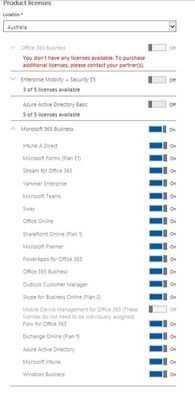
Hi Mike - synchronised identity is fine, so using AADC shouldn't be a problem. One of the pieces that I think is going to cause some confusion, and hopefully we'll see some updated documentation on it, is the Win 10 Pro/Business upgrade activation requiring AADJ and not AD join, as it's the synchronised/cloud identity that has the license assigned. I've attached the component listing so you can see the breakdown. I contacted my CSP provider to enable the preview, they just added it to an existing CSP tenant I had and I was up and running. I've got some other random licenses in the tenant as well, but it shows the mix and match story.1.9KViews1like1CommentMicrosoft 365 Business sessions at Ignite
Hi all I'll be delivering a couple of short theatre sessions (THR2216 and THR2216R) that are focusing on behind the scenes pieces of the Windows 10/AAD/Intune components in Microsoft 365 Business. If you are planning on heading along to either of these, let me know if there's anything in particular you really want to hear about. regards Mark2KViews2likes4Comments