User Profile

sunnyschindler
Brass Contributor
Joined 7 years ago


User Widgets
Recent Discussions
Security risk of Windows Auto-Login mitigated by Screen_Lock-out_Immediate?Outlook.com Rule to run
Windows Auto-Login incurs security risk. Does Screen Lock Out Immediately mitigates? Too slow Outlook.com Rule renders mine useless if it cannot run once before User Login. Unfortunately, this same Rule in Outlook created malicious alert from Microsoft and my IT department cannot understand why. APPENDIX FOR MY WORKAROUND TO TRY https://www.howtogeek.com/119028/how-to-make-your-pc-wake-from-sleep-automatically/ https://www.howtogeek.com/684639/how-to-lock-your-windows-pc-after-signing-in-automatically/How to Ad Hoc External Share Office 365 Document with unlimited number times of access?
I need help to share a Microsoft Office Document with external users that their access is unlimited within expiry period. Is this possible? Is there a limit on how many times external users can access same document (within expiry period)?Re: LOOKUP to include formatting with its Return Value? Formatting Code Function? non-VBA request
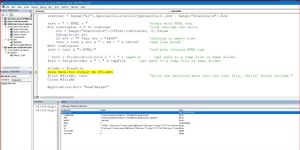
bosinander Thanks for more help. But my VBA literacy is insufficient and needs to change line from ' Path = ThisWorkbook.Path & " \ " & tmpFile 'get path to a temp file in same folder Path = TargetFolder & " \ " & tmpFile 'get path to a temp file in same folder The Target Folder works for code as follows 'https://learn.microsoft.com/en-us/office/vba/language/reference/user-interface-help/freefile-function Sub FreeFile_Example1() Dim Path As String Dim FileNumber As Integer Dim TargetFolder As String TargetFolder = "C:\Users\wongsunn\OneDrive - Schindler\Documents\scrap" Path = TargetFolder & "\Articles2019File 1.txt" FileNumber = FreeFile Open Path For Output As FileNumber Path = TargetFolder & "\Articles2019File 2.txt" FileNumber = FreeFile Open Path For Output As FileNumber End Sub Now I have to resolve error "Open Path For Output As #fileNo".4.5KViews0likes1CommentRe: LOOKUP to include formatting with its Return Value? Formatting Code Function? non-VBA request
bosinander Thanks for helpful sharing of file. On the other hand, I am finding how to view its insides and stay within IT constraint. For Enterprise users, how to view code/formlae without opening macro file shared by external user?4.6KViews0likes3CommentsFor Enterprise users, how to view code/formlae without opening macro file shared by external user?
I need help to view code (within Excel file with XLSM extension) shared by external user. How to view formula or code shared by this Community Post? IT policy is not to download such file. How to know its code and/or formulae? Is there a Microsoft sandbox for Enterprise end-users?877Views0likes3CommentsRe: LOOKUP to include formatting with its Return Value? Formatting Code Function? non-VBA request
Word is capable of what I need by find and replace (1) all emoji with superscript and (2) ASCII alphabets with subscript. With my limited VBA expertise, I am tempted to record Word macro to do above with input (hyperlinked) from Excel (formula output). I like to know if anyone can share code that Find and Replace (1) all EMOJI with a fixed formatting (2) all Alphabets with another fixed formatting. Otherwise, I will spend the time creating a wheel probably someone else already perfected.4.7KViews0likes1CommentLOOKUP to include formatting with its Return Value? Formatting Code Function? non-VBA request
Without VBA, is it possible for LOOKUP to return formatting of its Return Value? It is much easier if Formatting Code Function (similar to CODE function) can be exposed to end user. I need to differentiate LOOKUP output from other formulae outputs within long formulae.6.4KViews0likes21CommentsRe: LOOKUP to include formatting with its Return Value? Formatting Code Function? non-VBA request
bosinander Thanks for very useful code. However, it is not working; Is it because Unicode is the problem? My string is ":question_mark:4⸍24:bed:️SOME:heavy_dollar_sign:549;:fork_and_knife_with_plate:️:heavy_multiplication_x::question_mark:🧾:heavy_dollar_sign:43;:heavy_dollar_sign:394:fork_and_knife_with_plate:️:heavy_multiplication_x::question_mark:🧾:heavy_dollar_sign:43;:question_mark:4⸍25:bed:️SOME:heavy_dollar_sign:549;:fork_and_knife_with_plate:️:heavy_multiplication_x::question_mark:🧾:heavy_dollar_sign:43;:question_mark:4⸍26:bed:️SOME:heavy_dollar_sign:2619;:heavy_dollar_sign:394:fork_and_knife_with_plate:️:heavy_multiplication_x::question_mark:🧾:heavy_dollar_sign:43;6⸍21:heavy_dollar_sign:1723🛧;:question_mark:7⸍10:bed:️FAIR_MAKATI:heavy_dollar_sign:1581;:fork_and_knife_with_plate:️:heavy_multiplication_x::question_mark:🧾:heavy_dollar_sign:43;:fork_and_knife_with_plate:️:heavy_multiplication_x::question_mark:🧾:heavy_dollar_sign:43:heavy_dollar_sign:84;:question_mark::fork_and_knife_with_plate:️:heavy_multiplication_x::question_mark:🧾:heavy_dollar_sign:43:heavy_dollar_sign:84:bed:️FAIR_MAKATI:heavy_dollar_sign:1721;:fork_and_knife_with_plate:️:heavy_multiplication_x::question_mark:🧾:heavy_dollar_sign:43:heavy_dollar_sign:84;:heavy_dollar_sign:543:fork_and_knife_with_plate:️:heavy_multiplication_x::question_mark:🧾:heavy_dollar_sign:43:heavy_dollar_sign:84;:question_mark::fork_and_knife_with_plate:️:heavy_multiplication_x::question_mark:🧾:heavy_dollar_sign:43:heavy_dollar_sign:84:heavy_dollar_sign:37:bed:️FAIR_MAKATI:heavy_dollar_sign:3972" Reason for my suspecting Unicode as problem is because VBA local window is not showing Unicode for said string. Thanks for helping!4.8KViews0likes8CommentsRe: LOOKUP to include formatting with its Return Value? Formatting Code Function? non-VBA request
Thanks, I learnt more today but should have mentioned that my need is to mobile text a string; by TEXTJOIN LOOKUP outputs. The best I can come up with (w/o VBA) paste TEXTJOIN output into WORD APP to substitute "control characters" (which, similar to your suggestion, wrapped around each LOOUP output) with superscripts and subscripts depending according to "control characters". Appreciate your help!5KViews0likes1CommentRe: LOOKUP to include formatting with its Return Value? Formatting Code Function? non-VBA request
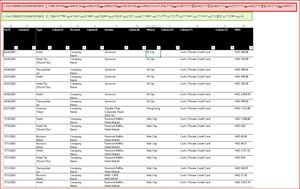
HansVogelaar I need to superscript an output of Excel formula to differentiate from other outputs of other formulae in same cell. Is there a non-VBA solution? I need help to superscript first 3rd and subscript 4th argument =TEXTJOIN("",TRUE,Acronymn[@[🛧]:[:bed:️]]) USE CASE Example of above use is I am delegate for expense claiming for my Executive who is always on the road and has disorganized receipts (for good reason). I need to claim expense only once a month by company policy. To deal with missing receipts, I mobile texting my Executive because he/she has too many emails. Unfortunately, summary (not yet unconfigurable for filter) from Enterprise level Expense App is large Spreadsheet on a mobile screen and contains too many details; My workaround is reduction to a single line of text of items for mobile texting; because delineating items cost footprint in a string, I do away with delineator characters by applying subsequent word alternatively with Superscript and Subscript. Since there is not yet Excel functionality, I wish Lookup can. As demo by screenshot, long text message (red) becomes much shorter (green) and use less mobile display footprint. If there is a better way, I much appreciate the help . Until my Enterprise Expense App cater to mobile messaging interim information such as comments, I wait for more end-user to voice how they mobile text a summary in spreadsheet format. Is there more effective way?4.9KViews0likes1CommentRe: Is there a function to superscript part of a cell formula to differentiate its output among others?
My version does not have "change format for the part of the text within the cell with ExcelScript package". Is there beta version that can? Probably, it will be available when enough demand come in. Until my Enterprise Expense App cater to mobile messaging interim information such as comments, I wait for more end-user to voice how they mobile text a summary in spreadsheet format. Is there more effective way?2.4KViews0likes1CommentRe: Is there a function to superscript part of a cell formula to differentiate its output among others?
Thanks for responding. Would you know if Office Script is for Desktop yet? As for Excel Online or Excel Web, it still doesn't feature Subscript and Superscript. Is there production level VBA for Font Subscript and Superscript on word if not character?2.9KViews0likes3CommentsRe: How to find out what cause unintentional Table Column to end at last column of sheet?
Thanks NikolinoDE for help. But I checked your potential causes but unable to find any. My questions is there: (1) more potential causes? (2) non-programming quickstep to detect above? (3) non-programming quickstep to remove columns to the right? using criteria such as blank columns AND headers with column numbers. IMHO columns which are blank and headers with column numbers can be safely removed without detriment to data. Alternatively, is there production-level code (VBA or Script)? Lastly, would you share screenshot on your item 5? I need help to find"Resize Table" enabled. Operating System: 19041.1.amd64fre.vb_release.191206-1406 10.0.0.0.2.4 Program: Microsoft Excel, 16.0.15601.206801.8KViews0likes1CommentIs there a function to superscript part of a cell formula to differentiate its output among others?
I need to superscript an output of Excel formula to differentiate from other outputs of other formulae in same cell. Is there a non-VBA solution? I need help to superscript first 3rd and subscript 4th argument =TEXTJOIN("",TRUE,Acronymn[@[🛧]:[:bed:️]]) USE CASE Example of above use is I am delegate for expense claiming for my Executive who is always on the road and has disorganized receipts (for good reason). I need to claim expense only once a month by company policy. To deal with missing receipts, I mobile texting my Executive because he/she has too many emails. Unfortunately, summary (not yet unconfigurable for filter) from Enterprise level Expense App is large Spreadsheet on a mobile screen and contains too many details; My workaround is reduction to a single line of text of items for mobile texting; because delineating items cost footprint in a string, I do away with delineator characters by applying subsequent word alternatively with Superscript and Subscript. If there is a better way, I much appreciate the help3.2KViews0likes5CommentsFor Formula Editing, mouse input to modify argument to refer another Table Cell same row?
For Desktop App, I need help to change an argument from text to reference cell in same row. It is not referencing cell (working same way as a non-Table Cell). Windows 10 Enterprise 19041.1.amd64fre.vb_release.191206-1406 10.0.0.0.2.4 Microsoft Excel, 16.0.15601.206801.2KViews0likes7CommentsRe: For Formula Editing, mouse input to modify argument to refer another Table Cell same row?
Please correct me if wrong, Feature of mouse selection of a cell is now lost for formula editing when it comes to Table reference. Instead of a simple single click (as for a non-Table cell), I now have to keyboard the structured reference to a Table Cell; IMHO this requires extra effort of knowing names (Table and Column). If there is a quicker step, I would appreciate the help.1KViews0likes0Comments
Recent Blog Articles
No content to show