User Profile

Benzini
Copper Contributor
Joined 7 years ago


User Widgets
Recent Discussions
Cannot access MS Forms after making survey in Teams
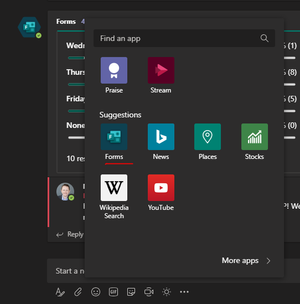
I have noticed several times that after creating a survey using Forms in Teams, I cannot access Forms on the web. I get a "Your account is not enabled for Microsoft Forms" error message. I get the same error message if I try to add a Form as a tab in Teams. A few hours later I have access to Forms again as usual. It sounds really weird, but it has happened multiple times. I never have a problem accessing Forms unless I create a survey in Teams, so it has to be related somehow. I created the survey by clicking on the Forms add-on, not doing the quick poll with an "@Forms" mention or adding a Forms tab (see image).11KViews2likes7CommentsRe: Is anyone having issues to upload a video to Stream?
garrettbronner Is there a way to file a support ticket with MS directly? Same as CharlieArellano, my support page only gives me the option to submit a ticket to my IT department. They don't have any answers about my missing video upload button.Re: Unable to upload video.
garrettbronner matteo_1234 I am also unable to upload any videos or record Teams meetings. Our IT admins swear up and down that we are not restricted from doing so. I have uploaded lots of videos in the past but the button is missing as of late last week. No error, just no option to upload. Everyone else in my company that I have talked to has the same issue. We're on US East servers. I attached a screenshot.Re: recording video on teams limited permissions
robert_robert I'm not sure why permissions of a video would vary based on who recorded it. Maybe a difference between someone who is an owner of a Team vs. a member? In my experience, the permissions are consistent. I see the setting that changes limited vs. all-company. I attached a screenshot. The owner of the video can change this setting to make it available to everyone, but not sure how to make that happen automatically. I tried to do a test just now, but I have not been able to upload anything to Stream since last week. Any recorded meeting in Teams give an error message that it failed to upload to Stream.Re: recording video on teams limited permissions
robert_robert The person who initiated recording of the meeting should be the owner of the video. That person can give access to others by going to their videos (my content>videos), clicking the edit (pencil symbol) next to the video, and changing the permission for the video. They can search for a group to give members of that group access. We record safety presentations in Teams and have to do this each time before the video is visible to everyone in our Safety channel, even if they can see it in Teams in the meeting thread.Re: Is anyone having issues to upload a video to Stream?
descapa_msft I attached a screen grab of an outage notice for Stream that was sent to me by our IT department. I believe we are on MS's US East servers. Our headquarters is in Minneapolis. Our IT department said that they did not make any changes to our O365 tenant. Even if my upload access was restricted, the upload button should still be visible, according to the article at the link below. I attached a screen grab of what I'm seeing in Stream. https://docs.microsoft.com/en-us/stream/restrict-uploadersRe: Is anyone having issues to upload a video to Stream?
CharlieArellano I'm having issues too. A recorded meeting in Teams failed to upload to Streams and the upload button is missing from Streams. I can't find any way to upload a video at all. Maybe they temporarily disabled uploads due to high usage?
Recent Blog Articles
No content to show