User Profile

8932LDG
Copper Contributor
Joined 7 years ago


User Widgets
Recent Discussions
Investigating Excel-Initiated Email Activity Without Sent Items Trace
Two days ago, three emails were sent from a user’s inbox without leaving any copies in the Sent Items folder. The user did not send these emails manually—this is confirmed by the presence of the SimpleMAPI flag in Outlook. **What I know:** **Email Characteristics:** - All three emails contained a Word attachment. - No body text was present. - The subject line matched the attachment file name. - Two of the emails were identical. **Recipients:** - Emails were sent to colleagues who originally created the attached documents. **Attachment Details:** - One attachment appeared to be a temporary file (e.g., a3e6....). **System Behavior:** - No suspicious logins detected before or after the event. - Emails were sent via the Outlook.exe process on the user’s machine. - Excel.exe was identified as the parent initiating process according to Microsoft Defender endpoint logs. **In Defender's Endpoint logs I found this under Typed Details (related to the firing of the 3 emails):** - Downloaded file: `2057_5_0_word_httpsshredder-eu.osi.office.net_main.html` - Path: `C:\Users\s***s\AppData\Local\Microsoft\Office\16.0\TapCache\2057_5_0_word_httpsshredder-eu.osi.office.net_main.html` - Downloaded file: `~$rmalEmail.dotm` - Path: `C:\Users\s***s\AppData\Roaming\Microsoft\Templates\~$rmalEmail.dotm` I am seeking assistance to replicate this issue and accurately determine how these three emails were triggered.24Views1like0CommentsInvestigating Excel-Initiated Email Activity Without Sent Items Trace
Two days ago, three emails were sent from a user’s inbox without leaving any copies in the Sent Items folder. The user did not send these emails manually—this is confirmed by the presence of the SimpleMAPI flag in Outlook. What I know: Email Characteristics: All three emails contained a Word attachment. No body text was present. The subject line matched the attachment file name. Two of the emails were identical. Recipients: Emails were sent to colleagues who originally created the attached documents. Attachment Details: One attachment appeared to be a temporary file (e.g., a3e6....). System Behavior: No suspicious logins detected before or after the event. Emails were sent via the Outlook.exe process on the user’s machine. Excel.exe was identified as the parent initiating process according to Microsoft Defender endpoint logs. In Defender's Endpoint logs I found this under Typed Details (related to the firing of the 3 emails): 1. -Downloaded file: 2057_5_0_word_httpsshredder-eu.osi.office.net_main.html Path: C:\Users\s***s\AppData\Local\Microsoft\Office\16.0\TapCache\2057_5_0_word_httpsshredder-eu.osi.office.net_main.html 2. Downloaded file: ~$rmalEmail.dotm Path: C:\Users\s***s\AppData\Roaming\Microsoft\Templates\~$rmalEmail.dotm I am seeking assistance to replicate this issue and accurately determine how these three emails were triggered.22Views0likes0CommentsOptimizing Excel Formula for Dynamic VLookup
Hi, I have this formula: =IF(F2="", "", VLOOKUP(IF(VLOOKUP(F2, $A$2:$I$1400, 4, FALSE) = 0, VLOOKUP(F2, $A$2:$I$1400, 6, FALSE), F2), $A$2:$I$1400, 9, FALSE)) This formula is meant to fill in the Manager’s email. Rank 0: Every role below the Department Manager level is ranked as 0 in the 4th column (‘Rank’). Currently If an executive reports to a Senior Executive (Rank 0), the formula checks the 4th column. If the Senior Executive has a Rank 0, it looks at the 6th column instead (to get the employee number the Senior Executive reports to). Example: For employee ‘7586’ with email ‘email address removed for privacy reasons’, the formula currently fills ‘email address removed for privacy reasons’. It first looks at the 4th column of 1577, finds 0, then takes the value in the 6th column (0209) and uses that for the final VLOOKUP. Needed Change: I need the formula to perform an additional VLOOKUP. It should check the 4th column for employee 0209. If it’s still 0, it should look at the 6th column instead. Goal: The new formula should fill ‘email address removed for privacy reasons’ as the manager’s email for employee 7586, not ‘email address removed for privacy reasons’.63Views0likes1CommentCan Copilot extract data from a Sharepoint list (to which I have access to)?
In Loop, I asked Copilot to create a table with similar instructions: "Design a table and for each row in the SP list 'A' on the 'Z' SP site that has column 'C' empty and column 'D' with the value mailto:email address removed for privacy reasons add a row to the table with the following columns: column 'f' and 'g' with values as in the SP list 'A' and then the following empty columns 'h','i','l'. Add 5 empty rows at the end" It created the table with just one row and now values extracted from the sharepoint list to which I have access to. Is there a way I can instruct Copilot to do that?1.9KViews1like1CommentSharepoint List lookup value not adding additional fields values
Hi I have a main list 'Actions Types', where to each type of 'Action Type ID' is assigned a Person (using Person of Group field). Using a JSON code, I created a single text column (named 'Owner Email Address') column where the email address of that person is extracted. Now I have a second list: Actions. Each action has an 'Action type' lookup column so that when the type value is selected (from the 'Action Type ID' list) then the related 'Owner Email Address' is pulled in . No value is added though, the field remains blank. If I add default additional fields such as 'Modified' or 'Created' those are filled correctly. Has anybody some clue while the 'Owner Email Address' values , which is a single text column, are not being pulled in?723Views0likes1CommentSCIM User Provisioning : exclude fields from syncing with Azure
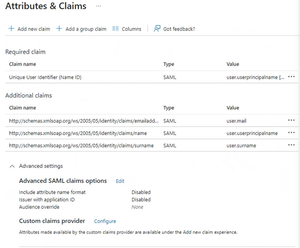
Hi, we have setup on Knowbe4 SCIM user provisioning from Azure AD. It works, but now we would like to excluded the manager field from syncing with Azure AD. We edited the SAML SSO configuration on Azure, deleting the manager field from the 'Attribute Mapping' (I put a screenshot below just to give an idea of where we removed the manager's field. NB: this is not a screenshot from our system) list under User Provisioning. We even stopped for a few minutes User Provisioning on Azure and then restarted it, but it still keep syncing and overriding the 'manager's field' and the related manager's email field on Knowbe4 platform. Any idea on how can I stop the manager's field from syncing between Azure AD and Knowbe4 platform?2.5KViews0likes1CommentRe: Calculate value of a cell based on the 'text value' assigned on other cells
Thanks for the reply, the formula doesn't seem complete. If I apply this formula the different coefficients won't be applied to the initial starting score. Is there a way I can have the starting score multiplied by the different coefficient when the value in the relevant cell is 'yes'?914Views0likes1CommentCalculate value of a cell based on the 'text value' assigned on other cells
Hi, I'd like to be able to calculate the value of cells in a column based on the what has been selected on other columns. Each item has a starting numerical value (column be), that value should be modified based on how the columns from C to G (Conditions 1-5) have been filled. If the value in one of the those Condition columns is 'yes' then a coefficient should be applied to the initial number, if there's a no or is blank then no coefficient should be applied. Coefficients are: 0.8 for Condition 1, 0.7 for Condition 2, 0.6 for Condition 3, 0.5 for Condition 4, 0.9 for Condition 5. So in the sample table below Item 1 (Cell A2) has a starting score of 23. This score should be multiplied by 0.8 (Yes on Condition 1 column, cell C2) x 0.6 (Yes on Condition 3, cell E2) x 0.5 (Yes on Condition 3, cell F2) x 0.9 (Yes on Condition 3, cell G2) and thus returned 4.968 on Cell H2. Is it also possible to round this 4.968 to the nearest integer? Item ID Starting Sore Condition 1 Condition 2 Condition 3 Condition 4 Condition 5 Final Score Item 1 23 Yes No Yes Yes Yes Item 2 13 Yes Yes No No No Item 3 15 Yes No No Yes Yes Item 4 20 No No Yes Yes Yes Item 5 11 No Yes Yes No No Item 6 10 Yes Yes No Yes No Item 7 14 No Yes Yes Yes No Item 8 13 Yes No No Yes No Item 9 18 No No No Yes YesSolved971Views0likes3CommentsError when recording a macro (argument is invalid or missing or has an incorrect format)
I'm trying to automate a set of operations in Excel and recorded a macro. The macro gives the following error: Line 56: Range setFormulaLocal: The argument is invalid or missing or has an incorrect format. This is what's on the script on line 56: selectedSheet.getRange("J2").setFormulaLocal("=IF(F2=\"\",\"\",VLOOKUP(IF(VLOOKUP(F2,R2C1:R1400C9,4,FALSE)=0,VLOOKUP(F2,R2C1:R1400C9,6,FALSE),F2),R2C1:R1400C9,9,FALSE))"); When recording the macro I entered this formula on the cell J2: =IF(F2="","",VLOOKUP(IF(VLOOKUP(F2,$A$2:$I$1400,4,FALSE)=0,VLOOKUP(F2,$A$2:$I$1400,6,FALSE),F2),$A$2:$I$1400,9,FALSE)) The formula worked fine while I was recording it. Anybody has any idea what could I have done wrong?8.5KViews0likes8CommentsHow to combine if statement with VLOOKUP formula
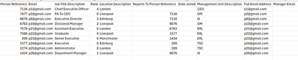
I have a table (please see the sample below), and I need to fill two columns ('Manager's name' and 'Manager's email') based on the column 'report to'. The value in 'Report to' indicates the 'employee ID' of the manager. So for instance, employee 101 reports to employee 100. To that though, I need to add a condition: if employee A reports to employee B, and employee B has a value in the 'Job Title rank' equal to 0, then the manager's name and email for employee A must be filled with the manager's name and email employee B reports to. If an employee reports to someone who has a rank higher than 0, like employee 109 who reports to employee 110. Employee 110 has a 'Job title rank' equal to 1, so manager's name and email columns for employee 109 should be filled with name and email from employee 110 row. If instead the employee report to someone with rank 0, than it should take the values for the person above him. So as in the table below, Employee 104 reports to employee 109. Employee 109 has a 'Job Title rank' equal to 0. In this case being the rank equal to 0, manager's email and name for employee 104 should be filled with the manager's name and email employee 109 reports to (so looking at the table employee 104 should have employee 110 name and email in the manager's email and name column, because employee 109 how has a rank 0 reports to employee 110). Employee ID Employee email Employee Name Job Title Rank Department Report to Manager’s Name Manager’s Email 100 email address removed for privacy reasons name0, surname0 4 CEO 101 email address removed for privacy reasons name1, surname1 3 Exec director 100 102 email address removed for privacy reasons name2, surname2 1 Finance 103 103 email address removed for privacy reasons name3, surname3 2 Business Operations 101 104 email address removed for privacy reasons name4, surname4 0 BPI&IT 109 105 email address removed for privacy reasons name5, surname5 0 Finance 102 106 email address removed for privacy reasons name6, surname6 0 HR 108 107 email address removed for privacy reasons name7, surname7 0 Finance 105 108 email address removed for privacy reasons name8, surname8 0 HR 111 109 email address removed for privacy reasons name9, surname9 0 BPI&IT 110 110 email address removed for privacy reasons name10, surname10 1 BPI&IT 103 111 email address removed for privacy reasons name11, surname11 1 HR 103 112 email address removed for privacy reasons name12, surname12 1 Finance 103Solved2.3KViews0likes1CommentVLookup formula based on two columns with condition
Hi I have a list with the following fields: Email Forename Surname Job Title Department Portal Username Management Unit Full Email Address I need to create 2 vlooup columns for manager and manager's email . We have 5 roles (ordered by the lowest to the highest) in the organization (we have more, but 5 is enough to describe the problem that needs to be resolved) Executive, Senior Executive, Department manager, Divisional Manager, CEO The manager field would be filled based on the 'Job Title ' 'Management Unit' and the 'Department'. So if an employee is a department manager, the vlookup fomula should look for the for the row that has the same management unit as the employee and 'divisional manager' in the' job title' field. Then concatenate the last name and the first name in the manager's column cell. If the employee is 'Divisional manager', it should look for the row that has 'CEO' in the 'job title' and then concatenate the last name and the first name in the manager's column cell. If the employee has as a role 'Executive' or 'senior executive' then the formula should look for the column that has the same 'department' value and 'department manager' in the job title. Then concatenate the last name and the first name in the manager's column cell. For each one of those 3 cases it should also fill the 'manager's email' field accordingly (taking the value from the last column 'full email address' ). Do you know if it's possible (and if it is do you have any clues on how) to create such a formula?817Views0likes1CommentExcluding custom fields from SAML-based Sign-on
Hi, in my organization we enabled SSO with a third party platform and it's working. We need though to excluded some fields in AD from syncing. We want prevent the following fields from syncing/being managed by ADSync: -Manager -Division -Location -Employee-start-date Does anybody know how we can exclude those fields from the SSO/ADSync?620Views0likes2CommentsEnabling Remote wipe for desktops
As per title I'm looking to find out if it's possible to wipe remotely desktops and laptops on SCCM. Searching over the internet I find information on how to do it for mobile phones. But I couldn't find any information about how to do it for desktops.1.2KViews0likes1CommentForms Pro : can't see link to share and colleagues with std version cannot edit my form
Hi, I started the trial with Forms Pro, and created a new Form. Didn't do anything different than when creating forms with the standard version. The problem is that other colleagues with standard version cannot edit my form. They get a blank form, My colleague with Pro paid version can edit it using the same link. Also I miss the link to send to people for submission. Initially the link was there, and I downloaded the QR code, but now I can't see it anymore. Please see the screenshots871Views0likes1Comment

Recent Blog Articles
No content to show