User Profile

jraff
Brass Contributor
Joined 7 years ago


User Widgets
Recent Discussions
Feature Request: We need a true dark mode in Microsoft Office Apps
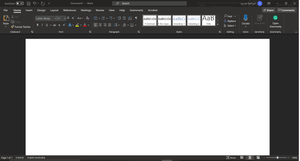
While apps like Word, Excel and Access all have a dark theme for the UI, however, it is rendered quite ineffective considering its intentions (to reduce eyestrain). The main focus of these apps is the content in the middle of the screen (whether it be a spreadsheet or a document) so when I enable dark theme and the largest part of the screen is still bright white, it makes me wonder why I would use it in the first place. In OneNote, Microsoft has done a great job at including a 'dark mode' and this is what I'd like to see in Word, Excel etc. where the dark mode includes the background and inverts the text along with brightness of the pens while keeping photos and other attachments in their original forms: This can be as simple as a 'Switch Background' button in the ribbon (like in OneNote). I'm a student who suffers from severe photophobia due to albinism and this feature would allow me personally to use word without eyestrain and fatigue while still keeping the document accessible to other people who want to view, share or print it. It would make my workflow less complex as I would no longer need to invert the colours of the entire screen through Ctrl + Win + C over and over again and would definitely allow me to focus more on my classes and be a better student.17KViews4likes8CommentsRe: Vertical Taskbar arrangement is ugly, have I fixed it?
Hi there, thanks for your response all the info, however, its not really what I'm looking for. I'm aware of all these options but they can't address the problems I've outlined above. I'll be sure to post these things where they belong next time, even if it means using another computer with diagnostics enabled.5.6KViews0likes0CommentsVertical Taskbar arrangement is ugly, have I fixed it?
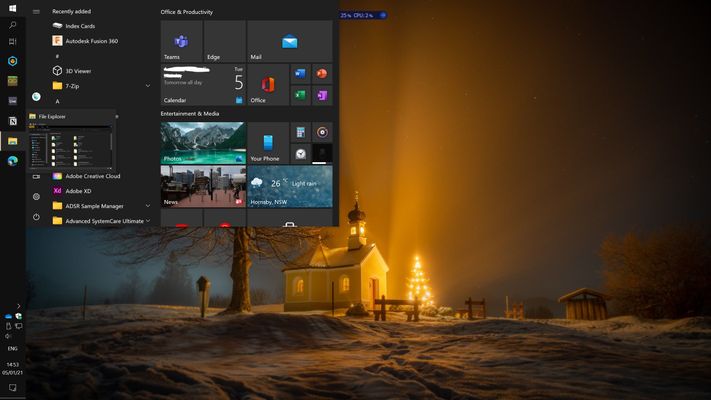
I tried posting this in the feedback hub, but I have diagnostics completely disabled. I've always wanted to unlock my taskbar and fling it over to the left side of my screen. It makes more sense, especially on ultrawide monitors where a horizontal alignment takes up so much more space. However, I find myself switching back a few minutes after moving it because of how poorly arranged the taskbar is. Firstly, it is too wide, and a lot of unnecessary space is used. This may be because it must fit the date but if Microsoft can remove it with the 'small taskbar buttons' option, I'm sure removing it with vertical alignment wouldn't hurt. Furthermore, inverting the arrangement of icons creates a tedious learning curve and it's just not necessary. I've attached two screenshots - one of the normal arrangement and one made by me, which I highly prefer. Please let me know if I'm not considering something important or if I'm just delusional and my idea is terrible. All responses are greatly appreciated! 🙂5.8KViews1like3CommentsRe: Feature Request: We need a true dark mode in Microsoft Office Apps
I know, and I do that. The problem is, I have to change it back before I go to send it to a colleague, or before I print it. Also, various elements such as tables and borders don't change colour, they stay black - rendering them invisible. I believe a quick "change background" button would resolve all this - just like the one in OneNote.16KViews1like2CommentsRe: Welcome to the Office Insider Community
Please check out my Feature Request, I feel very strongly that this feature has been overlooked and this continues to hinder me as a result. https://techcommunity.microsoft.com/t5/office-insider/feature-request-we-need-a-true-dark-mode-in-microsoft-office/m-p/109757027KViews0likes0CommentsRe: Top Feedback summary for January 8
Release is getting too close! Please allow the search bar in the new tab page to be configured with other search providers ASAP. All this has to be is a drop down menu where the Bing logo is currently placed on the NTP search bar and an option to set a default in the NTP settings along with 'page content' etc. Give your users the choices they deserve! I know the inclusion of this simple feature will determine for me and many other people whether we use the new Edge.8.1KViews2likes0CommentsRe: Top feedback summary for December 3
I'm sure Bing is great, and I may give it a try. However, you can't expect every other lay user to just start using Bing, people like Google and are resistant to change. More people would use edge if they'd just allow us to use our own search engine for the NTP. I know that some people only use DuckDuckGo for privacy reasons, would it be more user-friendly to just add the option?3.4KViews0likes3CommentsRe: Top feedback summary for December 3
Why can't you just add support for other search providers on the New Tab page? Is it not as simple as it seems? You've got a great thing going here but forcing people to use Bing will drive people away from Edge. Please don't make the same mistake you did with the previous Edge.7.5KViews0likes27Comments
Recent Blog Articles
No content to show