User Profile

JanBakkerOrphaned
Iron Contributor
Joined 7 years ago


User Widgets
Recent Discussions
Re: AD Connect Staging Server doesn't Auto Upgrade
CharlesPearson Can you check this: If the Synchronization Service Manager UI is running on the server, then the upgrade is suspended until the UI is closed, and this: You can change between Enabled and Disabled with Set-ADSyncAutoUpgrade. Only the system should set the state Suspended. Prior to 1.1.750.0 the Set-ADSyncAutoUpgrade cmdlet would block Autoupgrade if the auto-upgrade state was set to Suspended. This functionality has now changed so it does not block AutoUpgrade. Automatic upgrade is using Azure AD Connect Health for the upgrade infrastructure. For automatic upgrade to work, make sure you have opened the URLs in your pr2.3KViews0likes0CommentsRe: SignInLogs are not showing in Log Analytics / Azure Monitor
tetlika I just enabled this on my brand new tenant. Let's see if these logs come through and how long it takes. Right after configuring, de audit logs are showing up. I assume sign-in logs are following soon. I have a dev subscription with P2. Let's wait for 24 hours to see if I got the same problem. I'll keep you posted.15KViews1like5CommentsRe: Intune Android & iOS enrollment - need some guidance
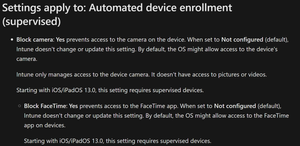
You can manage that with MAM for iOS and Android, but the difference might confuse you. In order to make it work on Android, the Company portal needs to be installed on the device. But there is no need to start the app and enroll. In fact, you could prevent that using enrollment restrictions. For iOS Company Portal is not needed. MAM is your way to go....1.8KViews1like0CommentsRe: Passwordless sign-in for selected users
zsaltzman Your good here. Even when you enable passwordless sign-in, the user can still use their passwords. The note in the documentation only states that the new policy will overrule the PowerShell policy. It does not say that users included in the policy cannot use their password anymore (had to read it twice also ) The enabled users are allowed to activate passwordless sign-on via the Authenticator app(device needs to be registered) Users that are not enabled cannot do that.2.4KViews0likes0CommentsRe: Number added to user email addresses - SharePoint access
pawmo According to the information that you gave, the user account is deleted on-prem and re-created. But, when a cloud account/mailbox is deleted, it is only soft deleted. So the account would still exist for 30 days, and that's why the email address is different. Can you see the deleted account/mailbox under deleted users in the Admin portal?1.1KViews0likes0CommentsRe: Trying to clear Chrome cache and cookies using Intune
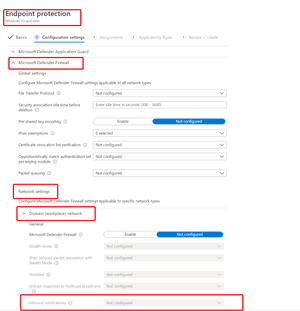
GreenixIT You can make use of the Google Chrome ADMX files and ingest them in Intune (Read more)(ReadMore) The second option would be to create a scheduled task (via PowerShell script or MSI) that kicks off a script that loops through all profiles deleting the cache and cookie folders. (not recommended)14KViews1like0CommentsRe: Keep Log Collector running
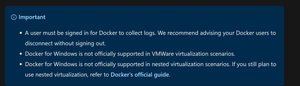
leoschroer not much options here: I would suggest that you add this system to your Tier 1 servers, and not applying any GPO that logs off users from disconnected sessions. It's best to use a dedicated server, with least privileged access, and well-documented procedures.2.6KViews0likes0CommentsRe: Sensitivity Labels Office Web
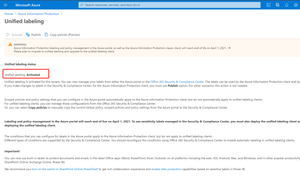
NunoMSilva It is not enabled by default, because this would have an impact on all customers using AIP. The impact is described here. After you enable sensitivity labels for Office files in SharePoint and OneDrive, for new and changed files that have a sensitivity label that applies encryption with a cloud-based key (and doesn't use Double Key Encryption😞 For Word, Excel, and PowerPoint files, SharePoint and OneDrive recognize the label and can now process the contents of the encrypted file. When users download or access these files from SharePoint or OneDrive, the sensitivity label and any encryption settings from the label are enforced and remain with the file, wherever it is stored. Ensure you provide user guidance to use only labels to protect documents. For more information, see Information Rights Management (IRM) options and sensitivity labels. When users upload labeled and encrypted files to SharePoint or OneDrive, they must have at least view rights to those files. For example, they can open the files outside SharePoint. If they don't have this minimum usage right, the upload is successful but the service doesn't recognize the label and can't process the file contents. Use Office on the web (Word, Excel, PowerPoint) to open and edit Office files that have sensitivity labels that apply encryption. The permissions that were assigned with the encryption are enforced. You can also use auto-labeling for these documents. External users can access documents that are labeled with encryption by using guest accounts. For more information, see Support for external users and labeled content. Office 365 eDiscovery supports full-text search for these files and Data Loss Prevention (DLP) policies support content in these files.4.5KViews1like1CommentRe: Email notification to user when new device is enrolled to intune
Roiit Not by default, but you can use Azure Monitor and look for that enrollment event with KQL query. From there you can trigger a logic app to send an email to the user. Here's an example for another use-case, but you'll get the idea.9KViews0likes0Comments
Recent Blog Articles
No content to show