User Profile

Tech_Mike
Brass Contributor
Joined 7 years ago


User Widgets
Recent Discussions
Defender for Office 365 and quarantined objects in shared mailboxes with security groups
Hello everyone, I hope to get a best practice or definitive answer on how to solve my current issue with releasing objects from quarantine. Situation: AD sync to O365 (users, groups, devices), Mailboxes are in Exchange Online (hybrid Exchange for some subsidiaries). Users have M365 E3 + Defender P1 for threat protection. Issue: We have several shared mailboxes, where multiple users have access to. While users can release quarantined objects as long as they have been given full access to the shared mailbox individually, they will receive an error, when I give them access to the mailbox through a synced AD group. Reason for using synced AD groups is the easier management and controlling of access to shared mailboxes. While the access itself works like a charm, and even accessing the quarantine of such shared mailbox, releasing mails doesn´t. User get´s following error: "The operation couldn´t be performed because the user does not have the authorization." Any advice or how are other bigger org´s handling this, maybe I´m totally wrong here? If this is already on Microsofts schedule or backlog, then forgive me, didn´t find anything on this. MichaelSolvedRe: Syncing Issues for specific users when Opening in the Desktop App
rijomapi Hi, the Office Upload Center has been removed and the feature is now integrated in the specific apps e.g. Excel. You´ll find it under "Files needing attention" when you click File > Open and then you will see the button with an exclamation mark. See screenshot attached. If there isn´t such button, try one of the other steps described above. Also try deleting the cache through the GUI of the specific app: File > Options > Save > Cache Settings > "Delete cached files" Button Mike61KViews0likes0CommentsRe: Syncing Issues for specific users when Opening in the Desktop App
Hello Lclift61 I have had such issue with one colleague of mine, always the same Team and the same Excel Sheet and only that particular user. Opening the sheet in the desktop app resulted in showing an older version even though it said it´s up to date and changes are saved. Opening in Teams or Excel web app, revealed that there are newer changes and the desktop app was showing days/week old versions. There are several places to check now, and which I went through to solve it. In my case it was the first option, a pending upload which somehow got stuck. 1. Check if there any pending uploads in the "Upload Center" (little orange icon in the taskbar). Cancel them necessary. 2. Delete local cache files \appdata\local\temp \appdata\local\microsoft\office\unsavedfiles 3. Delete server cache from registry HKEY_CURRENT_USER\Software\Microsoft\Office\16.0\Common\Internet\Server Cache Assuming you´re using current Office 365 installation and everything is updated. Michael EDIT: Office Upload Center has been removed, please see my reply below. Go to reply84KViews1like8CommentsSound from participant is distorted but not when recorded
Hello everyone, I have a really strange issue with the audio output from Teams, with one particular user. Let me explain the whole case.. Sometimes, once a day or even in every meeting after some minutes, or not at all, the sound from one colleague gets immediately distorted. It´s so loud that you need to mute her and it won´t dissapear unless she puts on a wired headset or rejoins the meeting or reboots her brand new ThinkPad T14 (Ryzen5). Now first I thought it was the built-in microphone, as with her headset the sound gets clear immediately. But now comes the really strange part: I recorded the distorted sound from a meeting with her (through Teams recording) to proof the issue for the Lenovo Support. But on that recording you don´t hear any distortion at all. That leads me to think, that it is not an issue of the device, more like the transimission or any automatism/technique that creates that noise. The CQD says that all her calls were in good quality and no values are out of range. I can provide a video and also a report from the CQD of one of the meetings if necessary. Any help greatly appreciated. ps. To double check I will sent her another laptop to try, maybe something is messed up with the user account? pps. I also found one guy on reddit who describes the same issue, but without any further solution. Michael1.8KViews0likes0CommentsRe: IOS mail profiles and conditional access
Hello Jason, you can make the transition smoother with an App configuration policy to pre-configure the Outlook App for the user, so he/she only has to enter the password on first start. When the configuration policy is in place, you can push the Outlook app through company portal app. Just add it to the iOS Apps in Endpoint Manager and set the assignment to "required" to all users or a group. With these two steps can easily deploy Outlook side by side with the native Mail app and witch to ModernAuth. Contacts can be an issue for some people (I have some of them in my org too) but with proper training they will get used to it and maintain their contacts in Outlook. Michael3.7KViews0likes0CommentsiOS Update Policy does not download latest update, but 14.4.
Hi everyone, yesterday created an iOS update policy to enforce the update of our Apple Business Manager enrolled iOS devices to the latest 14.4.2 to apply the emergency update ASAP. We never had an update policy in place for our ABM devices, but I thought that it´s a good time now to do so. So I created the policy, set the version to install to "latest update" at "next check-in" and assigned it to the user group which has got all users with ABM devices. The odd thing now is, that these users can update their device, but after a reboot the iPhone stays on 14.4 and telling the user that there has been an error and you´re using the latest version your administrator approved (or similar wording, as my colleagues use their devices in german). There is no other configuration profile setting restricting the use of this or later versions. So what am I missing here? 🙂 I set the Update Policy manually to 14.4.2 now in order to get these devices update to date, but I´d like to know my mistake. Michael2.6KViews0likes0CommentsRe: Device Diagnostics - MDM (located under device)
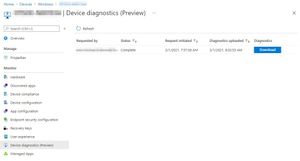
braedachau you can download the diagnostic logs after you initiated them under "Device diagnostics (Preview)" on the left pane when you still have the according device selected. The collection needs only a few minutes and you can check the status in the beforementioned menu. In case you weren´t asking for where to find them, please excuse me, might have misunderstood your post 🙂2.6KViews1like0CommentsRe: iOS Outook sync to Contact app, protection from non managed apps
nirispa Hi nirispa, maybe you can take a look at the discussion here: New contact sync scenario available with Outlook for iOS on enrolled devices - Microsoft Tech Community it´s basically the same requirement from what I understood in your post. Regarding your link to iOS 12.1: The main issue here is even though you can sync from managed (MEM) Outlook to contacts app, once the contacts are synced to the contacts app of iOS they are in an unmanaged app, meaning that you can´t control any further if e.g. WhatsApp gets access to them or not. The second setting just controls, wether unmanaged apps can directly access contacts within a managed app like Outlook, which is not very useful for our case IMHO. Mike12KViews1like1CommentRe: Scan a document or save a picture directly to a Teams folder
Hello TonyYoung you could send reciepts diretly to a Teams channel via E-Mail attachment, all attachments are saved to a folder within the files library in that channel. To get the E-Mail address from a channel, right click it > get email address > send an E-Mail to that channel with an attachment. This mail will show up as a new thread, the attachment is also in there and in the files tab. You could make the channel address available via address book or create a PowerApp/Flow for that, there are several ways to achieve that in the end 🙂 Kind regards Michael30KViews1like1Comment
Recent Blog Articles
No content to show