User Profile

Paul_VC
Iron Contributor
Joined 7 years ago


User Widgets
Recent Discussions
A major step backwards: Classic Outlook vs. New Outlook on changing the "From" sending account
The Issue: In New Outlook, changing the "From" address after you have already started composing an email message opens a new, blank message window, forcing you to copy and paste your original message subject, contents, and attachments. This is an irritating change from Classic Outlook, where you could simply switch the sending account from a dropdown menu while keeping your drafted message fully intact. Expected behavior: When changing the "From" address while composing a mail message, it should simply be updated to the newly selected account, and the body, subject line, and any attachments of the message you are writing at that time should be preserved within the same composition window. The Classic Outlook Way (The Right Way) to Switch the "From" address: For years, my workflow in Classic Outlook has been simple. I click "New Email." The new message window opens, and the "From" field shows the currently selected account. I start writing my message. Then I realize I wanted to send it from another mail account. I click the "From" button, and a dropdown menu appears with all my accounts. I pick the one I want, and I'm good to go. The message content is untouched, it's all still there. Changing the From-address is a two-second action that is intuitive and efficient. The "New Outlook" Way (The Baffling Way) to Switch the "From" address: Now, I try to do the exact same thing in the "New Outlook." I click "New Email." The new message window opens, and the "From" field shows the currently selected account. I start writing my message. Then I realize I wanted to send it from another mail account. I click the "From" button, and a dropdown menu appears with all my accounts. I pick the one I want. But then, after choosing a different From-address, a completely blank new message is opened. And I have to copy/paste everything from the message window I was writing in before to the newly opened message window. So annoying! This feels like a classic case of simplifying the UI to the point where it loses critical functionality. What used to be a simple dropdown selection in Classic Outlook is now an irritating multi-step process in New Outlook. It seems to be an intentional design choice, but it's one that ignores the reality of how users with multiple mail accounts actually work.205Views3likes2CommentsNew Outlook - "Propose new time" option missing for meeting invites to Outlook.com accounts?
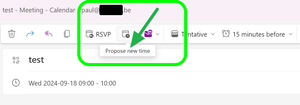
While using New Outlook I've noticed a discrepancy in the functionality of meeting invites between my personal and work email addresses: Personal email (@outlook.com): Meeting invites lack the "Propose new time" option Work email (@company.be): Meeting invites include the "Propose new time" option I've attached two screenshots demonstrating this difference. My hypothesis is that personal Outlook.com accounts may not support the "Propose new time" feature. Alternatively, this could be a bug in New Outlook.311Views0likes0CommentsNew Outlook: how can I send attached files with it, from within File Explorer?
I need to attach files to an email using New Outlook, from within File Explorer. In classic Outlook Desktop, I'd choose the files in File Explorer, right-click them, then select "Show more options", "Send to", "Mail Recipient". However, this doesn't open a message in New Outlook, despite setting it as the default mail handler in Windows 11's System Settings.836Views0likes0CommentsRe: Dev Channel update to 121.0.2248.1 is live
In Microsoft Edge Dev, a peculiar issue occurs when it has multiple tabs open, and its window is positioned so that its right edge touches the right edge of the display. When you click the Close icon located in the top-right corner of the window, an unusual behavior unfolds: the Edge Dev window starts moving gradually towards the left until it stops when it touches the left edge of the display. It's important to note that this behavior is specific to the Edge Dev version and doesn't occur in the release version of Edge. The Edge Dev build I'm using is Version 121.0.2248.1 (Official build), and it's the 64-bit version.3.7KViews0likes1CommentRe: Dev Channel update to 117.0.2007.0 is live
Eric_E I have reported the following via the in-app "Send feedback": Cosmetic bug in Edge Dev 117 version: On the WhatsApp app site (https://web.whatsapp.com/), numerous interface elements are rendered with a white drop shadow outline around them since the update to this browser version. This issue does not occur in either Edge or Chrome browsers. Examples:6.8KViews0likes0CommentsRe: Dev Channel update to 116.0.1938.1 is live
Question: when I click on a link within a website installed as an app, the link opens in the Sidebar instead of in a new browser window. How can I prevent this behavior? I could not find a Setting or a Flag for this. (I prefer such links to open in a new window).602Views1like0CommentsRe: Dev Channel update to 116.0.1938.1 is live
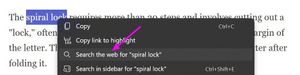
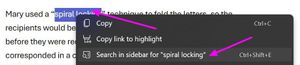
Eric_E Jeremiah-V Another bug which got fixed is that upon selecting text on a web page, we can right-click/search again. Great! Yet this fix was not listed in the announcement above. May I kindly suggest that future announcements provide a full & comprehensive rundown of all the new features and resolved issues? This would be highly appreciated. Thank you.9.8KViews4likes1CommentRe: Dev Channel update to 115.0.1880.1 is live
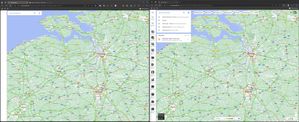
Eric_E This is a problem which appears in Edge Dev, but not in Edge. Google Maps fails to render properly, and also zooming stutters, it's not smooth. In the included screenshot, Edge Dev is on the left, Edge on the right. Notice the incorrect rendering of the left sidebar, and the absence of other UI elements.1.8KViews0likes0CommentsRe: Dev Channel update to 115.0.1880.1 is live
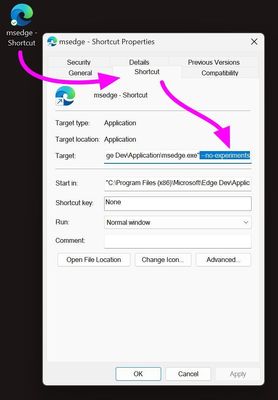
tonyzxcv Your workaround was helpful. Thank you. Steps to apply the workaround: Locate the Edge Dev app, via File Explorer. Create a shortcut to it, on the Desktop. Right-click the shortcut, select Properties. In Properties, go to Shortcut tab. At the end of the Target field, add " --no-experiments". Click OK button to close Properties. Open the Shortcut: Edge Dev will open normally. Go to edge://flags/#edge-enhance-text-contrast Set this flag to "Disabled". Restart Edge Dev.8KViews3likes1CommentRe: Dev Channel update to 115.0.1880.1 is live
Trouble is, Edge Dev "Uninstall" (via Windows/Settings/Add or remove programs) does not work. Nor does "Modify". Furthermore, Edge Dev Uninstall via "Control Panel/Programs and Features" does not work either. It simply hangs, with the Edge Dev icon showing on the Taskbar and nothing else happening.8.5KViews0likes1CommentRe: Dev Channel update to 115.0.1880.1 is live
Same here, crashes to a completely black window and after some seconds it show a background wallpaper video (a video of Mount Fuji, this morning) with a black band on top. Furthermore, Edge Dev "Uninstall" (via Windows/Settings/Add or remove programs) does not work. Nor does "Modify". And Edge Dev Uninstall via the Control Panel/Programs and Features does not work either.8.6KViews1like0CommentsRe: Dev Channel update to 115.0.1843.0 is live
Eric_E What is the keyboard shortcut to "Move tab to new window"? And if there is none yet, could you ask the developers to add one please? Thanks. (Moving tabs to their own browser window is most likely a feature which is more frequently used than some other features which do a have a keyboard shortcut).6.5KViews1like2CommentsRe: Dev Channel update to 114.0.1793.0 is live
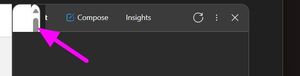
Eric_E The Sidebar rendering artifacts issue, which emerged in the previous version, has not been fixed in this release alas. As you can see in the screenshot below, parts of the scrollbars of the underlying webpage still show through in the top-left of the Sidebar:6.5KViews8likes1Comment
Recent Blog Articles
No content to show