User Profile

FcoManigrasso
Iron Contributor
Joined 7 years ago


User Widgets
Recent Discussions
Re: Issue with retention policy with adaptive scope
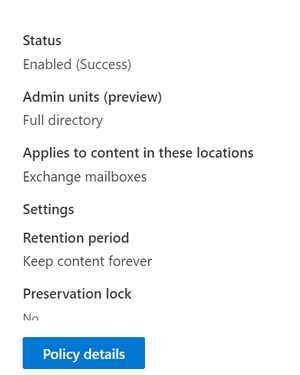
Hi rodoj That´s strange. You may need to open a support case. Do you see al correct in the policy details? When you click on Policy details you should find the "Locations" section. On the other hand, if you know that the scope is working properly, you can identify the mailboxes running something like this, (adapt to your scope): $attribute = "Department" $value = "Sales" Get-Mailbox -Filter "{$attribute -eq '$value'}" | Select-Object DisplayName, PrimarySmtpAddress647Views0likes1CommentRe: Issue with retention policy with adaptive scope
Hi rodoj I guess that you should be able to identify it checking for the mailboxes In-Place holds. Get-Mailbox <username> | Select-Object -ExpandProperty InPlaceHolds To get all organization-wide Microsoft Purview retention policies you can run: Get-OrganizationConfig | FL InPlaceHolds And once you have the GUID, somthing like this should work to get all the mailboxes with that policy applied: Get-mailbox -Resultsize Unlimited | Where {$_.InPlaceHolds -like "*GUID*"} You can get more information here: https://learn.microsoft.com/en-us/purview/ediscovery-identify-a-hold-on-an-exchange-online-mailbox Hope this helps. Have a good day. Best Regards, Francisco Manigrasso.675Views0likes3CommentsRe: Bulk release of Quarantined Messages (PowerShell) and Release Requests
That would be great, but as per now this is only possible with PS. (Or I´m not aware about other possibilities). I guess you should be able to create a query with KQL, but not for release. https://learn.microsoft.com/en-us/graph/api/security-security-runhuntingquery?view=graph-rest-beta&tabs=http Have a great day, BR Francisco Manigrasso.2.6KViews0likes0CommentsScript to rename Distribution groups and change PrimarySMTPAddress in order to keep them as backup
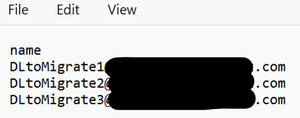
Hello team, Recently I faced a scenario where I needed to recreate several Distribution Groups, (hundreds), avoiding deleting the previous ones to keep them as rollback plan. As you know, if we want to keep the previous ones, we need to change the name, alias ecc in order to have those available for the new ones. So, I prepared this script for the task and share it here as maybe can be useful for some of you. What do you need? A single column csv file, with "name" as header, and listed all the DGs addresses. The script will go through all of them, adding "OLD_" in front of the name, displayname and alias. It will also add the modified alias as the PrimarySMTPAddress and will remove the previous one. Find the script below. NOTE: Remember to edit your csv file path and file name, the domain for your desired addresses and the prefix for your renamed groups. (If you don´t want to use "OLD_" you can simply change that for something that you prefer). # Connect to Exchange Online Connect-ExchangeOnline # Import CSV file $csvPath = "C:\temp\RenameDLs10042024.csv" $groups = Import-Csv -Path $csvPath foreach ($group in $groups) { $groupName = $group.Name # Get the distribution group $distributionGroup = Get-DistributionGroup -Identity $groupName if ($distributionGroup) { # Modify the properties $newName = "OLD_" + $distributionGroup.Name $newDisplayName = "OLD_" + $distributionGroup.DisplayName $newAlias = "OLD_" + $distributionGroup.Alias Set-DistributionGroup -Identity $groupName -Name $newName -DisplayName $newDisplayName -Alias $newAlias # Set the new alias as primary SMTP address Set-DistributionGroup -Identity $newName -PrimarySmtpAddress "$email address removed for privacy reasons" # Delete the previous primary SMTP address $primarySMTP = $distributionGroup.PrimarySmtpAddress Set-DistributionGroup -Identity $newName -EmailAddresses @{Remove="$primarySMTP"} Write-Host "Distribution group '$groupName' updated with new properties." } else { Write-Host "Distribution group '$groupName' not found." } } As usual, even if I tested it and works well for me, please test it first of running it in your PROD environment. Cheers.744Views1like0CommentsGet Delve skills with MgGraph PowerShell
Today I was asked to get a report for the Users skills published in Delve. It took a while to figure out how to do it, but finally it's really easy with MgGraph. See the commands below: - First we need to install the Beta People Module Install-Module Microsoft.Graph.Beta.People - Then import the module Import-Module Microsoft.Graph.Beta.People - The connection should use the scope User.Read.All Connect-MgGraph -Scopes User.Read.All - Then you can use the following command to get the required information Get-MgBetaUserProfileSkill -UserId <user email address> The output isn´t as clean as desired: So, after a pipe FL I found what I really need, the Skill Display Name: Get-MgBetaUserProfileSkill -UserId <user email address> | fl displayname An this is the output: Here you can find more information about this Beta commands and also much more possibilities of getting users information. Very useful: https://learn.microsoft.com/en-us/graph/api/profile-list-skills?view=graph-rest-beta&tabs=http976Views0likes0CommentsRe: Block users from creating Public Microsoft Teams groups
Hi NunoMota705, First of all, sorry for my late reply. Sounds strange to me that you can´t reproduce the label policy... I'll test it again to see if something changed. The only thing that comes to my mind right now is a licensing issue. (Maybe the license isn´t compatible or MS changed something and now Teams Premium is required, as they moved some features to Teams Premium ).12KViews0likes0CommentsRe: Get permissions for all folders in a mailbox: PS
Hi Thiraviam5316, Sure, that's the standard cmdlt for a folder permission. My post talks about a complete report with all the folders and excluding the system permission ones. Take a look to my script or the one that Andres Bohren shared, those are very useful for such activities. Anyway, thanks for the clarification 🙂 Have a good day.8.3KViews1like0CommentsRe: How to make Outlook reminder window pops up on top of other windows?
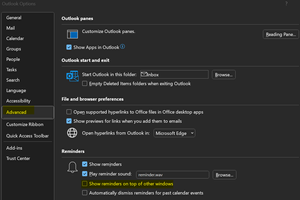
Hello BlackMiracle, You should be bale to do it from "File - Options - Advanced" and mark "Show reminders on top of other windows". Find also more reminders configuration options in the following article: https://support.microsoft.com/en-gb/office/set-or-remove-reminders-7a992377-ca93-4ddd-a711-851ef3597925#ID0EBD=New_Outlook Hope this helps 🙂 Have a good day.56KViews2likes3CommentsAdd users with the same Manager and mail domain to a DL, ( No dynamic ), with PS
Hello Community, Recently I got a special request. A script that adds new joiners, ( or users that changed department/office ), that are all under the same Manager to a Distribution List. The standard will be think about a dynamic DL, but in that specific environment wasn't an option, ( Manager isn't eligible and not all users with the same manager have other atrtibutes in common. Custom attributes, due the process of users creation, wasn't an option as well ). On the other hand, in this environment there're many users with different domains and they wanted only one specific domain users. So, I created a script that connects to MgGraph and Exchange Online, ( you can modify it to connect to Exchange OnPrem for hybrid scenarios ), that collects all users reporting to the required manager, ( you'll need the Manager ObjectId ), filters the list for users with the desired domain and add them to the DL if they're not already members. NOTE: This is a personal script, tested by me and working in my environment. Please test it and adapt it as per your requirements. # Connect to Microsoft Graph Write-host "Connecting to Microsoft Graph..." -ForegroundColor "Yellow" Connect-MgGraph -Scopes "User.Read.All","Directory.Read.All" # Connect to Exchange Write-host "Connecting to Exchange..." -ForegroundColor "Yellow" Connect-ExchangeOnline # Get Manager's Direct Reports Write-host "Getting users with Manager Name as Manager..." -ForeGroundColor 'Yellow' $DirectReport=Get-MgUserDirectReport -UserId a8691c6b-User-Object-ID-fc1503f573e1 | select Id # Filter Direct Reports for domain.com users only Write-host "Filtering domain.com accounts..." -ForegroundColor 'Yellow' foreach ($Id in $DirectReport){ $Users=Get-MgUser -UserId $Id.Id | Where-Object {$_.Mail -like '*@domain.com'} | Select-Object Mail # Check for Group Membership Write-host "Checking Group Membership..." -ForegroundColor 'Yellow' $GroupName="TestGraphDL" $DL=Get-DistributionGroupMember -Identity $GroupName | Select PrimarySmtpAddress foreach ($Mail in $Users){ if ($DL.PrimarySmtpAddress -notcontains $Mail.Mail) { #Add Users to the DL Write-Host "Adding users to the DL..." -ForegroundColor "Yellow" Add-DistributionGroupMember -Identity $GroupName -Member $Mail.Mail -BypassSecurityGroupManagerCheck} } } Write-host "Script completed successfully" -ForegroundColor "Green"Re: Export all images from Teams Comments within a channel
Hi jshaunBTC, Maybe you need to give it a try wit PS and use the -AllowNotFoundExchangeLocationsEnabled parameter. As the Teams channel is not a regular mailbox. https://learn.microsoft.com/en-us/powershell/module/exchange/new-compliancesearch?view=exchange-ps I'll try to test it as well next week and see if it works. Wish you a good day.10KViews0likes4CommentsRe: Outlook email account Disconnected
Hi CrazyKZ, Default folder names, like contacts, cannot be modified, ( technically it's possible with MFCMAPI, but it's a high technical procedure not recommended for non tech professionals ). I would suggest to create a custom one, and move there all the desired contacts, ( you can select all or many of them and move in one step ). https://support.microsoft.com/en-au/office/create-address-book-41d343c2-0508-45fe-b6f4-a0294bfe3da09.2KViews0likes0CommentsRe: Quarantine Messages, Transport rules, Security and Compliance
Hi Robert Bollinger, From my perspective you're already in the correct way. There's no other way, ( that I know ), to achieve this task and the limit of 1000 per run makes sense in order to not interfer with the EXO delivering limits. https://learn.microsoft.com/en-us/office365/servicedescriptions/exchange-online-service-description/exchange-online-limits1.5KViews0likes1CommentRe: Export all images from Teams Comments within a channel
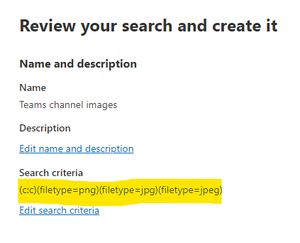
Hello jshaunBTC, Images sent in a channel chat in teams are stored in the teams mailbox. To export all those images I would suggest to perform a content search from https://compliance.microsoft.com/ ( Content Search - New Search ). Choose Exchange location and select the teams mailbox. ( To get the Temas mailbox, click on the 3 dots at the right side from the channel name and select "Get email address" ). In order to filter only the desired content, I would suggest to use the "file type" search filter. Hope this helps!10KViews0likes8CommentsRe: Powerpoint App won't open on Mac
Hello CarolSatt, Unfortunately that kind of issues are usual for some MAC users. Please try to follow this troubleshooting steps, ( one by one ), and test after each step if the issue is solved. Hope this helps! https://learn.microsoft.com/en-us/office/troubleshoot/powerpoint/fails-starting-powerpoint-mac618Views0likes0CommentsRe: Outlook email account Disconnected
Hi CrazyKZ, If I understood correctly, you have the contacts but those are not shown by default when you create a new email message. If this is the scenario, please follow the steps described in this article in order to set your contacts as the default address list: https://support.microsoft.com/en-au/office/change-default-address-book-53b3ce7a-9d35-4e27-9e37-57979778fe5b9.1KViews0likes2CommentsRe: move emails to archive and prevent deletion
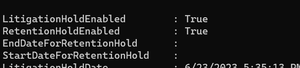
Hi nadsurf93, If you disable the retention hold, ( not the litigation hold ), MRM should be able to archive all the old staff and litigation will still keep in place. Let me suggest to run this cmdlts: Get-mailbox UserMailboxName | fl *hold* Look at the retention and litigation outputs for that account: If RetentionHoldEnabled is true, run: Set-Mailbox UserMailboxName -RetentionHoldEnabled $false Then it should look like this: Then MRM should work as expected. It will run automatically after some day, but you can force it with the cmdlt: Start-ManagedFolderAssistant MailboxUserName1.1KViews0likes1CommentRe: Outlook email account Disconnected
Hi CrazyKZ, Great that you were able to setup your accounts correctly! Happy to help 🙂 Regarding the address book, it depends of the account that you're using. Outlook will take the address book from the account in use at that moment. On the left side of your client, you should see your mail accounts and mail folders, ( depending of your view configurations ). If you go to the inbox, ( or any other folder ), of account "A", your sender address and address book will be the one from account "A". But if you´re placed on account "B", both sender address and address book will be from account "B".230KViews0likes4Comments


Recent Blog Articles
No content to show