User Profile

PS83Tech
Brass Contributor
Joined 7 years ago


User Widgets
Recent Discussions
Re: New copilot app can't switch from work to personal account
boomanbb Same here. It did work fine initially when I first installed it on my PC and used my personal MS account, but then I thought since my MS work account has a premium copilot license, I'll try that account to see if it had any enhanced features. Since then, I have not been able to get it to work with my personal account on my PC. Works fine on my iPhone. Let me know if you find a solution.16KViews0likes0CommentsNew copilot app can't switch from work to personal account
I installed the app from the Windows 11 store yesterday, and it was working fine just like it did on my mobile app. I made sure I signed in with my personal Microsoft account on both. Today, when I attempted to use it again on my Windows 11 PC, it seems like it signed in with my work account and no matter how many times I sign out and back in with my personal account it keeps displaying "It looks like you're signed in with your work account". I've terminated the app, uninstalled it, not sure what else to do? It is signed in with my personal account now but still not working.Solved30KViews17likes47CommentsRe: 365 whitelist from being quarantined as malware
That only works for spam/phishing emails, not malware as mentioned in the blue box in that link "Important Messages that are identified as malware* or high confidence phishing are always quarantined, regardless of the safe sender list option that you use. For more information, see Secure by default in Office 365."1.1KViews0likes0Comments365 whitelist from being quarantined as malware
Greetings. I am looking for some assistance with allowing a few specific external senders as their emails keep getting blocked in quarantine as “Malware” and these senders are already allowed in the anti-spam policy. When I release the email to the intended recipient, I do report the message to MS for a false positive and wait for 30 days, but it is not effective. Just today, I had to send email from one sender three times. I have tried creating a transport rule, but the only option there is to skip spam filtering, but there is nothing to skip malware detection. How can I allow a sender so that no emails from them get blocked in quarantine due to malware?1.4KViews0likes3Commentsazcopy.exe. vs uploading via Azure Storage Explorer?
When using the network upload methodology to push PSTs into 365 for a cutover migration, it seems like we can skip using the azcopy.exe cmd tool and just jump right to using the Azure storage explorer tool to both upload the PSTs and verify that they’ve been upload right? https://docs.microsoft.com/en-us/microsoft-365/compliance/use-network-upload-to-import-pst-files?view=o365-worldwide#:~:text=Each%20time%20you%20run%20the,no%20larger%20than%2020%20GB. Also, pre-migration, If run the local auto-archive function to trim the PST do I also need to run the compact to shrink it?763Views0likes0CommentsSecurity defaults Microsoft authenticator only
I’ve setup a new tenant in 365 that’s using security defaults and when a user attempts to login it displays the warning that they need to setup MFA in 14 days which is find but it only gives them the option to use Microsoft Authenticator or another authentication app. For my other 365 tenants it used to give the option to use either an authentication app, SMS, or phone call verification. Can I adjust the security defaults to allow SMS or what would I need to change to give my users that option?1.3KViews0likes1CommentPS command to list sahred mailbox + distro list membership for specific user
I’m looking a for a powershell command I can run to get a list of all the distro groups and shared mailboxes a specific user is a member of, but I cannot seem to find one that would do that. I know I can run a command on a specific shared mailbox to get a list of members but when I have to setup a new user and give him/her the same access as someone else it would be more efficient to run a command that can show me what User A's memberships are so I can give them to User B1.1KViews0likes1CommentRe: ATP licenses for shared mailboxes?
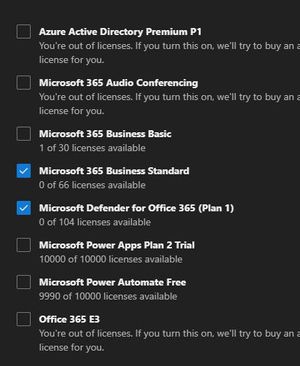
PascalDBX It's a bit confusing. Let's say Bob leaves the company. Prior to leaving, he had a 365 business standard license + Defender license. We convert his mailbox to a shared mailbox and give access to it to another user. Since it's been converted to shared, we don't need to apply the 365 Business Standard license to his user account but do we need to leave the defender license? I'm asking because if you create a fresh shared mailbox, there are no options to apply a license14KViews0likes3Comments

Recent Blog Articles
No content to show