User Profile

rw1234
Brass Contributor
Joined 7 years ago


User Widgets
Recent Discussions
Re: Dev channel update to 80.0.334.2 is live
josh_bodner Another update, still NO scrolling fixes even a week after scrolling issues were said to be addressed. Please... just directly translate the ENTIRE scrolling and zooming behaviour from the Classic MS Edge/UWP source code... To make Classic Edge, how did Microsoft take the Win32-centric Internet Explorer and make the scrolling actually better than every other browser including Safari on iOS (the OS where today's touch scrolling experience originated)? You need to do the same for Edge Chromium. In part due to Chromium's weird relationship with Win32 and half-hearted attempts to make Chromium's UI platform-agnostic, it has various rendering issues everywhere across the UI (e.g. tooltips were previously rendering with incomplete borders, or the still longstanding issue of the address toolbar having a 2px grey bottom border on HiDPI screens when maximised but not when minimised). I believe these also affect the scrolling behaviour. Why is Internet Explorer Mode scrolling and zooming 60 FPS within Chromium Edge but Chromium Edge's own scrolling/zooming behaviour terrible in comparison? I will upload a video comparison of Edge Chromium and Classic Edge/IE Mode rendering and scrolling behaviour later/tomorrow. THREAD about what needs to be done: https://techcommunity.microsoft.com/t5/Discussions/What-needs-to-be-done-to-improve-scrolling-and-zooming-in-Edge/m-p/994000 Please make it a priority to: Make scrolling 60+ FPS as you managed to do for Classic Edge (despite being based on Internet Explorer). Chromium Edge LAGS noticeably in comparison. Fix the scroll arrows. They are Windows 7 style on Windows 10. Make 2 finger scrolling bounce within HTML "div", "input" elements. Not only the main browsing area as is presently the case. Make 2 finger pinch zooming bounce in the main content area when reaching zooming in/out limits. If needed I will even work for free to be your scrolling QA Lead... The quality of scrolling in Chromium Edge, in most if not all areas, is unacceptable. You could make even Internet Explorer's scrolling/zooming perfect. You can do it for Chromium Edge....18KViews10likes0CommentsRe: What needs to be done to improve scrolling and zooming in Edge (Chromium)?
rw1234 For anyone interested, Edge Chromium's IE Mode's scrolling and zooming behaviour is actually better than Edge Chromium's behaviour itself. It begs the questions: how did Microsoft take the ancient Internet Explorer and make its scrolling/zooming better than on any other platform and why can't Chromium Edge's scrolling/zooming behaviour be just as good? To test IE Mode easily, Enable IE Mode in edge://flags and also make a shortcut to Chromium Edge with the command line flags "-ie-mode-test". Open the shortcut then click the '...' menu in Edge > More Tools > Open Sites in Internet Explorer mode. Note the difference when scrolling the main content area and within HTML "div"/"input" elements, and note the difference when zooming fully in/out (the "bounce" animated feedback). Please note that this method is unsupported and should only be used for testing.7.2KViews1like0CommentsWhat needs to be done to improve scrolling and zooming in Edge (Chromium)?
One of the top reasons many of us Edge fans love Classic MS Edge is its perfect scrolling experience on multi-touch trackpads and screens. It's so smooth (50+ FPS on lower-end hardware), it 'feels' like a premium, polished experience you'd get on e.g. an iPad or macOS and it makes work more intuitive and fun. It's so much better to be able to flick the trackpad on my laptop and have Edge and webpages jump to where I want them to be (based accurately on my motion) and it helps me read faster. But... I've been testing Chromium Edge since March this year and while I've been excited with the many new possibilities and features brought along the way, I have been disappointed with the scrolling experience. Scrolling improvements have been at the top of the Top Feedback list since July but with each passing month, that gets pushed forward. I worry that not enough attention is being given to this area and the scrolling experience won't be optimal upon release in January 2020 (2 months away). I want to open discussion around scrolling areas for improvement in Edge (Chromium). Here is what I see needs improvement: General scrolling is still too jittery/laggy in comparison to Classic Edge. HTML "div" elements and input elements do not have the entire "Microsoft Edge scrolling personality" that is enabled elsewhere in the browser (edge://flags/#edge-experimental-scrolling), meaning no over-scrolling bounce animation and these elements lack smoothness when scrolling. This makes Chromium Edge inconsistent with itself, inconsistent with Classic Edge and inconsistent with the host OSes (Windows 10, Windows 8, and macOS). This will also cause WebView2 apps and Progressive Web Apps to behave inconsistently with other apps that are supposed to have a 'modern'/'native' experience. Zooming in and out does not bounce/animate or feel smooth when reaching limits as in Classic Edge, leading to same inconsistencies as mentioned above. When running on Windows 10, the scrollbar arrows are still the ones from Windows 7. To conclude, most important to fix are the jittery scrolling and no scrolling/zooming animations. As mentioned before, these are necessary modern usability enhancements that improve workflow and make the Microsoft experience a great one. I also want to ask everyone here with a multi-touch trackpad or touch screen, what are your thoughts on scrolling in Chromium Edge and what should be done to improve it? Cheers7.5KViews6likes5CommentsRe: Dev channel update to 80.0.320.3 is live
josh_bodner Please make Chromium Edge scrolling the exact same as Classic Edge scrolling on multi-touch trackpad and touchscreen devices. Areas for improvement: HTML "div" elements do not have the entire "Microsoft Edge scrolling personality" that has been enabled elsewhere in the browser. Meaning no over-scrolling bounce animation and also lacks smoothness. Zooming in and out does not bounce/animate when reaching limit as in Classic Edge. When running on Windows 10, the scrollbar arrows are still the ones from Windows 7. General scrolling is still too jittery in comparison to Classic Edge. (And yes, these actually are deal breakers for me when it comes to using Chromium Edge instead of Classic Edge)20KViews5likes0CommentsRe: Top feedback summary for October 29
I'm glad scrolling now seems to be an area of attention, I look forward to the improvements. Hopefully they will appear early in November. It's been too long!! I know I keep harping on about specific scrolling issues to be fixed, but please be sure to fix scrolling inconsistencies where: 1. Make scrollable HTML elements (e.g. <div>s with scrollbars) bounce on reaching scroll limit on multitouch trackpad/touchscreen devices. This already applies to main content area, why not scrollable sub-content? 2. Fix scrollbar arrows. They are currently Windows 7 style, not Windows 10 style. 3. Make scrolling buttery-smooth like Classic Edge. Classic Edge has absolutely the best scrolling experience out of platforms. The scrolling in Chromium Edge still has noticeable jumpiness when compared to Classic Edge on same device. (7th Gen Core i3 2.71Ghz, Intel HD Graphics 620). Especially w/ regard to the scrollable sub-elements, the scrolling behaviour on multitouch devices is inconsistent with Windows 10 UWP apps, Windows 8 apps, macOS, Classic Edge and even Chromium Edge itself. Please make it perfect!!! If the scrolling behaviour isn't fixed, Progressive Web Apps (e.g. Spotify Web Player) and any apps that make use of WebView2 will seem poorly done/inconsistent.6.3KViews1like0CommentsRe: Dev channel update to 79.0.308.1 is live
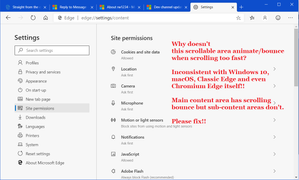
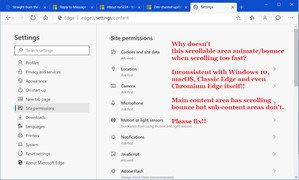
josh_bodner Thank you for fixing the tooltip border issue. Please, please, please(!) fix the inconsistent scrolling behaviour where: Laptop multi-touch touchpad 2-finger scrolling/fling not as smooth in Chromium Edge as in Classic Edge. Multi-touch touchpad scrolling animations (e.g. rubber band/bounce) apply to main content area but not scrollable HTML elements. This is inconsistent with Windows 10, macOS, Classic Edge and Chromium Edge itself (main content area has this behaviour but not sub-content areas) and will also present as inconsistency in apps where WebView2 is used. It also makes Progressive Web Apps like Spotify act inconsistently with other modern apps. Multi-touch zooming animations (e.g. feedback bounce) don't occur when zooming too far in/out. Again, inconsistent with Windows 10, macOS, Classic Edge and also inconsistent with other Microsoft apps where "content is king" such as Photos, Mail and the modern Print dialog Shock/horror: Scrolling arrows in Chromium Edge are the ones from Windows 7!! Not using the native arrows/icons from the OS. Notepad (e.g.) and almost every other app uses the correct ones from the host OS. I'd love to use Chromium Edge as my main browser but until these issues are fixed I will likely keep using Classic Edge as long as possible because the high level of polish makes my Windows laptop feel like a premium experience, regardless if other browsers are getting faster and gaining other improvements. Pictures:19KViews3likes3CommentsRe: Top feedback summary for October 22
David Rubino Edge is getting closer to public release. Scrolling fixes have been waiting on the feedback list for 9 weeks!! Please fix the longstanding inconsistent scrolling behaviour where: Laptop multi-touch touchpad 2-finger scrolling/fling not as smooth in Chromium Edge as in Classic Edge. Multi-touch touchpad scrolling animations (e.g. rubber band/bounce) apply to main content area but not scrollable HTML elements. This is inconsistent with Windows 10, macOS, Classic Edge and Chromium Edge itself (main content area has this behaviour but not sub-content areas) and will also present as inconsistency in apps where WebView2 is used. It also makes Progressive Web Apps like Spotify act inconsistently with other modern apps. Multi-touch zooming animations (e.g. feedback bounce) don't occur when zooming too far in/out. Again, inconsistent with Windows 10, macOS, Classic Edge and also inconsistent with other Microsoft apps where "content is king" such as Photos, Mail and the modern Print dialog Shock/horror: Scrolling arrows in Chromium Edge are the ones from Windows 7!! Not using the native arrows/icons from the OS. Notepad (e.g.) and almost every other app uses the correct ones from the host OS. I really really want to use Chromium Edge as my main browser but until these issues are fixed I'll likely keep using Classic Edge as long as possible because the high level of polish makes my Windows laptop feel like a premium experience, regardless if other browsers are getting faster and gaining other improvements. Pictures:8.2KViews4likes0CommentsRe: Dev channel update to 79.0.301.2 is live
josh_bodner The perfect scrolling experience is what separates Classic MS Edge from every other browser, including the new Chromium Edge. The only things keeping me using Classic MS Edge as my main browser are: Laptop multi-touch touchpad 2-finger scrolling/fling not as smooth in Chromium Edge as in Classic Edge. Multi-touch touchpad scrolling animations (e.g. rubber band/bounce) apply to main content area but not scrollable HTML elements. To see what I mean, try touchpad scrolling in Settings -> Site permissions on the right hand side, or other places such as the main content area in Spotify web app, or the left navigation pane on docs.microsoft.com pages (e.g. https://docs.microsoft.com/en-us/windows/win32/api/unknwn/nf-unknwn-iunknown-addref) . No scrolling bounce when reaching the end of scrollable content. Multi-touch zooming animations (e.g. feedback bounce) don't occur when zooming too far in/out. Tooltips in whole browser (which are no longer rendered via comctl32.dll in Google Chrome and Chromium Edge) aren't rendered correctly on HiDPI displays. Sometimes the border lines are wrong colour or missing completely. This is a longstanding issue, please fix. When favourites bar is disabled, the address bar has an annoying black line as a border. This was previously a 2px grey line. The line should be 1px grey as in Classic Edge. There is no option to set window frame colour to grey/dark grey/translucent (i.e. as UWP apps look). Please fix these. I've been testing Chromium Edge for months and most of these issues have been present but have never been addressed. I'd love to use Chromium Edge as my main browser but until these issues are fixed I will likely keep using Classic Edge as long as possible because the high level of polish makes my Windows laptop feel like a premium experience, regardless if other browsers are getting faster and gaining other improvements.19KViews4likes1Comment
Recent Blog Articles
No content to show