User Profile

jensjakobsen1966
Brass Contributor
Joined 7 years ago


User Widgets
Recent Discussions
SharePoint Lists do not accept date format from date picker (punctuation vs. dash as delimiter)
Hi All I have an odd scenario. I have a MS Lists, where I have a date column with a date picker, Whenever I use the date picker to chose a new date e.g. 10th July 2022, it suggests 10.07.2022 (punctuation between digits) (info: order of DD-MM-YYYY is a Danish date format). Validation of the entered date suggests I use the format MM/DD/YYYY (forward slash between digits), while the previously entered date have the format of DD-MM-YYYY (dash between digits). I want the date format to be the same as already entered values in the SharePoint List (dash between digits and DD-MM-YYYY). How do I prevent the date picker for suggest punctuation between digits (DD.MM.YYYY)? Please see screenshot.4.2KViews1like5CommentsRe: How to populate the TITLE column (via Power Automate?)
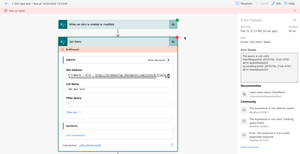
DhirenMehtaMSFT - thank you. Can we take it a step further, please? Some of my users will populate data directly from SharePoint, and others will do so from a PowerApp. So in my view, I believe I need to make a Power Automate flow. How would that look like? I've tried to build one, but I get an error on the GET ITEMS, that fails. I've provided 2 screendumps: 1. The error, and the error description. 2. My attempt at the Power Automate flow26KViews0likes4CommentsHow to populate the TITLE column (via Power Automate?)
Hi I have made a SharePoint list. I really have no use for the TITLE field, as all of my other fields in that lists are getting values from a lot of dropdown values (lookup columns). I need to populate the TITLE field with the value from e.g. another column that I called SWIMMER. As far as I know, the TITLE column cannot get values from a lookup field by switching the default value from TEXT to CALCULATED VALUE option. If it's possible, then how do I do it? If it's not possible, I guess I need to create a Power Automate workflow, which will copy the value from the SWIMMER field into the TITLE field? Any help is appreciated. Thanks.30KViews0likes10CommentsWhen you don't need the TITLE column
Hi All When building SharePoint lists, I rarely need the TITLE column. When I do need the TITLE column, I would like, if it could show me a calculated value, more specifically values from 2 different LOOKUP columns. Lookup columns for the seems to be a dealbreaker for calculation based on other columns? Or have I missed something?675Views0likes0CommentsRe: Lookup field in PowerApps to another SharePoint lookup field
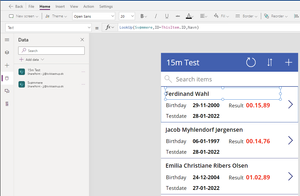
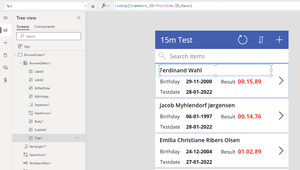
RobElliott, thank you for taking time to help! The error I tried to describe, is on the "BrowseScreen1", the very first pageview of the data. I have added a screenshot to explain the best I can. The syntax I use (to try and) reference the swimmers name is: LookUp(Svømmere,ID=ThisItem.ID,Navn) I did add another datasource (before I posted the first post) - this means that I have a datasource for both of the lists.Re: Date calculation on SharePoint lists between today and a birthdate
RobElliott - thank you for revisiting this subject. I totally agree with you, and I struggle to explain the error. Can it be something to do with the regional setting for the SharePoint? I've uploaded my settings, if this can shed any light. Don't do anything, please, I'm happy to use it, even though my results differ a bit.9.5KViews0likes0CommentsRe: Powershell bulk creation - error with UserPrincipalName
Harm_Veenstra I used the script: Import-Csv -Path "C:\Users\Jens Jakobsen\users.csv" | ForEach {New-MsolUser -DisplayName $_.DisplayName -FirstName $_.FirstName -LastName $_.LastName -UserPrincipalName $_.UserPrincipalName -UsageLocation $_.UsageLocation -LicenseAssignment $_.AccountSkuId} | Export-Csv -Path "C:\Users\Jens Jakobsen\Results.csv" I received the error: New-MsolUser : You must provide a required property: Parameter name: UserPrincipalName At line:1 char:64 + ... | ForEach {New-MsolUser -DisplayName $_.DisplayName -FirstName $_.Fi ... + ~~~~~~~~~~~~~~~~~~~~~~~~~~~~~~~~~~~~~~~~~~~~~~~~~~~~~~~~~ + CategoryInfo : OperationStopped: (:) [New-MsolUser], MicrosoftOnlineException + FullyQualifiedErrorId : Microsoft.Online.Administration.Automation.RequiredPropertyNotSetException,Microsoft.Online.Administration.Automation.NewUser New-MsolUser : You must provide a required property: Parameter name: UserPrincipalName At line:1 char:64 + ... | ForEach {New-MsolUser -DisplayName $_.DisplayName -FirstName $_.Fi ... + ~~~~~~~~~~~~~~~~~~~~~~~~~~~~~~~~~~~~~~~~~~~~~~~~~~~~~~~~~ + CategoryInfo : OperationStopped: (:) [New-MsolUser], MicrosoftOnlineException + FullyQualifiedErrorId : Microsoft.Online.Administration.Automation.RequiredPropertyNotSetException,Microsoft.Online.Administration.Automation.NewUser The domain has been accepted (see screendump). It's really weird, and any help is welcome. Thanks.3.4KViews0likes3CommentsRe: Date calculation on SharePoint lists between today and a birthdate
Hi again RobElliott - I believe there's an error. And I'm sorry to bother you again. Whenever a person has his/hers birthday within January to July, the formula will round up the age, even though the person has not yet had their birthday.9.9KViews0likes3CommentsLookup field in PowerApps to another SharePoint lookup field
Hi I have 2 SharePoint lists: 15 meters test - a list where I store test results Swimmers - a list where I store swimmers names, age, and other basic info From list no 1: 15 meters test I use a dropdown called SWIMMERS to chose swimmers from list no. 2 Swimmers. This will save me the time and avoid spelling errors for each recorded test result. I've made a PowerApp based on Sharepoint. My problem is that PowerApps - for some reason - won't suggest or display values if I reference the column called SWIMMERS from list no. 1. So: ThisItem.Swimmers shows nothing. I'm beginning to realize that this might be a limitation within PowerApps? How can I show my swimmers name? Thanks.Re: Powershell bulk creation - error with UserPrincipalName
Hello Harm The example email you used has been removed by the editor. You have to use the syntax, as I did in my first question. I tried a one-liner, with no CSV file, and it worked like a charm. Below is the one-liner I used: New-MsolUser -DisplayName "Lars Larsen" -FirstName Lars -LastName Larsen -UserPrincipalNamelars . larsen @ DOMAIN . dk -UsageLocation DK -LicenseAssignment kvikkastrup:STANDARDPACK3.4KViews0likes5CommentsDate calculation on SharePoint lists between today and a birthdate
Hi I've tried to calculate the age of a person based on 2 columns (NO success at all) on a SharePoint list. Therefore I need help, from the ground: Birthday column is a DATE column Today's date - how do I create that? Age in years (no decimals) between column 1 and 2 - what column type and calculation should I use? Thanks.Solved11KViews0likes11CommentsPowershell bulk creation - error with UserPrincipalName
Hi I use a simple script (and it works) to bulk create new users on my M365 tenant (cloud based only). When I set the UserPrincipalName to e.g. [jan . jensen @ DOMAIN . onmicrosoft . com] it works (disregard the spaces, if I didn't use spaces in the example, the email gets removed by the editor). When I set the UserPrincipalName to e.g. [mailto:Email address removeddk] it doesn't work. I'm missing something here, because, I assumed that the UserPrincipalName also could be the new email address. What do I need to in order to also create a valid email address as well? Below is the online script, and the CSV file it references. Import-Csv -Path "C:\Users\Jens Jakobsen\users.csv" | ForEach {New-MsolUser -DisplayName $_.DisplayName -FirstName $_.FirstName -LastName $_.LastName -UserPrincipalName $_.UserPrincipalName -UsageLocation $_.UsageLocation -LicenseAssignment $_.AccountSkuId} | Export-Csv -Path "C:\Users\Jens Jakobsen\Results.csv" Thanks.Solved3.7KViews0likes7Comments- 164KViews1like0Comments
Recent Blog Articles
No content to show