User Profile

NicoRotaryCH
Copper Contributor
Joined 7 years ago


User Widgets
Recent Discussions
Re: WHO released emails from quarantine?
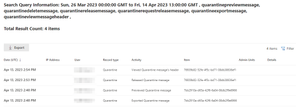
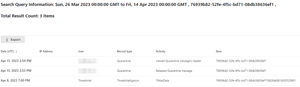
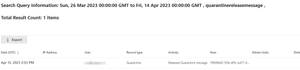
elieelkarkafi OK I did some more testing. I used the Network message ID as keyword search for both the message I released... ... and the message that was released for unknown reasons: Unfortunately I can find any release information in the audit log. FYI the details of the message: Do you have any more ideas? Otherwise I will open a ticket. Thank you!11KViews0likes4CommentsRe: WHO released emails from quarantine?
elieelkarkafi Thank you very much! Unfortunately this only help to some extent: I ran both classic and regular searches but they only generated one result. This is not one of the three messages but a release I did for testing purposes. So the three messages released are not on the list!11KViews0likes0CommentsThreat Management - Messages submitted for review still considered Phishing after review?
Hi I have two legitimate message from sender at the largest Swiss ISP bluewin.ch that are considered "High Confidence Phish" and where thus quarantined. I reported them as wrongly quarantined but the status is "Should have been blocked. Use your organizational settings to allow similar messages in the future." After manual checking the messages I couldn't find any reason why those messages should be considered phishing. (Looking at one message I see: SPF pass, conversation between a group of people (multiple previous messages), no links where URL and text would contradict - the only issue are some embedded pictures (cid:image...@...) not being shown because one email client in the "chain" probably wasn't Outlook-compatible) This creates a real problem for our organization because users have no option to realize that they have missed messages. I want to avoid to modify filters and wonder what steps you recommend. Thank youSolved4.9KViews2likes3CommentsBug: Issues when receiving two messages with same message id
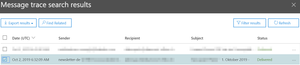
The following lines are based on findings in Ticket 16988032: A message is sent from a third party to two so called mail lists (Mailman; allowing the multiplication of the message). In a first step the two mail lists are merely the recipients of the same message. Once the message arrives at the two mail lists, a process of “moderation” (where someone has to approve the message being sent out to many parties) is being started. When the moderator approves the message it’s sent to all members (recipients) of the mail list. If someone is a member on both mail lists, he or she will only receive the message once even tough the messages (in our case) have different senders, subjects and are sent to the Exchange environment at different times (see also Bug 2). Bug 1: Even tough (as per Design, see Bug 2) the message is only delivered once to the Inbox, the Message Trace Utility suggests in parts the second message has been delivered too (the message the lower end of the screenshot is marked Delivered): This is especially annoying because the detail view contradicts (but is correct): --> Message Trace must display that the 2nd message was dropped because of Bug 2 Bug 2: The Exchange Server, as I have been informed, uses the Message ID and the Sent Date/Time to decide if a message was processed before to avoid duplicates in the mailbox. This not only leads to issues like this, where two quite similar messages (same content but different Senders and Subject because modified during the moderation) are only partly delivered but actually allow anyone to trick Exchange in not delivering a message into the Mailbox of an user while allowing the Sender to prove it was delivered. Sadly this has been noticed for more than 7 years and the issue is still not addressed: https://www.mailstore.com/en/blog/2012/07/31/exchanges-duplicate-detection-vs-completeness-archive/ So I hope that those issues are being addressed in the nearer future. Thank you!2.6KViews0likes0CommentsRe: How-To add a shared mailbox to the From dropdown?
Thank you - but the manual does only offer the following steps to send an email "Click From in the message, and change to the shared email address. If you don't see your shared email address, choose Other email address and then type in the shared email address." so it's not in the dropdown and one needs to type the address every time...23KViews0likes4CommentsHow-To add a shared mailbox to the From dropdown?
Hi I have a shared mailbox from which emails are regularly sent and thus it should appear in the from dropdown. I couldn't find any way to it. Is there any way to do it? In the past I added the mailbox as a sperate account but since we started to rely on MFA this not really feasible because the 2nd factor is associated with one person... Thank you for your thoughts.23KViews1like6Comments

Recent Blog Articles
No content to show