User Profile

AlbertoMorillo
MCT
Joined 7 years ago


User Widgets
Recent Discussions
How to make a database release to target SQL Server instead of Azure SQL Database
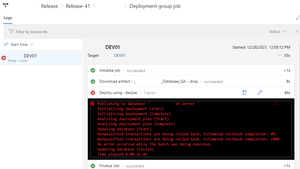
Sorry if I do not explain myself correctly, I am pretty much a beginner on DevOps topics. I tried to create a database release an ended of with the following error message: The release is intended for a SQL Server instance on a QA environment. When I double click on the image above I get the following errors: On the database we are using SQL Server FileStream feature but that feature is not supported on Azure SQL Database. It seems when deployed the dacpac is targeting Azure SQL instead of SQL Server 2019. How I can change this behavior. When we use vs2017-win2016 as Specification Agent on the pipeline the deployment is successful but this specification is deprecated and should be retired by March 2022. If we use windows-2019, windows-2022, or windows-latest the errors shown on the image above immediately appear. Please guide me how can I fix this issue.742Views0likes0CommentsRe: Uptime Monitoring of Azure Databases in Azure Dashboards
You can get the availability status of a specific Azure resource by querying the REST API of resource health. https://learn.microsoft.com/en-us/rest/api/resourcehealth/availability-statuses/get-by-resource?tabs=HTTP This an alternative for all Azure resources.3.2KViews0likes0CommentsRe: DP-300 EXAM VOUCHER
Microsoft Certification / Exams is currently not supported in these forums. Maybe one of the links is helpful: Microsoft Training & Certification is supported on their own forums: Microsoft Certification - Exam Registration: https://trainingsupport.microsoft.com/en-us/mcp/forum/mcp_exams-mcp_exam Pearson VUE Support: Pearson VUE - Customer Service: https://home.pearsonvue.com/Test-takers/Customer-service.aspx Pearson VUE - Chat: https://home.pearsonvue.com/microsoft/contact1.2KViews0likes0CommentsRe: SQL Server ldf file size keeps increasing, but there are no changes in the mdf file
Please make sure that database maintenance (jobs, maintenance plans or scripts) are not creating those increase in the size on the database log. Maybe on those scripts you are updating statistics with FULL SCAN or rebuilding indexes, all these are logged operations. Making frequent log backups of the database can prevent the log from increasing its size or switch the database to SIMPLE recovery model.3.3KViews0likes0Comments
Recent Blog Articles
No content to show