User Profile

MaryHill
Brass Contributor
Joined 7 years ago


User Widgets
Recent Discussions
O365 and G-Suite both being used
O365 AND G-SUITE We are a university and predominantly a Microsoft shop (O365) but we do have a number of staff (mainly teaching staff) and students who use Google Docs and Google Drive. A common problem we are discovering is that staff are using Google Docs & Drive for university-related emails as it is very good for sharing, both internally and externally. But this causes problems as it is (a) “officially” unsupported by the University - any usage issues won’t be dealt with (b) files are not backed up by us and can only be owned by individuals so when they leave the file goes (just 25 days to recover) (c) there are question over how much it is a safe harbour for university business docs. My call goes out to any other organisation who has people using O365 and G-Suite and what advice / guidelines you give them regarding the storage and sharing of files.1.2KViews1like1CommentActivating Microsoft Stream
Here's a conversation I had today with my very risk-averse Infrastructure Manager: [Me] Please would you allow MS Stream to be enabled for me? [Infrastructure Manager] Turning on Stream has a whole load of implications globally. I'm afraid we are just not in a position to review those implications. [Me] Does Stream need to turned on globally? I thought it was like Teams in that it is activated per users? [Infrastructure Manager] Teams had to have changes made globally to allow the release of teams to individuals. Stream is the same. [Me] So if it the same as Teams in that respect I don't understand how it can't be managed on a per user basis for now. What global changes need turning on the ability to turn on Stream for an individual have? [Infrastructure Manager] Enabling a service is not just about assigning a licence. Does anyone have any ideas what this guy might be referring to by "Teams had to have changes made globally to allow the release of teams to individuals. Stream is the same." ?Activating Microsoft Stream
Here's a conversation I had today with my very risk-averse Infrastructure Manager: [Me] Please would you allow MS Stream to be enabled for me? [Infrastructure Manager] Turning on Stream has a whole load of implications globally. I'm afraid we are just not in a position to review those implications. [Me] Does Stream need to turned on globally? I thought it was like Teams in that it is activated per users? [Infrastructure Manager] Teams had to have changes made globally to allow the release of teams to individuals. Stream is the same. [Me] So if it the same as Teams in that respect I don't understand how it can't be managed on a per user basis for now. What global changes need turning on the ability to turn on Stream for an individual have? [Infrastructure Manager] Enabling a service is not just about assigning a licence. Does anyone have any ideas what this guy might be referring to by "Teams had to have changes made globally to allow the release of teams to individuals. Stream is the same." ?964Views0likes1CommentTeams Meeting recordings taking over a week to appear!
Stream is not activated in our tenant. Recordings of meetings of about an hour in length are taking over a week to appear in the meeting chat. Is this how it is, or is it indicative of something being amiss in our tenant? I believe that when Stream is not in use the recordings get stored in the Azure Media Service and are deleted after 21 days, but taking over a week to appear in the meeting chat feed is somewhat ridiculous. If Stream were to be activated for relevant users would we see an instance improvement and have such recordings made available via Stream in a matter of hours not days? If so, it gives me some ammunition to get our Global Admins to activate Stream sooner rather than later. But if it is not going to make any difference there's no point. I would really appreciate any advice on this.1.3KViews0likes1CommentTurning off the ability to edit or delete posted messages
Has anyone’s IT Pros (Teams Admins) turned off the ability for users to delete or edit their messages once they’ve been posted in Teams chats or channels? This can be done via a policy. Do you think there is justification for such a decision, e.g. minimising risk of lack of auditing? I’m really interested in your views, because it’s happened in our tenant (and I’m NOT happy!).2.1KViews0likes1CommentRe: Restoring/recovering an edited message
ThereseSolimeno Thank you Therese, but the link you shared covers restoring files. My issue concerns a posted message. I haven't been able to find anything so far on restoring messages, and importantly the different versions of a message there would be if the message had been edited.44KViews0likes2CommentsRestoring/recovering an edited message
Can the original message which has been posted in Teams (Chat or Channel), which has subsequent been edited, be restored/accessed. Scenario: A student posts an inappropriate message in a chat or channel, realises their mistake/faux pas, and later edits it. A person or people saw the original message and was/were offended but didn't take a screen shot and the evidence has now disappeared. I know a deleted message can been recovered, but can an edited message also be recovered?Solved46KViews0likes5CommentsStruggling with a bit of JSON
I am using a modern Communications site on SharePoint Online (365) I have two lists: ListA and ListB. I want ListA to show direct clickable hyperlinks to the websites stored in a hyperlink column in ListB. I wanted ListA to have a lookup column looking up on an hyperlink column on ListB, but found this is not possible. (or is it?) So ListA just has a lookup on a text column in ListB and "Allow multiple values" option is ticked and must be ticked for my purpose. All I could achieve was ListA showing a link to the details window of the looked-up entry in listB, in which the hyperlinks are shown. That unfortunately is too clumsy for my purpose. So then I created an extra single line text column in ListB which just holds the url as a piece of text, and another lookup column in ListA which looks up this text. This gave me progress in that ListA does now show the url text, but concatinates with a comma when there are multiple urls brought through. So then I thought of using some JSON on the lookup column in ListA to display these text urls as active hyperlinks. I tried the following: { "$schema": "https://developer.microsoft.com/json-schemas/sp/v2/column-formatting.schema.json", "elmType": "a", "txtContent": "@currentField", "attributes": { "target": "_blank", "href": "= @currentField" } } This works, BUT for any line with multiple values coming through the lookup it simply binds them together and covers them with a hyperlink to the url in the first value. This is where I am struggling. I've tried many times to code a ForEach loop in the JSON but with no joy, I just don't know JSON well enough and am struggling to find example code that is close enough to my situation to learn from. Please could anyone help me with my JSON to create what I need, or suggest an alternative way to approach this problem all together?954Views0likes1CommentLooking for a good and reliable "What's new in ..." source of information for O365 applications
I want to produce regular and timely "What's new in ..." individual articles to promote the new features in the big player applications in Office 365, e.g. Word, Excel, PowerPoint, Outlook, SharePoint, Teams. Ideally I want to do this with the minimum of effort by finding a source which produces the content which I can then modify to suit my organisation. I just need a source which regularly summarises new features on a regular basis for individual O365 applications. I would have thought there were hundreds of "What New in Word January 2020" or "What's New in PowerPoint 2020" articles produced across the world every quarter or so, but alas I can't find a good source. Yes there are some Microsoft produced ones but they aren't that consistent. Does anyone have any ideas of sources of this type of information?1.1KViews0likes1CommentParts missing from my Teams Admin Center !
I have the role Global Admin Reader. I am training the Teams Admins in my organisation. In the Teams Admin Center the following options are not visible to me: Teams - Manage Teams Teams Apps (and therefore Manage Apps, Permission Policies and Setup policies are not visible either) Planning - Teams Advisor Please, does anyone have any idea why this would be, and what I should do to get them to become available in the Teams Admin Center?8.5KViews1like2CommentsRe: Determining where the SharePoint sites associated with Teams teams are created
Beau Cameron many thanks for responding so quickly. This Microsoft document https://docs.microsoft.com/en-US/sharepoint/manage-site-creation implies that it's a setting for Microsoft 365 group-connected team sites I understand in SharePoint when creating a new SP site there are three options: A Communication site A team site without an Office 365 group A team site connected to an Office 365 group My organisation create SP team sites without an Office 365 group (since we migrated from SharePoint on prem). I guess that when you create a SP team site connected to an Office 365 group manually you can specify the url as you can do when you a classic SP site, i.e. a SP team site without an Office 365 group. But SP sites which are created when MS Teams Teams are created, appear to be created automatically, so is this setting to only place you can effect the location, .../sites or .../teams?5.7KViews0likes1CommentDetermining where the SharePoint sites associated with Teams teams are created
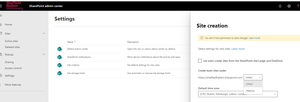
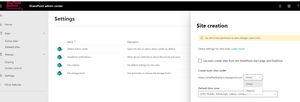
When a Teams Team is created in effect a 365 Group is created and a host of other things, one of which is an associated SharePoint site, or as I call it a "SharePoint site behind". I want to know how the location/url of this 'SharePoint site behind' is set. I have found in the SharePoint Admin Center under Settings the Site Creation :- Am I on the the right lines? Do I correctly interpret this 'Create teams sites under' as saying there are only two locations where the SharePoint sites behind teams i.e. Microsoft 365 group-connected team sites, can be created? In our tenant this setting is currently set to 'sites' . If it is changed to 'teams' what else will it have an impact on other than the location of the sites which sit behind/are associated with Teams teams?5.9KViews0likes3CommentsDetermining the url of the SharePoint sites created behind Teams teams
When a Teams Team is created in effect a 365 Group is created and a host of other things, one of which is an associated SharePoint site, or as I call it a "SharePoint site behind". I want to know how the location/url of this 'SharePoint site behind' is set. I have found in the SharePoint Admin Center under Settings the Site Creation :- Am I on the the right lines? Do I correctly interpret this 'Create teams sites under' as saying there are only two locations where the SharePoint sites behind teams i.e. Microsoft 365 group-connected team sites, can be created? In our tenant this setting is currently set to 'sites' . If it is changed to 'teams' what else will it have an impact on other than the location of the sites which sit behind/are associated with Teams teams?2.5KViews1like1CommentOur early Teams SharePoint sites are in the wrong place
We’ve piloted a few Teams teams. Their SharePoint sites behind were created in a now undesirable part of our tenant. The users of these pilot Teams don’t want their Teams deleted and recreated. Is it possible to keep a Team but move the SharePoint site behind to a new url? I know that changes on a SharePoint site can break it’s link to Teams, but I’m hoping someone has cracked how to move a SP site and either preserve or re-connect its links to its Team.1.8KViews0likes2CommentsRe: Activating Microsoft Stream
Hi ChrisHoardMVP , Thank you very much for responding. My new role is the Digital Skills Manager at the University I work in, but I have a very technical background having worked in Higher Education IT for nearly 30 years. My focus at the moment is driving the adoption of Teams for all staff and eventually all students. Without Stream being made available I can't promote the recording of meetings. All your comments "how can it be administered, controlled, what happens if someone uploads questionable content, they have to ensure the service is compliant, the data is housed in the right data centres." are valid business and policy matters, and indeed need to be addressed. I want to be the proof of concept you talk about. In your opinion, are there any settings or configurations that mean if the Global Admins activate Stream just for me, then they are opening it for any others too? I have the O365 Global Admin Reader role, but I can't access the Azure Admin Center. I don't know what the Global Admins have to do to enable me to have access, and as such they can hide behind comments like "there's more to it than just enabling it for individual users, like Teams". I want them to engage with me, and for that I could with knowing what settings they actually have to activate for Stream. Is there any way you could tell me some more detail of the technical configuration that is needed to activate Stream? I would really appreciate and technical detail you could share with me.Activating Microsoft Stream
Here's a conversation I had today with my very risk-averse Infrastructure Manager: [Me] Please would you allow MS Stream to be enabled for me? [Infrastructure Manager] Turning on Stream has a whole load of implications globally. I'm afraid we are just not in a position to review those implications. [Me] Does Stream need to turned on globally? I thought it was like Teams in that it is activated per users? [Infrastructure Manager] Teams had to have changes made globally to allow the release of teams to individuals. Stream is the same. [Me] So if it the same as Teams in that respect I don't understand how it can't be managed on a per user basis for now. What global changes need turning on the ability to turn on Stream for an individual have? [Infrastructure Manager] Enabling a service is not just about assigning a licence. Does anyone have any ideas what this guy might be referring to by "Teams had to have changes made globally to allow the release of teams to individuals. Stream is the same." ?
Recent Blog Articles
No content to show