User Profile

rshupak
Iron Contributor
Joined 7 years ago


User Widgets
Recent Discussions
Cannot update expiration of credit card for which virtual card numbers are enabled
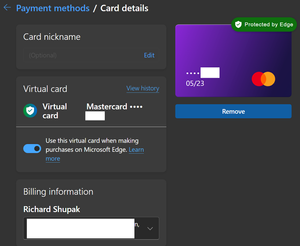
I've reported it before but no effort appears to be being made to correct. I have a credit card for which I enabled virtual card numbers a while back at the prompting of Edge. This credit card is expiring next month and I received a replacement with a new expiration. The flaw in Edge is that there is no way to update the expiration. The edit UI for cards with virtual numbers enabled doesn't let me change the expiration or supply the new CVV. In contrast, here is the UI for a non-virtual number enabled card. I was able to work around this by updating at https://account.microsoft.com/billing/payments/. I don't know if the virtual card feature works still since the web site is not virtual card aware. Rich462Views0likes0CommentsRe: Web page content overlaps side panel
I only pin favorites and had confirmed that closing and reopening didn't correct it. I then pinned history and found that when you switch from one to another it corrects itself. If closed and reopened, the problem returns. Still, thank you for the work around. I should note that this fixes the issue with Favorites and History. It doesn't fix the issue with the search side panel.2KViews0likes0CommentsWeb page content overlaps side panel
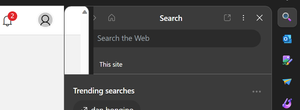
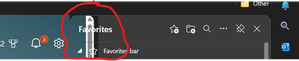
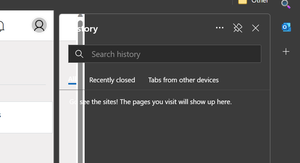
For over a week in canary and now in dev, the content area overlaps a side panel such as that for favorites. This makes it impossible to access content near the right edge of the current web pages content area. It ffects both Favorites and History when pinned. For the panels opened from the sidebar, the behavior is inconsistent. Here is the Search panel RichSolved2.3KViews1like7CommentsEdge content display area extends below the Windows taskbar
Since the latest Windows 11 update which included some taskbar behavior changes, Edge has a problem with the bottom of web pages being obscured. Specifically, the content area extends below the taskbar. It may not actually be painted behind the taskbar but what is displayed is as if this was the case. I discovered I can work around this by opening the taskbar settings in the Windows Settings app, turning the following setting on and then off. Attached is a short video of just this point of one web page. When working properly, the bottom of the page, which is a messaging UI, has a visible send button. I have attached a video which shows the button partially obscured followed by me changing the setting, which can't be seen in the small rectangle I recorded, followed by it being visible afterwards. This bug affects all channels of Edge from stable to canary. The video was created with canary. From this point onwards, Edge works until either I sign out or restart. I have not experimented to determine what will reset it to broken. Rich2.6KViews1like1CommentRe: Dev Channel update to 113.0.1774.3 is live
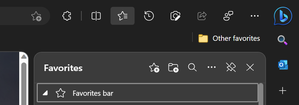
Eric_E Since the introduction of the discover button, Edge has a flaw that whenever the favorites panel or similar is pinned, the sidebar is also displayed even when this option is turned off. Here is what I see The sidebar wastes what looks like 96 pixels. This is more than 20% of the size of the favorites panel wasted for something I explicitly turned off. Since Edge is capable of displaying SxS windows with or without the sidebar, it should be able to display a sidepanel without the wasted space as well. Rich9.4KViews6likes1CommentWhat does Microsoft mean by "Web content like the pages you view"
What does Microsoft mean on https://support.microsoft.com/en-us/microsoft-edge/microsoft-edge-browsing-activity-for-personalized-advertising-and-experiences-37aa831e-6372-238e-f33f-7cd3f0e53679 when it states that it collects and uses, among other things, "Web content like the pages you view"? Does this mean that it collects and uses financial information from banking sites, medical information, or passwords or other authentication details that me be on a web page the user is viewing? Rich528Views0likes0CommentsDeleting basic info from edge://settings/personalinfo has been broken for over a week
Deleting Basic info entries from edge://settings/personalinfo is broken in canary. Sometimes it just does nothing. Other times, it crashes the whole of Edge. I have reported this muktiple times via the feedback mechanism in Edge. No fix appears forthcoming. Rich719Views1like0CommentsHow can the new discover button in canary builds be removed?
How does one remove the following new button? I might be OK with having it but I definitely do not want it in this privileged position. It's broken in build Version 111.0.1660.0 (Official build) canary (64-bit) so I can't confirm the behavior is not changing but one major flaw with this position is that the discover pane would open in mouse over and I would regularly move my mouse over that position on its way elsewhere. Rich848Views7likes0CommentsRe: Edge silently enabled data collection for Personalization & advertising without my consent
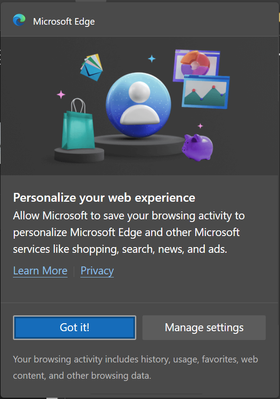
A short while after today's canary update to Version 111.0.1660.0 (Official build) canary (64-bit), Edge displayed the following: As you can see, I have only two buttons from which to choose. I don't want to manage the settings which were just fine so I click on "Got it!" which in plain English means "Understood" not "I consent to the privacy violation!" After dismissing the popup telling me about the feature, I opened settings and found that the data collection was silently switched on again. I do not know if it was switched on because of the clicking of the Got it! button or was enabled by the update. The Privacy Dashboard at https://account.microsoft.com/privacy/ confirms that data collection started about 20 minutes ago as that is my oldest browsing history item. Another issue is that the Learn More link that presumably describes this feature in some detail is not present on the switch setting from edge://settings/privacy which has only a link to the privacy dashboard. On a related note, I have the "Alerts and tips button" disabled. Apparently, this does not disable Edge's display of "tips". How does a user disable tips like the false messaging above regarding data collection? Rich2.4KViews1like2CommentsRe: Clear browsing data should not tie browser saved autofill data with personal info added by the user
Thanks for passing on. I have submitted feedback in the Edge app on this issue multiple times to no avail. The same goes for the other autofill issues I posted here. Even then, there are still bugs I have not submitted. One is that the trashcan icon to delete an entry doesn't always display. This can be fixed by dismissing the autofill dropdown and opening it again. Usually once is enough but it may take more. Adding or deleting basic info has been broken in canary on and off for at least a week. Deleting entries, either individually via menu or with selection and the Delete button, triggers the confirmation popup but the entries do not get deleted. Sometimes Edge will suggest the Basic info names for a form field but selecting the entry doesn't add it. For example, visit https://www.familysearch.org/tree/person/, click on the Recents menu then Add Unconnected Person. Click in the First Names field. You will see suggested basic info. Pick one and nothing happens. In contrast, type a slash and then the first letter of an entry. This changes the behavior so that you only see individual field values but if you select one, it will fill in. This mechanism cannot be used to fill in multiple fields such as the first and last name. You will need a free familysearch.org account to complete this repro. Payment card and password autofill are also buggy. I would report more but the stuff I have reported multiple times over long periods don't get fixed so it appears that no one cares enough. Rich1.1KViews0likes0CommentsEdge saves form field values that I did not enter
I use a web site with a feature that opens a its own search page with many values filled in with data copied from a record on the site. This action does not add any of the pre-filled values to autofill. This is good. Now, if I change, delete, or add a value to any field and resubmit the search, Edge doesn't just save the value I typed as autofill, it saves everything including specifically the values provided by the web site which I never touched. The result is that I end up with thousands of useless values being saved as autofill data. They not only obscure access to the values I did enter myself but they roam and get pushed to all my devices. Edge should only save autofill values that the user enters whether via typing or pasting or other input method but not values supplied by the web site itself whether by HTML or script. Rich814Views0likes0CommentsPlease support clearing all autofill data for a single field instead of just one at a time
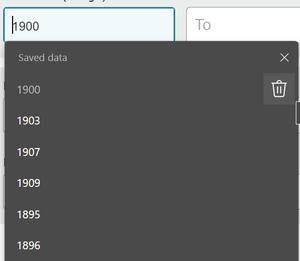
Edge exposes a mechanism to delete a single form field autofill value one at a time. You can see this with the trash can icon in the image below. Frequently, I would like to clear all the values saved for a single field. Please add a mechanism to do this such as a clear all link or icon just to the left of the X. Rich674Views0likes0CommentsClear browsing data should not tie browser saved autofill data with personal info added by the user
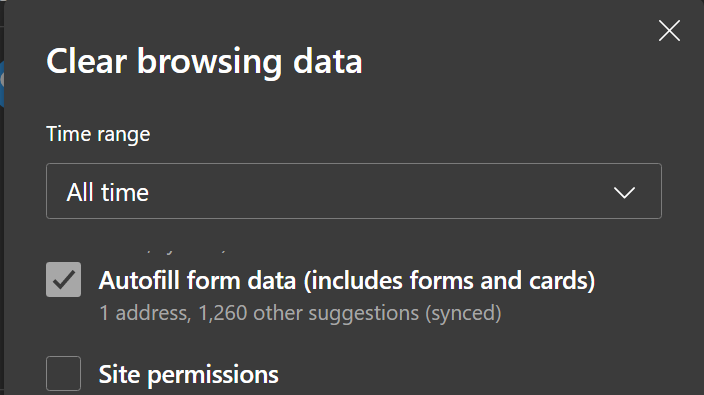
When clearing browser data, Edge inappropriately groups form autofill data that it has saved automatically without user action and personal info which I have explicitly entered such as my home address. I want to clear the accumulated junk which Edge doesn't provide any mechanism to manage but not my home address which I explicitly entered. This should be split into at least two categories with no mixing of data saved by the Edge with data added explicitly to Edge by the user. Rich1.2KViews2likes2CommentsCredit cards with virtual number support do not work
Anyone from Microsoft care that credit card filling is broken for cards with virtual card numbers enabled? No one has responded in two weeks to Saved credit card opted in to virtual card numbers not offered for use - Microsoft Community Hub1.2KViews0likes1CommentSaved credit card opted in to virtual card numbers not offered for use
Ever since I opted in one of my saved credit cards to use virtual card numbers, Edge does not offer in as a credit card available to use. Here is edge://settings/payments Here is adding a credit card on https://www.amazon.com/cpe/yourpayments/wallet Rich1.5KViews0likes0Comments




Recent Blog Articles
No content to show