User Profile

davidpetree1
Iron Contributor
Joined 10 years ago


User Widgets
Recent Discussions
interesting calendars - Football Calendar is released (How to turn it off?????)
Hey Everyone, Back on Aug 1st, Microsoft put a blog out about "Interesting Calendars" that were coming - https://blogs.office.com/2016/08/01/follow-the-summer-games-in-rio-with-the-new-outlook-interesting-calendar-feature/ Well, i guess one of the first ones is here. Its the Football Calendar. https://blogs.office.com/2016/09/08/football-season-is-here-outlook-helps-you-track-the-games-that-matter/ When you launch your calendar in OWA for the first time you will get a pop up asking you if you want to add the Football calendar to your Calendar. If you select NO, it wont show again, you can just go back to the dropdown and add ti when you want. Well, i have a customer that upset that this is showing up in his "business" email. He does not want his employees adding football calendars. He wants a way to hide it, delete it, don't show it......whatever, you get the point. I kind of agree with him in the sense that we (Any Admin) does need a place to hide this stuff or turn it off so the tenant/Users cannot see it, but does anyone know of a way to do this? I have looked around and I do not think you can turn it off. Just wanted to put this out there to see what people think or if they know of a way to turn it off/delete it *Update - Sorry, Rio Summer Games was first one, Football is the 2nd one https://blogs.office.com/2016/08/01/follow-the-summer-games-in-rio-with-the-new-outlook-interesting-calendar-feature/2.6KViews5likes4CommentsRe: "Throttled" image when connecting to EXO from Outlook
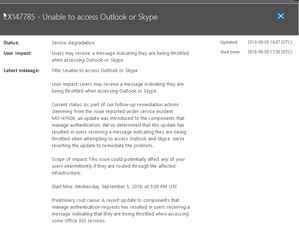
Yea, we keep getting calls/tickets on it from different tenants too. We are trying to open a Service ticket with MS but we are on Hold (9 mins now) since calling in to open a case.. And yea, no SI on SHD that we can see either.1.8KViews0likes0CommentsRe: "Throttled" image when connecting to EXO from Outlook
Let me also say, Outlook clinet says "need password" and when they click on that to enter in password, that is the box that pops up. We just got around 11-15 different customers all call in at the same time, with the same issue1.8KViews0likes2CommentsRe: OneDrive restored site scope
Oh, then by default, Once a user is deleted, then the users "Onedrive" is marked for deletion. Default is 30days. So, depending on when you deleted the user, you have 30 days to get in there and get all the users data out of that users Onedrive library. Now, you are saying, you have used PowerShell to restore that users site, and you assigned a different Site Collection Admin to that site collection. Are you want to know how long this site collection will stay there? As you might already know, once you restore a users, the users OneDrive will restore, but you are saying that you did not restore the user, you used PowerShell to just restore the site collection. Why dont you just restore it, then move the files out of it, put it in SharePoint or something and then you don't have to worry about that other users Restored Site Collection. But, I would think, once you restore the site collection, and you have assigned a new site collection admin to it, then it will stay , as long as that new Site Collection Admin is active. I just think there are easier ways to do what your trying to do. Since the only files in the users OneDrive should of been the users own Personal files, you could just move them to a new SharePoint library and not worry about the restored site collection But yea, I think that answers your question1.1KViews0likes0CommentsRe: Outlook 2016 defaults to an end date on recurring appointments now - need "no end date" fix
Understand, but that is not how it is, specially on the server side. The server has to be able to render those appointments all the way up to the end date, so, its there, on the server side ,rendering forever. When the client (outlook desktop app) opens up, you can see on the bottom right how its "updating folders", and at that time, the client will connect to the server and the server has to have all those appointments ready to go so when you click on it, it can render it. Even when you go and you edit the first one, when it says "Edit just this one, or entire series", it has the "Entire Series" in memory, ready to be edited, in case that is the option you pick. So, its just best to always have an end date, and your outlook will run faster and all of that.31KViews0likes2CommentsRe: Outlook.com UI
Since OWA is code from Exchange, and outlook.com is not, it will take a bit. Check the office 365 roadmap and you will see some items are on there to get ported over to the Exchange OWA. They are working on it and adding new features all the time. With the new Exchange 2016 (or maybe 2019), the name was just changed from "OWA" (Outlook Web Access), to "OOW" (Outlook on the web). With the new Name Changed ,they spoke about how they are bringing new features over to that interface from the outlook.com interface. This has been months and months ago. Its best for you to google and search for some blogs so you can read about it. But, if you really want a feature added sooner than later, its always best if you go and post in UserVoice so others can also vote on your feature request. The more the votes, the faster Microsoft looks into it., Heck, who knows, the main feature/features you want might already be on UserVoice, so just go Vote on it https://outlook.uservoice.com/forums/313228--outlook-on-the-web-office-3652KViews0likes0CommentsRe: Outlook 2016 defaults to an end date on recurring appointments now - need "no end date" fix
You should never have it set to "no end date". People wonder why outlook is slow at times, or when they click Calendar, it takes a while to load, well, has anyone ever thought it has to load 20 years of an appointment? This puts a big strain on the server and I am guessing this is why the default behavior has changed. Because people don't understand that if it says no end date, then it will keep going and going and going and going, and its putting a load on a server and in a shared environment, its not a good thing.31KViews0likes5CommentsRe: OneDrive restored site scope
The key unknown information missing here is , how long was this user deleted? There are many articles on here about restoring deleted users. Once you restore the user, the OneDrive should reconnect automatically, as long as the users profile was still in a soft delete stage1.2KViews0likes2CommentsRe: Backup and Sync Folder to OneDrive Without Making Local Copy
First, make sure you have “files on demand” enabled...this basically uploads the files to your OneDrive library online, but removed them from your machine. You can still see them all in windows explorer, just like they are on your machine but they are not taking up any space. Once it’s enabled, you can drag “some” files from the F drive, to the OneDrive folder. The files will sync and then clear from the C drive and not take up any space. Continue that process till you get all the files uploaded. You could also just drag the files/folder to the browser. Sync them by the browser26KViews0likes1CommentAssigned Number belongs to another business (Anyone ever seen this)?
Just wondering if anyone ever seen or heard of this. I have had PSTN Calling on my Tenant for about a year and a half. I have always had the same number assigned to my clinet. When my client is on, you can dial my number and reach me. Great, it works as its suppose to.... but but, if i have my clients turned off, and you dial my number, you get a Hotel. I even asked them "Can you tell me your number, or the number i called", and they read it back to me. Its the same number that I have assigned to my S4b. Now, I did not do any type of porting of the numbers or anything. I just purchased PSTN calling over a year ago and had Office 365 give me a list of numbers and i picked one. Its the same one I have been using for over a year... But as i said, if i have no clients turn on and you call me, you will get some Hotel answer. "Thank You for calling Days In - Panama City Beach FL, How can i help you".... I told them to stop answering my calls......LOL Anyone ever heard of this or what i can do to stop this? I am sure i could just change my number, but why is it even happeningRe: How to add a domain and users to a current account
If the "Everybody@" is a shared mailbox,you dont make "members" of a shared mailbox.. You can give Bill and Melinda "permissions" to view, or send as, or whatevevr, but its a "Shared Mailbox". The users are not "Members" of the mailbox, they can jsut have permissions to view it, or full access to it. if you want mail that gets sent to bill@ to go into the shared mailbox too, then setup a forward rule (the way you have it setup) Crazy scenario13KViews0likes2Comments

Recent Blog Articles
No content to show