User Profile

matthias_fleschuetz_ntt
Copper Contributor
Joined 7 years ago


User Widgets
Recent Discussions
Connect-MS365 v1.0.0 for MS365 Admins released
Did you ever the experience that it's complicated to deal with multiple of the different Microsoft cloud-based services and have to remember the specific modules to add, commands to use to connect? So did I and found myself always looking them up again and again, especially for those used more rarely. That's all what Connect-MS365 is about: it delivers one central CmdLet function which can be executed to connect to one or many of Microsoft's services and you don't have to care about the single service connection commands. Supported services: MSOL, AzureAD, Exchange Online, Teams, SkypeForBusiness, Security & Compliance Center, SharePoint Online. additionally it checks and installs the right modules or packages if necessary. supporting modern authentication / MFA Have a look on my https://github.com/blindzero/Connect-MS365 or Install the module from https://www.powershellgallery.com/packages/Connect-MS365 Install-Module Connect-MS3651.1KViews0likes0CommentsAccept AD Guest invite is not working if user has Live account
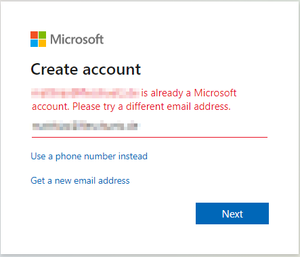
Hi everybody, I know, there are plenty of threads about issues on guest invitations but I couldn't find anything specific about this issue we are facing, yet (maybe I'm just blind 😉 😞 We are inviting a user from our Azure AD (through Graph API). If the user has an organizational account from another tenant, he is logging in and everything is fine --> fine. If the user has no organizational account and no live account, he will receive a login through code mail verification --> fine. If the user has no organizational account but a live account (home, xbox live, old skype, ...) he receives an error when clicking on accept that an account with this email already exists. Bad thing: there is no way to login with your home account, you only can select another email address (which will not work on this invitation anyway).Re: Inviting guest who already has a Microsoft account
Thanks a lot, it turned out that it seems that it is really an issue with that particular live-/microsoft-account account (very strange orphan tenant in the background...). We tried it out with a new fresh outlook.com address and there it worked.8.9KViews1like0CommentsRe: Inviting guest who already has a Microsoft account
Hi JimGrisham, thanks for this very detailed explanation. We are facing an issue with your setup of "Johnny" (having already an "Live" or "Home" account), maybe MSFT has changed something here? All other scenarios (guest has MSFT org / tenant account / guest has no MSFT account at all) are working fine. We are inviting this guest through GraphAPI GraphAPI creates a AAD guest account: guest_something.tld#EXT#@#EXT#@tenant.onmicrosoft.com User receives an invitation mail User clicks on invitation mail link and receives link that an account with that email is already existing and user shall select another address Do you have any experience on this?9KViews0likes2CommentsRe: How to handle meetings organized by deleted users?
oliwer_sundgren Thanks, I assumed something like that...but somehow really sad as offboardings / responsibility changes shouldn't be something so rare in corporate / enterprise environments. I would somehow expect a good and integrated featureset for this usecase from a professional solution? E.g. OneDrive / Sharepoint has this in place by using the manager field to grant access to the personal file space when a user is deleted. Even with fallback to a centralized email address if manager field is blank...23KViews0likes2CommentsHow to handle meetings organized by deleted users?
Hi Community, there is that nearly-all-time known limitation that Exchange / Exchange Online can't change the organizer of a meeting. That is really driving me mad in real life...imagine a team assistant leaving the company after having that up meeting series for the whole team / company including meeting room reservations etc... How are you handling this limit in your real-life? Best, M.23KViews0likes6CommentsRe: Notifications on autoaccepted meetings with room or equipment mailbox
Hi oliwer_sundgren thanks for your feedback. Yes, the rules might work but it is really manual and easy to fail if something changes in delegations. I wanted to set this up with RBAC groups...:-/ I found some posts about people trying to solve it with Flow which seems not to be ideal as well, because the triggers didn't work on shared equipment mailboxes... Let's try... Best, Matthias5.8KViews1like1CommentNotifications on autoaccepted meetings with room or equipment mailbox
Hi there, the following use case drives me nuts... it‘s so valid, so easy, but there is really no good solution for it in Exchange. Users can create meetings an invite rooms or equipment mailboxes. Those meetings are automatically accepted if there is no conflict. No, we don’t want to have those approved, because of too much work on regular processes. There are room / equipment responsibles (put into the mailbox settings as delegates). Those will only be informed if there is a conflict. We want: - the delegates to be informed when a meeting is autoaccepted by the system - optionally: inform the delegates short before meeting as with regular meetings where people are invited directly I spent plenty of time crawling the internet but it seems that nobody really managed it. The proposed solution of transport rules is not working as the accepted: prefix may vary due to different languages used by different users (en, fr, de, ...). Sorry, but I can’t understand that those usecases are not supported as they are basic for handling of reservations of rooms (e.g. for catering) or equipment (e.g. fleet managers). Thanks a lot for your input Matthias6.1KViews0likes3CommentsHow to handle meetings organized by deleted users?
Hi Community, there is that nearly-all-time known limitation that Exchange / Exchange Online can't change the organizer of a meeting. That is really driving me mad in real life...imagine a team assistant leaving the company after having that up meeting series for the whole team / company including meeting room reservations etc... How are you handling this limit in your real-life? Best, M.2.3KViews2likes4Comments
Recent Blog Articles
No content to show