User Profile

gbartumeu
Brass Contributor
Joined 7 years ago


User Widgets
Recent Discussions
Re: Add Teams group to Project for the Web with Power Automate
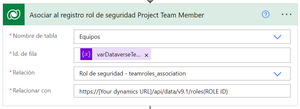
Hello PhilippS1, I did it using Power Automate. On Dataverse, the Team table will automatically add the Team you recently created. But if you want you can add it by yourself. Then you will need to relate this Team with Team roles associations: Project Team Memeber and Project Common. Here is how I have done it using a "https://learn.microsoft.com/en-us/connectors/commondataserviceforapps/#relate-rows" (In Spanish..): 1. Table name: Teams 2. Row Id: Your Team Id 3. Relate: Team Role Associaton table 4. Relate with: https://[Your dynamics URL]/api/data/v9.1/roles(ROLE ID), where the role ID you should copy it from your "Team Roles" Dataverse table. Hope it helps!!3.7KViews1like3CommentsRe: Add Teams group to Project for the Web with Power Automate
Hello PatrickGrebe, Thanks for your response. As you said, it took a while but now I see the project it's being assigned to the team! Could you explain me which role and how I must assign it to the Team? Do you refer the "team" entity record or the AAD Group? Thanks in advance,6.2KViews0likes14CommentsRe: Add Teams group to Project for the Web with Power Automate
Hello PatrickGrebe, I use Power Automate to update the ownerid field from the entity msdyn_project with the teamid field located in the entity "Team" but it still does not update this change on Project for the web:6.3KViews0likes16CommentsDelete the "Shared with us" link on navigation menu for modern sites
Hi everyone! I've tried to remove the lin on the navigation bar called "Shared with us". It appears whenever it wants and disappear... I've read many posts but it looks that no one have tried or want to remove this link. Why? Help!113KViews14likes43Comments
Recent Blog Articles
No content to show