User Profile

christinepayton
Iron Contributor
Joined 10 years ago


User Widgets
Recent Discussions
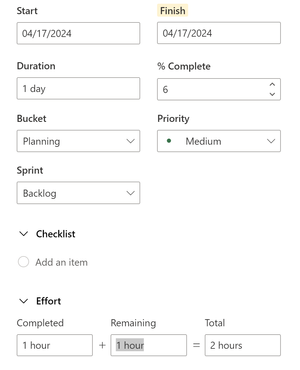
% Complete - doesn't seem to calculate properly, what am I missing?
I am fiddling with Project for the Web / Premium Planner in an attempt to make YouTube tutorial content. I'm creating tasks, trying to make some sample content, and setting the completed/remaining hours to be partially done to simulate an in-progress project. What I'm noticing is that the %Complete tries to auto-update, but seems to be calculating really oddly? Like it's coming out with 6% complete for 1 hr completed + 1 hr remaining = 2 hr total. Am I misinterpreting what it's trying to do or is it not functioning? When I try to manually set the %Complete to 50% to override, it changes out the hours to be very different and it still doesn't come out right.690Views5likes4CommentsRe: Effects of a term store item change
You might consider archiving the files to the other library before deleting or deprecating the tags. The way the "move" works for files is it basically creates the files in the destination library, so it will need the tags to be usable when the files are moved. I am pretty sure the tags remain searchable after, but haven't tested it.1.4KViews0likes0CommentsRe: Retrieve Power BI report name into sharepoint list
Elijah94 Not with MS Forms. But I have done this with Power Apps forms, which can capture URL parameters in the form. So for example, what you would do is put your report ID in the URL for the Power App feedback form link as a parameter, and the parameter would set a hidden field in the form (you could call it "report ID") to capture the report ID. That lets you use one feedback form for any number of reports, just editing the URL for each report. MS Forms will not take URL parameters to set fields, hence Power Apps. You have to be careful too with which version of the canvas app you create on the SP list - the ones you generate from SharePoint via the "customize the form" options will not work, you have to create the Power App from make.powerapps.com and just set your source to SharePoint (it's something about the SharePoint integration where it doesn't get the full feature set). This is notable only because I started with the former and had to restart with the latter when I did this. 🙂603Views0likes0CommentsRe: how do i get last week sale for same period when I don't have the dates column
The reason "sameperiodlastyear" isn't working for you is because it doesn't know what last year is in your data because you have no date reference. The date/time-intelligence features require a date table and I believe you even have to designate them as a date table in the relationship view (it's in the right-click menu). Date tables require a sequential list of dates in order to be marked as a date table (it'll give an error if you try on something else). The other reason you'd need dates is so that you can get the relative week in order to filter on something like "last week". The function to get "now" in Power Query as a comparison returns a date/time value, usually that's what you use to get a relative date/week/month for your date table. Unless your data has some reference to what the current period is... if it does you could use that to create a "relative period" column to filter on (where 0 is the current period, -1 is the last period, etc) and bypass the date/time intelligence functions by just filtering on that value.1KViews0likes1CommentRe: Cannot move lists from "Site Contents" to a "Document Library"
You cannot put lists in a folder, it doesn't work like that. If you want them to live in the library, add them as links through the "+new" menu inside the library - it'll create objects people can click to get to the lists.2.4KViews0likes0CommentsRe: Use SharePoint for yearly employee performance reviews.
I've done something similar, but using SharePoint lists. What I did was set the permissions on the lists so that users could only view their own items, then used the org hierarchy to set the row-level security in Power BI (users can see records for people reporting up through them using PATHCONTAINS()). I would not do this with files if you can avoid it, because then you have to set actual file permissions and it's a mess (whereas with lists you can just do dynamic row-level security).6.1KViews0likes0CommentsRe: how do i get last week sale for same period when I don't have the dates column
Are you using Power BI? You'd need a date dimension table that maps the days in a year to the periods. If you do a search for "power bi date table" there should be quite a few examples. If your data is coming out of an accounting system, it'll often have a date table you can use somewhere in the database.1.2KViews0likes4CommentsRe: SharePoint get all Site Views (not only Top 10 by standard Site-Analytics)
I just posted this, which is relevant - it'll get you global site views at the least. I think you can probably also get item views with a similar technique but the limiter there will probably be the size of your environment (it uses the OData feeds and pulling activity data for all items in all sites would be a bit massive). https://techcommunity.microsoft.com/t5/sharepoint-bi/tutorial-tenant-level-usage-metrics-site-subsite-list-library/td-p/39395901.7KViews0likes0CommentsTutorial - Tenant-level usage metrics, site/subsite/list/library inventory with Power BI
Hi folks, sharing this here because I think it might be useful to fellow SharePoint admins. Long story short, there's lots of good data in the OData feeds in SharePoint, and you can access those with Power BI. The feeds are site-level, but using a function you can take your query and have it iterate over all of your SharePoint sites to create a tenant-level set of reports and schedule refresh on that in the Power BI service. The sites query has a lot of the same data you'll find in the admin center, so all-time/recent views, last modified date, site template, etc. The value-add here is that Power BI can get the subsites, which you will not see in the admin center. Since we're phasing out subsites, it's useful to get an inventory to see what needs to be replaced/moved/archived. The lists query has item counts as well, which can be good for keeping an eye on things approaching the 5k list view threshold. I did a couple videos on how to get started with this technique here, planning on adding more as time goes by: Get sites and subsites: https://youtu.be/qYhXdNDnyfI Get lists and libraries: https://youtu.be/_MHRH3EbSuk Credit to Jordan Murphy as well, who figured out how to do this and asked me to share the technique. 🙂3KViews0likes0CommentsRe: Permissions based on Org chart?
Not in a sustainable way that will update as the org structure changes over time. The traditional way to manage this sort of thing was using active directory groups to assign access, where updating was as straightforward as updating the AD groups, but with Microsoft moving to more of a flat structure with M365 groups (which don't allow nesting), the hierarchical structure is going in the "legacy" direction. You can do row-level security in Power BI and Dataverse in a dynamic way based on org structure, but SharePoint is more rigid than that and doesn't really have an equivalent feature.1KViews0likes0CommentsRe: Can a SharePoint Document Library Be Created without a OneDrive Folder?
I'm suggesting if you want to check out features of a document library or pages, that you do so in a sandbox site. That way you don't have to worry about people stumbling on things you're fiddling with when they are looking for real content. It's just a personal preference. I'm unsure what you mean by communication pages making OneDrive folders - communication sites do not exist in OneDrive and are unrelated other than both being SharePoint sites. Typically pages libraries do not use folders, but they can be enabled there. OneDrive is your personal document library/site. You would not be able to create an additional library in OneDrive, but you could create one in a SharePoint site if you had permission in one. SharePoint sites can hold thousands of document libraries.1.5KViews0likes0CommentsRe: Can a SharePoint Document Library Be Created without a OneDrive Folder?
CMims You can create a document library in a different SharePoint site that you have access to. Typically orgs will have at least one "sandbox" type site that they let people fiddle around with, you could probably request one from a SharePoint admin if it does not already exist.1.7KViews0likes2CommentsRe: Permisions view
If you're already using Power Automate, you can skip the Power Apps bit entirely and just send the data back to the SharePoint list. So for a given item (on created or modified trigger), "get manager" for the people field on the item, then do an "update item" and feed it the manager email address from the "get manager" step and have it put it into a people column (you'd need to add the field to the list if it doesn't exist already). Then just use that field in the view filters.1.1KViews0likes0CommentsRe: Hide ribbon options in Sharepoint Page
It will only be visible to people who have permission to view it. The easiest way to address this is to structure your site permissions in a way that aligns with how you want people to use your site - so if people don't need edit access put them in the visitors group for read access instead.1.6KViews0likes0CommentsRe: Files and Folders are moved to Recycle bin after moving from one library to another
Yes, this is normal. I think functionally on the back end it's copying and deleting, not moving, because it has to cross site boundaries. If you move within a single library, it's behaves better.2.7KViews0likes0CommentsRe: Permisions view
There's not a great way to do this natively in SharePoint. You'd have to add a field for the manager to the SP list and set it with Power Automate (there's a "get manager" action). Once you have it populated, you can set the filter for the view to be Manager = [Me] OR <name of your other user field> = [Me]. It's much easier to do this type of thing using row-level security in Power BI, if you're open to that route. Power BI can connect to SP lists as a source and display clickable links to the items in a table, much like a view, and you can add some other data visualizations as a bonus. Alternately, you could also do it in a canvas Power App probably, but it'd take quite a bit longer to set up if you're not a frequent Power Apps user already.1.1KViews0likes2CommentsRe: SharePoint get all Site Views (not only Top 10 by standard Site-Analytics)
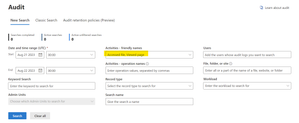
You can get viewer activity in the compliance center audit logs (https://compliance.microsoft.com/auditlogsearch?viewid=Async%20Search). The selector in there will let you choose the things you want to pull activity info for - things like "accessed file", "viewed page" etc. The issue with the audit log is that it doesn't go back very far in history, so if you want to do reporting over time you have to export it on a periodic basis. BUT you could export those to CSV each month, and use the "SharePoint folder" connector in Power BI to combine them all and make some charts out of it. If you are in a large organization, the number of records is going to be unwieldy for this connector; in that case you might be better off doing something custom with the REST API.1.8KViews0likes0Comments
Recent Blog Articles
No content to show