User Profile

FrankDeNunzio
Brass Contributor
Joined 7 years ago


User Widgets
Recent Discussions
Re: Dev channel update to 80.0.334.2 is live
josh_bodner Major issues encountered: Page load times are awful --> I've moved to Brave only for now. UI doesn't always respond to clicks as per your GPU note above. Scrolling still horrible. On the bright side, I haven't seen the intermittent crashing when testing phishing links that I had prior to this update.11KViews3likes0CommentsRe: Dev channel update to 79.0.308.1 is live
josh_bodner 1. Extension updating feature always returns an "extensions updated" message but extensions are never updated. 2. Please add more granular control for Javascript, like Brave browser. 3. Still no response to my questions re: Edge AppContainer. Same as old Edge? improved? etc. ...3.3KViews0likes0CommentsRe: Dev channel update to 79.0.308.1 is live
HotCakeX OP should have read: "... more granular control for Javascript ..." Brave's market share isn't important here, but its javascript control is. Generally, adding more control of features as an option for users who prefer it just makes sense.3.4KViews0likes1CommentRe: Dev channel update to 79.0.308.1 is live
josh_bodner Tracking prevention feature is pretty good but more granular control for Tracking prevention feature, e.g. like Brave browser, would make it great. I've asked about this before with no reply. Any chance this will ever happen?19KViews0likes3CommentsRe: Dev channel update to 79.0.308.1 is live
josh_bodner Thanks for the fixes to the "crashing" issues. The last version was my first experience in this channel with serious bugs. Also, I've noticed that edge://flags have changed over time, which had me thinking about native containers for Edge Old vs. Chromium. I inquired but never received a reply from staff asking whether Edge Chromium will be containerized like Old version, e.g. strong container for PDFs, for which there was a flag in earlier Chromium versions. Are you able to shed any light on this and how/if its process(es) compare to Edge Old. BTW: Installed Edge Stable for a relative who has become an Edge convert.19KViews0likes0CommentsRe: Dev channel update to 79.0.308.1 is live
Graham-STMC I think you summed it up pretty well. I just did extensive updating and configuration of Windows 10 for a "not tech savvy" relative. She is precisely one of the "... many of whom believe they 'need' Chrome because they mistakenly think that it is a search engine and immediately install it without trying Edge." I installed, configured and hardened the newly released Edge Stable for her laptop today and I'm quite certain she won't miss either Google or Chrome.20KViews3likes0CommentsRe: Top feedback summary for September 24
matsmcp David Rubino Please pass on the Google integration. What would be the point of adding it? I'll switch browsers if it comes to that. And I second the "Please fix mouse hijacking" request. The bug has been present since Old Edge and you have migrated this "feature" to Edge Chromium. It's incredibly annoying.7.4KViews1like0CommentsRe: Top feedback summary for August 29
cjc2112 I finally found this flag "Fill password on account selection" which gets the setting to work. Why does MS include a setting that only works if a flag is enabled? Sorry, I love where Edge is going but this is typical MS. I thought the Edge team was trying to shed that image... we'll see.3.3KViews1like2CommentsRe: blocking ads without third-party extensions.
HotCakeX I've tested Tracking Protection every which way - by itself, with µBO in easy mode, medium mode, etc. It's not a bad tracking blocker and it does block some ads regardless of your view, but it's for the-set-and-forget crowd - whichever way they use it. However, its implementation is limited if one expects more from it than what it is.3.4KViews0likes3CommentsRe: blocking ads without third-party extensions.
HotCakeX Broken but not unusable. Extensions: Privacy Possum - a tracking blocker (not an ad blocker, but you already knew that -right?) Cookie AutoDelete - eats cookies - right? Bitdefender Trafficlight - blocks phishing and malware sites, right? So Tracking Protection is tracking protection which does happen to block some ads, as faulty as the implementation may be. Seriously! LOL!3.4KViews0likes5CommentsRe: blocking ads without third-party extensions.
HotCakeX Of course you won't find it in the UI. Mode is a method of use, i.e. user mode, which was my original reference. As to Tracking Protection, example #1 is Balanced Tracking Protection and shows the top banner, and example #2 is Strict with no banner:4.4KViews0likes1CommentRe: blocking ads without third-party extensions.
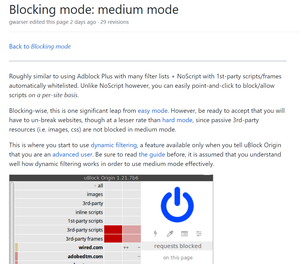
HotCakeX You asked me to show you where medium mode is. Either you didn't read the relevant Wiki section or you need it spelled out for you: https://github.com/gorhill/uBlock/wiki/Blocking-mode:-medium-mode Try reading the entire wiki and you may learn something.4.4KViews0likes12CommentsRe: blocking ads without third-party extensions.
nikitat1260 Your suggestion is a good one. My YouTube friends swear by Opera citing this reason among others. I believe Edge can ramp up features like you suggest, like giving more granular control directly from the address bar fly-out to block scripts, etc. Brave browser has incorporated some of these fairly well in some of its versions, but4.6KViews1like0Comments

Recent Blog Articles
No content to show