User Profile

amoller
Brass Contributor
Joined 7 years ago


User Widgets
Recent Discussions
Issue with Microsoft Mesh App in Teams
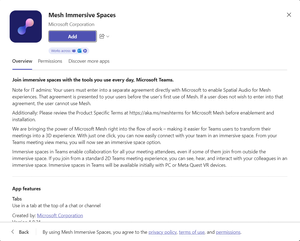
Hi Everyone, I was wondering if anyone else has been experiencing issues with adding the mesh app into Teams? When trying to add to a meeting or channel, I press add and it brings up a blank screen. This happens in the new / old windows client as well as the web app. I have no issue in accessing the mesh windows app, and have had several meetings through here, as well as on a meta quest device.LIS Database - Cannot create Emergency Address or Place
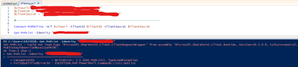
Hi All, I have been seeing a strange issue with creating Emergency Addresses and Places in Teams PowerShell. I get an unable to create location error with no real feedback as to why. I also get an error if I try to create it on the Teams admin center. This error happens 80% of the time and then magically the place is created. Any help is greatly appreciated1.1KViews0likes0CommentsContent Sharing Issue
Hi All, I use 2 devices when in a meeting, one to share the content and another to view/check the content I am sharing. Up until recently this had been working fine, however on the second device, I am no longer able to see the content being shared. It just shows my initials as if I have the camera turned off. I am using my account on both devices on the desktop app. Has there been any changes? Any help greatly appreciated.2.5KViews0likes1CommentDial Tone in Microsoft Teams Meeting
Hello Tech Community, We are currently experiencing an issue where users are hearing a dial tone in a Microsoft Teams meeting. We are currently in Islands Mode and the default chat app for Office is Skype for Business, and the users use both applications. We initially thought that the issue was due to users attempting to use call controls for Teams, therefore taking Skype into an off-hook state , causing that dial tone. However, one of our UC guys has said that this isn't in fact what is happening. When he either clicks the Teams toast or the join button from the calendar, the Teams meeting starts as usual, but Skype plays a dial tone, and he needs to exit the Skype app for the dial tone to stop. This also seems to have coincided with a recent office application update. Any help with this would be greatly appreciated. Kind Regards, Alex.Chat not present in meetings
Hi Everyone, We are currently experiencing an issue were the chat icon is not appearing in meetings for some users. These users have the correct policies applied and are recognized by the Teams client. I asked a user to collect debug logs when in the meeting, and a couple of things stood out: Conversation with id 19:meeting_YWY3YWQ4OTItNDE1NC00NDc3LWJkNmYtNzA1NDQxM2U3Njhk@thread.v2 not found and Chat panel has not been created. Reason: Chat disabled because unknown type or missing messageId Users also reported that the meeting was not showing as in progress in their calendar. They have signed out, quit the app and signed in again, however the issue was still present. Is anyone else experiencing these issues? I understand that Microsoft's servers may be under stress due to COVID-19, is this perhaps a symptom? Many Thanks, Alex.Teams Policies not Applying to Mobile Devices
Hi All, Our org has a custom app setup policy to reorder where the apps are in Teams. This policy applies without issue to the Teams Desktop client, however doesn't apply correctly to mobile devices. Is there any reason for this/any troubleshooting steps that we can follow to get this working?1.3KViews0likes1CommentTeams Candidate List
Hi All, I was wondering if anyone was aware on how to find the candidate list on Microsoft Teams? I have been using Charles and cannot search for a=candidate, as suggested in Thomas Binder's ignite session. Is anyone aware on the new process - if there is one? Many Thanks, Alex.1.5KViews0likes0CommentsParticipant Video Framing Settings
Hi All, In Teams, there are options to either "fit to frame" or "fill frame" on incoming participants video. Is there a method to assign one of these as a default setting org-wide? It is not a consistent meeting experience for users, and the movement of the camera ins't very reliable which can lead the camera wandering from side to side. I couldn't find a definitive answer to this online, and it would be great if someone could clear this up. Thanks in Advance, Alex.Solved51KViews4likes12CommentsRe: No Join Button - Teams Outlook Add-in
ChrisWebbTech Turns out that the version of Office we were using was causing the issue: Release Notes for 1902: Join Teams meetings from the Outlook Reminders dialog: When Outlook reminds users of an upcoming meeting, it will show a Join Online button if the upcoming meeting is a Teams online meeting. This is similar to the experience of joining a Skype for Business meeting from the Outlook Reminders dialog. https://docs.microsoft.com/en-us/officeupdates/semi-annual-channel-targeted-2019#version-1808-february-1230KViews0likes3CommentsRe: No Join Button - Teams Outlook Add-in
ChrisWebbTech Yes our org uses modern auth, and the teams meeting add-in shows up fine, we can schedule Teams meetings through the Outlook calendar absolutely fine. Its just purely the join button on the Outlook calendar reminder that ins't working. I have attached an image. Cheers121KViews0likes0CommentsRoom Lists - Teams Calendar
Hi All, We have an issue when trying to schedule meetings in the calendar tab of Teams. We have various room lists setup for different sites. The issue is that some of the room lists wont display the rooms in the drop down when you select the location. These lists appear fine within Outlook. Any ideas on what this might be? Thanks.29KViews0likes3CommentsRe: No Join Button - Teams Outlook Add-in
ChrisWebbTech I had 2 test users, one on islands mode and the other Teams only. I created meetings for each of the users and they both had the join online button on the calendar reminder. Just seems very strange that this is not happening for our org.121KViews0likes10Comments

Recent Blog Articles
No content to show