User Profile

Tom_Fox
Iron Contributor
Joined 7 years ago


User Widgets
Recent Discussions
Re: ExemptDomainFileTypePairsFromFileTypeDownloadWarnings policy
astee1280 I'm not familiar with Intune but found this example of multiple items in Edge policies. I hope you can work it out. Search for multiple on this page https://docs.microsoft.com/en-us/deployedge/configure-edge-with-mdm16KViews1like1CommentRe: ExemptDomainFileTypePairsFromFileTypeDownloadWarnings policy
astee1280 You need to put each file extension on a new line. In my example, this is as follows: {"file_extension": "eml", "domains": [ ".hrm.app.ourcompany.com", ".hrm.appacc.ourcompany.com", ".hrm.appdev.ourcompany.com" ] } {"file_extension": "msg", "domains": [ ".hrm.app.ourcompany.com", ".hrm.appacc.ourcompany.com", ".hrm.appdev.ourcompany.com" ] }17KViews0likes10CommentsRe: Dev channel update to 95.0.1011.1 is live
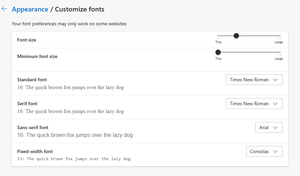
pp_e2 I haven't changed these settings at all, they are default. But they only apply to text in websites, not to the UI itself. Changing this doesn't resolve my problem. I'm typing this on an older laptop with a 1366x768 resolution. My Windows text size is set to 100%. My new laptop will arrive in the next few days with a 1920x1080 display. It will be interesting to see if I have the same issue there, and how the interface is with a high res display, and text zoom at different presets (125%, 150%) josh_bodner - Giving a child item a bigger size than it's parent is a weird UI choice for me. Can you add a UI text size slider please? I think this would be appreciated by people with very high res displays too.1.7KViews0likes1CommentRe: Dev channel update to 95.0.1011.1 is live
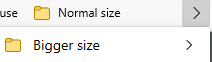
josh_bodnerNice selection of bug fixes as usual, and some great new features. But what's up with the huge text size in my Favourites the last few weeks? I was hoping that would have been fixed today. See these examples. The text size of the folders in the drop down is bigger than those on the Favourites bar, and the text size of items in the folders is also bigger than the folder names. I also left some feedback a while ago to be able to be able to Sort a Favourites folder by right clicking on it, and also if I move a Favourite's position inside a folder, the folder closes. That's quite annoying if I want to move several items, it should stay open so long as my mouse is there.9KViews2likes5CommentsRe: ExemptDomainFileTypePairsFromFileTypeDownloadWarnings policy
Hi Kelly_Y, Sorry for my late reply to this. After extensive testing, we can confirm that this policy works fine when we specify server names, but fails when we use DNS aliases. I believe this a bug. Please can you ask your Dev Team to replicate this to confirm. I tried looking in the DevTools logs when launching a download, to see if I can find a check on these rules, but didn't find anything. Can you confirm if there is some logging generated when downloading? Tom Fox17KViews0likes2CommentsExemptDomainFileTypePairsFromFileTypeDownloadWarnings policy
I am trying to configure the ExemptDomainFileTypePairsFromFileTypeDownloadWarnings policy to allow EML and MSG attachments from our HR systems to be downloaded automatically, without having to allow them. We use DNS aliases, so I have whitelisted ".hrm.app.ourcompany.com", ".hrm.appdev.ourcompany.com" and ".hrm.appacc.ourcompany.com", as I read in the documentation that you need to start with a period to match that specific entry. We don't want to whitelist our entire domain if possible, for security reasons. I have configured this through Group Policy using the example in the documentation, and it loads correctly in the edge://policy list. Its strange that "domains" and "file_extension" are swapped around, although it says OK. In edge://policy I have the following: { "domains": [ ".hrm.app.ourcompany.com", ".hrm.appacc.ourcompany.com", ".hrm.appdev.ourcompany.com" ], "file_extension": "eml" } ,{ "domains": [ ".hrm.app.ourcompany.com", ".hrm.appacc.ourcompany.com", ".hrm.appdev.ourcompany.com" ], "file_extension": "msg" } But this doesn't work, my users still receive the message that they first need to allow the file. Is there somewhere I can check the internal processing of these rules? I don't see anything in DevTools, unless I am looking in the wrong place. Has anybody successfully implemented this policy?19KViews0likes15CommentsRe: Remove unnecessary items from right-click menu in Edge
HotCakeX Instead of removing them completely, it would be better to collapse them into a "Dev Tools" flyout menu, so that people who need them (Web Developers/IT professionals like me) can easily find these tools. The Edge Team can then include even more tools here, and "normal" users will never see them, or have their menus cluttered.46KViews3likes9CommentsRe: Roadmap for PDF reader in Microsoft Edge
Aditi_Gangwar Great news to hear that you are actively working on the inbuilt PDF reader, this is one of the major blocking issues from rolling out Edge as our default browser in my company of 7000 workstations. We want to move away from Adobe Reader asap! In addition to the mentioned planned features, please can you add the following: "Rotate counterclockwise" button on the toolbar "Next/Previous page" buttons on the toolbar "Full Screen" button on the toolbar "Hand" scroll option like in Firefox/Adobe Reader The "Find" toolbar from Edge Classic The ability to sign PDF files with a digital signature "Document Properties" button like in Firefox76KViews24likes2CommentsRe: Dev channel update to 85.0.531.1 is live
josh_bodner Please can you provide some more info about your implementation of preloading. Does it only work on popular search engines, or for all websites? In my company we have hundreds of people in the field, in countries with very slow 3G/4G connections. If their browsers are constantly trying to preload content, this will saturate their already slow connection and make their browsing experience unworkable. Is there a management policy to disable this?11KViews0likes1CommentRe: Top Feedback Summary for April 28
MissyQ Great to hear that you are actively working on the PDF reader. This needs to be a key feature of Edge, with at least the same features as Edge Classic, Firefox and Chrome. Its imperative for business users to have a high quality PDF reader built into the browser, so that we don't need to use Adobe. Other missing features besides the Table of Contents include: Search menu Digital signature support - verification and signing Advanced fillable forms5.1KViews3likes1CommentRe: Provide different options for sorting favorites - Discussion
MissyQ I previously submitted feedback that you should be able to right click a folder on your Favourites Bar and sort your favourites there as well. You can drag favourites inside a folder on the Favourites Bar, but after doing so, the folder closes. It would be better if it would stay open so that you could drag multiple items if required.3.5KViews2likes0CommentsRe: UI issue with lockdown policies
Deleted It's not possible to use the inbuilt feedback tool on this popup menu unfortunately, it closes when you press the Settings button. The hotkey for the feedback tool doesn't work either. I see the same popup window on every website that I visit, including those I am certain do not implement Flash, bluetooth, notifications etc... So this confirms my suspicion that the entire content policy is being read and displayed, and not showing only the elements that are actively being blocked or allowed.1.3KViews0likes0CommentsUI issue with lockdown policies
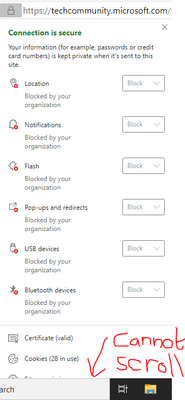
I manage browser security (amongst many other things) at a company with 8000 workstations. Because of several missing Enterprise features, we haven't rolled out Edge yet. I have enabled GPO Policies to block as many features as possible for standard websites (cookies, popups, tracking, location etc), whilst white-listing our internal domain. The idea here is to prevent malicious sites from hijacking the browser, whilst allowing all internal apps without our users needing to accept things. The problem here is that by default all of these restrictions are shown in the "View Site Information" page, even when the site is not actively using them. This is a big UI problem for screens with a standard resolution like 1366x768, because the bottom half of the window is cut off and inaccessible. So I have several questions here: why are all of the policies shown, even if they are not in use by the page? can we add an expand/collapse button to this list, if it contains more than X elements? Ideally this should be based on your screen resolution, so that 1366x768 shows 2 items, where as 1600x900 shows 5 See the below screenshot as case in point. I very much doubt this forum is trying to use all of these permissions... 1366x768 resolution 1600x900 resolution1.4KViews3likes2CommentsRe: [SOLVED] Bug: Send Feedback function inside Edge insider can't take screenshot - Black screenshot
HotCakeX Thanks for mentioning me on this, I also didn't think of that! I hope it will be easy to add an exception here, so that Sending Feedback works even if you choose Deny for all other sites?3.2KViews0likes1CommentRe: Dev channel update to 82.0.453.2 is live
LuKePicci That's a big i18n fail there, how did that ever pass internal Microsoft testing? josh_bodner Can you make an internal ticket to get the layout of this fixed please? I'm sure a lot of other languages will also fail i18n here....4.1KViews0likes1CommentRe: Creating a Beautiful, Informative and Productive New Tab Experience
MissyQ Is great that you are committed to providing a quality Azure Enterprise NTP, but please don't forget about those who are On-Prem. At my company we only allow people to read the news during their lunch break, so we really need a management policy to lock down the NTP view. We don't mind if people have background images, but we need to disable Content. This is one of the blocking issues that is stopping us from rolling out Edge. It would also be nice if we could display a custom background, or even a slideshow of images stored locally or on a network folder. +1 for the ability to choose how many favourite links you want. I could probably fit 10x5 links on my 1080p screen. A single row of 7/8 icons isn't enough13KViews0likes4CommentsRe: Dev channel update to 82.0.439.1 is live
Tom_Fox So I did a full uninstall, wipe of AppData profiles, restart, reinstall from latest installer and I still have the issue on my VM. I also installed a fresh copy of Dev onto my work laptop, which didn't have it before, and there I have the same issue. So it's partially fixed, but not completely. I will disable this feature anyway when I roll out Edge in my company, as I want all issues to be reported to our IT support.6.2KViews0likes1Comment

Recent Blog Articles
No content to show