User Profile

mahipundir
Copper Contributor
Joined 7 years ago


User Widgets
Recent Discussions
MS form record content and replied to that content to sharepoint list
Hi fellow humans, I'm hoping if someone can light me in the right direction. I have a Microsoft form that is accessible only for our members, which users can fillup when required. and it goes for approval to the creator of the form. right now it records those content to SharePoint list. what I would like if the creator approves it and leaves a comment, I would like that content to go to same SharePoint list on same line. Is that something possible ..? just trying to automate so the creator doesn't have to go and leave comment to sharepoint list. I hope someone can point me into right place. Thank you all Be safeSolved873Views0likes2CommentsUnable to create alias on Shared Mailbox in O365 after hybrid join
Hi, Looking for the best practice on how to add alias, before joining to hybrid I could add alias for single or shared account in O365/Exchange online but after hybrid join, I can't see a way to add alias for shared account in O365. Each time I add alias for shared account in O365/Exchange i gets a error says "We couldn't save your changes. Please try again." If I would like to add alias for user account, I cannot do it via the O365/Exchange online, I have to go to local AD>User>user attribute>Proxy address> smtp:mailto:email address removed for privacy reasons that's how I can get alias for user accounts I can create new users or shared account and add alias to them but can't do with already existed shared account. My environment: One AD Forest with One Domain (local) 1 O365 Tenant with 25 domains There isn't on-premise Exchange server. Does anyone have any suggestions on how to add an alias to shared account in o365 if we have Hybrid join.? Many thanksMerge AD admin to AAD global admin
Dear people from cloud, I'm doing a hybrid deployment, bringing AD & AAD together Have few questions and hoping if someone can share some knowledge. Merging AD to AAD using UPN which is working prefect for users, I can then use either mailto:ad@local.domain or mailto:email address removed for privacy reasons to login to devices. Problem I'm having is whenever I'm merging AD admin accounts to AAD changing UPN in AD and then forcing sync to happen using powershell or even without force syn it creates new account in AAD for the AD admins or users in AD admin groups. What is the best way.? or are there any standard practices I can follow.? Thanks in advance.Solved- 644Views0likes0Comments
Excel on web Help
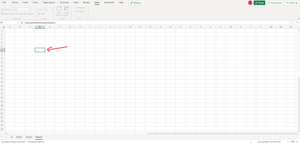
Hi All, I hope everyone doing great, I'm having a odd issue where I can not see what I'm tying in any cell onlye once I press enter or data can be seen into top bar (please see the attachment), I can see everything fine while using excel app but as soon as I got to excel online I can't while typing, checked fonts, worksheet protection. wondering if someone had same issue in the past. Thanks in advanced.695Views0likes2CommentsPowershell Script to Gather PC hardware details from existing Computers
Hi All, I was hoping if someone has done this scenario before. I'm looking for a PowerShell script to gather PC Hardware details in the local network. it's Windows 7,10 and not in DC. Details I would like to get from each PC is 1. RAM (name and size) 2. CPU (name and size) 3. HDD (name and size) 4. Local User profiles Is it something possible (logically I can't see how it's possible) as PC's are not in a domain. Any suggestions would helpful Love & Peace My fellow humans.1.9KViews0likes1CommentMoving Row to anther sheet automatically
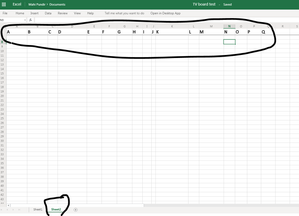
Yeallow Dear Humans, I'm looking for some advice on how to move the whole row to a new sheet automatically, I have a worksheet in excel web. and 18 Row A -Q header stays in freeze property (please see the attachment) What I would like for example if something is done or I change something that row moves to sheet 2 Any suggestion will be very helpfull Thank you788Views0likes1CommentDelete folder x
Hello fellow humans, I'm using this script to delete folders which are older than 15days or 5 days. # $limit = (Get-Date).AddDays(-15) $path = "xxxx\path" # Delete files older than the $limit. Get-ChildItem -Path $path -Recurse -Force | Where-Object { !$_.PSIsContainer -and $_.CreationTime -lt $limit } | Remove-Item -Force # Delete any empty directories left behind after deleting the old files. Get-ChildItem -Path $path -Recurse -Force | Where-Object { $_.PSIsContainer -and (Get-ChildItem -Path $_.FullName -Recurse -Force | Where-Object { !$_.PSIsContainer }) -eq $null } | Remove-Item -Force -Recurse But it doesn't work always, and I couldn't figure out what's wrong. is there any other way I can delete certain folders for example if there are more then 5 folders..? or is it best to delete which one is older..? I do a backup via PS script which works great, but when I'm using this script to delete older backups some reason it doesn't work always. is there any alternative way to do this.? Kind RegardsSolved1.1KViews0likes1CommentPowerShell backup Script Issue
Dear People, I'm struggling with a strange issue and I can't see what's wrong and hoping if someone can put some lights. I have few PowerShell scripts to download data from a web server, the problems I'm having. I'm using SSH key and stored in the same machine. Each time when I tried to run PowerShell scripts it comes up with the error says (doesn't let me log in) "error connecting" Each time when I'm using the same user credentials via GIT BASH it works fine (lets me log in) from the same PC Using the same user credentials via Filezilla (sftp) doesn't let me connect. Problem: Powershell can't connect so can't download from the path. The script I'm using # defines all variables (we don't acctually need the user and password as we are using a SSH key, but it prompts for user and password despite that, so i left it here just for the sake of it) $today = get-date -Format dd-MM-yyyy $password = "PASSWORD" $User = "USERNAME" $computername = "DOmain.com" $website = "WEBSITE" $key = 'C:\User\Admin\.ssh\exported-openssh' $source = "/home/USERNAME/www/domain.com/backup/$today" $port = "1000" # ---------------------------- Shouldn't be a need to edit code beyond this point ------------------------- $year = get-date -Format yyyy $localbackup = "E:\Backups\$year\Websites\$website\" $localreport = "E:\Backups\$year\Reports\" $path = "E:\Backups\$year\Reports\$today" $errorlog = "E:\Backups\$year\Reports\$today\Error-logs" $localreportfile = "E:\Backups\$year\Reports\$today\$today-$website.txt" $destination = "E:\Backups\$year\Websites\$website\$today" $timestamp1 = get-date # compiles and automates credentials pass $secpasswd = ConvertTo-SecureString $password -AsPlainText -Force $Credentials = New-Object System.Management.Automation.PSCredential($User, $secpasswd) # session connection setup $session = New-SFTPSession -ComputerName $ComputerName -Port $port -Credential $Credentials -keyfile $key # -------------------------------------- website Backup --------------------------------------------------- # creates a local directory for reports files If(!(test-path $path)) { New-Item -path $localreport -ItemType directory -Name $today } Add-Content $localreportfile "$timestamp1 - Backup Started." # Crates a local directory for backup files If(!(test-path $destination)) { New-Item -path $localbackup -ItemType directory -Name $today } Add-Content $localreportfile "Files Copied:" Try { # download todays website backup and sends to local directory Get-SFTPChildItem $session -Path $source -Recursive | ForEach-Object{ if ($_.Fullname -like '*') { Get-SFTPFile $session -RemoteFile $_.FullName -LocalPath $destination -Overwrite } write-output $_.FullName | Out-File -FilePath $localreportfile -Append } # Remove website File from SFTP Server (WARNING this will delete the server files) #Remove-SftpItem -session $session -path $source -Force -Verbose $timestamp2 = get-date Add-Content $localreportfile "$timestamp2 - Backup Completed." } Catch { If(!(test-path $errorlog)) { New-Item -path $path -ItemType directory -Name "Error-logs" } Add-Content "$errorlog\$today-error-$website.txt" "webserver-backup-$website.ps1 failed to run" remove-item "$localreportfile" } # -------------------------------------- End session ------------------------------------------------------- Remove-SftpSession $session -verbose I hope to find the correct answer. Many thanks771Views0likes0CommentsRe: Documenting office 365 structure and record changes
Hi adam deltinger thanks for your input, I did actually and I can see lots of stuff. Is there any way I can automatice some of the reports whenever there are changes and add those changes to the master record file or something like that ..? Thanks Mahi1KViews0likes1CommentDocumenting office 365 structure and record changes
Namaste All, I'm using office 365 with 45+ users. I was wondering if there is any automatic way to document and record any kind of changes users or admin does, so far I was doing it manually and it's time-consuming and doesn't cover everything. Documentation (examples) Users details Shared account details and who have access Alais Groups Distribution list etc etc I'm sure people do keep documents, and there would be a way. I would be very thankful if someone can direct me into right direction. Regards MahiSolved1.1KViews0likes3Comments
Recent Blog Articles
No content to show