User Profile

Tanaka_Jimha
Former Employee
Joined 7 years ago


User Widgets
Recent Discussions
Re: App does not launch immediately after installation but after a 40 mins delay it launches again
Hi Mo_Velayati, Does your CI/CD pipeline also install the app on users' machines, and how does it do so? Or is the installation driven by the end user. I'm trying to understand the specific scenario in which the app launch is delayed. Thanks, Tanaka2.8KViews0likes2CommentsRe: App does not launch immediately after installation but after a 40 mins delay it launches again
Hi Mo_Velayati Is the delay in launching the app happening only after the first installation/deployment from the CI/CD pipeline or does it take place for all launches other users try to make after the app is initially installed? Cheers, Tanaka2.8KViews0likes4CommentsRe: Appxmanifest Identity Publisher contains ST=Oregon instead of S=Oregon
Hi dmondou , Did signing fail with ST=Oregon? I've added this request to our backlog, so that using ST=Oregon would be supported by default. I'm sorry it doesn't work currently and it's causing issues for you. Thanks, Tanaka2.6KViews0likes1CommentRe: Error parsing app package
BrianShekkt Is the download page publicly available for our team to investigate? If it isn't can you please file an item in Feedback Hub (Win + F) while reproducing the issue. Please file it under the category Apps > AppInstaller. Please also attach a copy of your .appinstaller file + package, if possible. Thanks, Tanaka30KViews0likes0CommentsRe: Error parsing app package
Hi BrianShekkt, Does this fail when clicking on the .appinstaller uri on a webpage? Can you please share what your download uri looks like on the page. Also, there's a known App Installer install/caching issue which can be fixed by a restart, please try and see if a restart of your machine fixes the issue. Cheers, Tanaka30KViews0likes3CommentsRe: Appxmanifest Identity Publisher contains ST=Oregon instead of S=Oregon
Hi dmondou Did you confirm that signing fails when you set S=Oregon in the manifest? I chatted with the team and they said the validation uses this CertNameToStr function - CertNameToStrA function (wincrypt.h) - Win32 apps | Microsoft Docs and it says "The string representation follows the distinguished name specifications in RFC 1779 except for the deviations described in the following list: The X.500 key name for stateOrProvinceName (2.5.4.8) OID is "S". This value is different from the RFC 1779 X.500 key name ("ST"). " Unfortunately it looks like ST=Oregon will not work, and you'll need a subject name with S=Oregon.2.7KViews0likes3CommentsRe: Appxmanifest Identity Publisher contains ST=Oregon instead of S=Oregon
Hi dmondou Can you try passing in the /nv flag to MakeAppx when packaging. This should skip semantic validation. You'll have to verify that your package installs successfully after it's created. Cheers, Tanaka2.9KViews0likes8CommentsRe: Auto-update an app package with a Windows service
Hi adelkeita Installing a package with a Windows service using the App Installer file is supported. Restarting your machine may fix the error. To help us investigate the issue, can you please make a Feedback Hub submission in the Developer Platform > App Deployment category, while reproducing the error. And then can you please post the link to your Feedback Hub submission on here when you're done. Thanks, Tanaka4.1KViews1like6CommentsRe: Customizing Visual Studio MSIX packaging project output
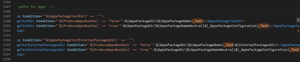
Hi MattGregory , The output directory of the packages is defined in the Microsoft.AppxPackage.Targets file at C:\Program Files (x86)\Microsoft Visual Studio\2019\Enterprise\MSBuild\Microsoft\VisualStudio\v16.0\AppxPackage (depending on your version of Visual Studio). If you want to remove the "_Test" suffix you can modify the lines defining the output directory. In my file it was around line 3190 - 3196: To modify the output html file, modify the index.template.html file in the "Landing" subdirectory - C:\Program Files (x86)\Microsoft Visual Studio\2019\Enterprise\MSBuild\Microsoft\VisualStudio\v16.0\AppxPackage\Landing (depending on VS version). Cheers, Tanaka2.5KViews0likes0CommentsRe: UWP web distribution behind AAD auth
Hi JoshKBCCG You're correct - the problem is that App Installer is making its own auth request without the inherited web auth tokens. Sending authenticated requests is currently not supported today but this is an item in our backlog and we're working to address this issue. Cheers, Tanaka1.7KViews1like1CommentRe: MSIX - Licensing
Hi DS2803, 1 - No there is no licensing constraint around MSIX. Here's some more info on supported platforms - https://docs.microsoft.com/en-us/windows/msix/supported-platforms. 2 - There is no licensing constraint if you use MSIX app attach on Windows 10 2004. Cheers, Tanaka2.9KViews0likes0CommentsRe: Write to non virtualized %APPDATA% location from MSIX installed binary
Hi davidanthoff, Yes, you can request approval when submitting your package and explain why Julia needs it and is in the same category as Python. The process is outlined here - https://docs.microsoft.com/en-us/windows/uwp/packaging/app-capability-declarations#restricted-capabilities. You can also get approval before you're submitting your app which is probably the better option in your case, the page says "To do so, visit the Windows Developer support page. Select Developer support topic Dashboard issue, Issue Type App submissions, and Subcategory Other. Then describe how you are using the capability and why it is necessary for your product. If you do not provide all the information necessary, your request will be denied. You may also be asked to provide more information. Note that this process typically takes 5 business days or longer, so please submit your request well in advance." Cheers, Tanaka2KViews0likes0CommentsRe: Support for Windows services?
Hi JeremyTellier, There is an alternative approval request process noted on the page that you can use (without making the submission). In your case you'd need to state that you're trying to submit a package with a service: ".. you must request approval in advance rather than providing info on the Submission options page. To do so, visit the Windows Developer support page. Select Developer support topic Dashboard issue, Issue Type App submissions, and Subcategory Other. Then describe how you are using the capability and why it is necessary for your product. If you do not provide all the information necessary, your request will be denied. You may also be asked to provide more information. Note that this process typically takes 5 business days or longer, so please submit your request well in advance. You may also use this method of requesting approval (rather than providing this info during your submission), whether or not you're using a development sandbox, if you prefer to confirm that you are approved to use a restricted capability before you start your submission." https://docs.microsoft.com/en-us/windows/uwp/packaging/app-capability-declarations#restricted-capabilities Cheers, Tanaka3KViews1like0Comments

Recent Blog Articles
No content to show