User Profile

Ashish_Arya
Brass Contributor
Joined 7 years ago


User Widgets
Recent Discussions
Parameter is incorrect error at ESP phase of Autopilot device preparation policy (Autopilot V2)
Hi Team, I am testing the Windows autopilot device preparation profile (Autopilot V2). Here, I need to rename the device while it is enrolling to the Intune (during ESP). So, I created a script that has below command to rename the device and rebooting it. Rename-Computer -NewName $newname -ErrorAction 'Stop' -ErrorVariable err -Restart -Force The issue I am facing now is that, when the device is at ESP, it runs the script to rename the device and also it restart the device. But after restart it does not complete the device preparation set up and s an shows an error screen called with message "Parameter is incorrect" and after clicking on OK, I get to see the login screen. After logging in, I am able to use my machine fine and the device is also renamed as per my organization standards. Does anyone also have faced this kind of issue while testing the Autopilot V2 with reboot script at ESP. Regards, Ashish AryaHow to reduce the script execution time to shut down the unused Hostpool AVDs
Hi Team, Below is the attached script which I am using to shut down the unsed AVDs (which are not in deallocated state) to save some cost. The issue with this script is that it is taking lot of time for its execution. I think the only issue is because Get-AzWvdSessionHost cmdlet from the Az.DesktopVirtualization PowerShell module does not have any property related to PowerState of the VM. This is why I am forced to use the Get-AzVm cmdlet from the Az PowerShell module to get each AVDs power state and this is what I think could be the reason of its slowness. I am unable to fix the script and need help to optimize this script. # Displaying the script execution start time $ScriptStartTime = Get-Date -Format "dd-MM-yyyy hh:mm:ss" Write-Output "`n##########################################" Write-Output "Script start time: $ScriptStartTime" Write-Output "##########################################`n" # Defining the array of hostpool objects $allHostPools = @( [pscustomobject]@{ HostPool = "HostPool Name" HostPoolRG = "Hostpool resource group name" } ) # Looping through all the hostpools For ($i = 0; $i -lt $allHostPools.Length; $i++) { $pool = $allHostPools[$i].HostPool $poolrg = $allHostPools[$i].HostPoolRG Write-Output "##################################################" Write-Output "HostPool Name : $pool" Write-output "HostPool Resource group : $poolRg" Write-Output "##################################################`n" # Get the Session Hosts which are in Drain Mode off and does not have any active session try { $runningSessionHosts = Get-AzWvdSessionHost -ErrorAction 'Stop' -HostPoolName $Pool -ResourceGroupName $PoolRg | ` Where-Object {($_.AllowNewSession -eq $true) -and ($_.Session -eq 0) } | ` Sort-Object { [int]($_.Name.Split("/")[1] -replace '.*-(\d+)', '$1')} } catch { $ErrorMessage = $_.Exception.message Write-Error ("Error getting a list of running session hosts: " + $ErrorMessage) Break } #Evaluate the list of running session hosts to shutdown the VM which are not in the deallocated state $Count = 0 Foreach ($sessionHost in $runningSessionHosts) { $Count = $Count + 1 $sessionHostName = ($sessionHost).name.split('/')[1] $VM = Get-Azvm -Name $sessionHostName -Status -ErrorAction Stop if ($VM.PowerState -ne "VM deallocated") { Write-Output "$Count. The session host $sessionHostName does not have an active session and also in running state." Try { # Stop the VM Write-Output " Hence, stopping the $sessionHostName session host..." $VM | Stop-AzVM -ErrorAction 'Stop' -Force -NoWait | Out-Null Write-Output " The $sessionHostName session host was stopped successfully.`n" } Catch { $ErrorMessage = $_.Exception.message Write-Error ("Error stopping the VM: " + $ErrorMessage) Break } } else { write-Output "$Count. The session host $sessionHostName is already in shut down state.`n" } } } # Displaying the script end time $ScriptEndTime = Get-Date -Format "dd-MM-yyyy hh:mm:ss" Write-Output "`n= = = = = = = = = = = = = = = = = = = = =" Write-Output "Script end time : $ScriptEndTime" Write-Output "= = = = = = = = = = = = = = = = = = = = =`n"586Views0likes1CommentFacing issues while using ImportExcel PowerShell module
Hi All, I am trying to export Azure AD group member details to a single excel workbook where every group member details should be mentioned in a separate worksheet. For example, group1 worksheet should contains members of one AAD group and group2 worksheet contains members of another AAD group and so on so forth. For this I am using two PowerShell modules: Microsoft.Graph and ImportExcel. The issue is that once 34 worksheets are added to the excel workbook, I get this error : InvocationInfo : MyCommand : Add-ExcelTable ScriptLineNumber : 428 OffsetInLine : 39 HistoryId : 122 ScriptName : C:\Users\ashish\Documents\PowerShell\Modules\ImportExcel\7.8.4\Public\Export-Excel.ps1 Line : Add-ExcelTable -Range $ws.Cells[$dataRange] -TableName $TableName -TableStyle $TableStyle -TableTotalSettings $TableTotalSettings PositionMessage : At C:\Users\ashish\Documents\PowerShell\Modules\ImportExcel\7.8.4\Public\Export-Excel.ps1:428 char:39 + Add-ExcelTable -Range $ws.Cells[$dataRange] -TableNam … + ~~~~~~~~~~~~~~~~~~~~~ =============================== Below is my code for reference. param( [Parameter(Mandatory, HelpMessage = "Enter the pattern for filtering groups" )] $Pattern ) # Excel file path $ExcelFilePath = "$($PSScriptroot)\GroupMembers.xlsx" # Azure AD App details $ApplicationId = $Env:Azure_CLIENT_ID $TenantID = $Env:Azure_TENANT_ID $ClientSecret = $Env:Azure_CLIENT_SECRET | ConvertTo-SecureString -AsPlainText -Force $ClientSecretCredential = New-Object -TypeName 'System.Management.Automation.PSCredential' -ArgumentList $ApplicationId, $ClientSecret # Connecting to Microsoft Graph Connect-MgGraph -TenantId $TenantID -ClientSecretCredential $ClientSecretCredential | Out-Null # Getting all the groups with displayname starting with the provided pattern $Groups = Get-MgGroup -filter "startswith(displayname,'$Pattern')" -Top 2000 # Looping through all the filtered groups and exporting their members to the csv files $Count = 0 foreach ($Group in $Groups) { $Count += 1 $WorkSheetName = "Group$($Count)" Try{ (Get-MgGroupMember -GroupId $Group.id -Top 150).AdditionalProperties | ` Select-Object @{n = "DisplayName"; e = { $_.displayName } }, @{n = "UserprincipalName"; e = { $_.userPrincipalName } } |` Export-Excel -path $ExcelFilePath -WorksheetName $WorkSheetName -Append -TableStyle 'Medium16' ` -Title $Group.Displayname -TitleSize 14 -TitleBold } Catch { Write-Host $_.Exception.Message -ForegroundColor 'Red' Break } } Any help would be appreciated. Regards, Ashish AryaNeed suggestion on learning C# for AZ-204 exam
Hi All, I am a sysadmin and I am looking to start the certification track of Azure Developer. I code in PowerShell and also know basics of C# programming. Can anyone suggestion any good resource to learn C# specific to Azure Developer (AZ-204) certification exam. Regards, Ashish Arya1.3KViews0likes2CommentsSuggestion for Azure Developer (AZ-204) Certification exam
Hi All, I am new to Azure and looking to get certified in the Azure Developer exam. I am not a developer but a good PowerShell scripter and would like to know if C# programming is required for AZ-204 exam or not. If yes, then need suggestions on where to get C# programming skills specific to AZ-204 exam. Any help would be appreciated. Regards, Ashish AryaAzure Storage Static website is not accessible on Primary Endpoint URL
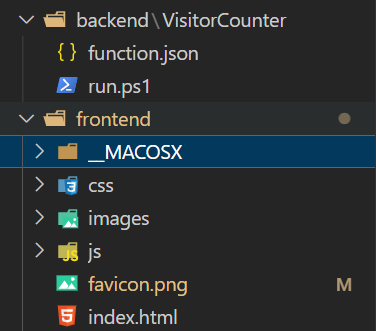
Hi All, Trying to set up a static website on an azure storage account and unfortunately it is not diplaying the website page and gives me the below error when trying to access it with the primary endpoint URL. The requested content does not exist. HttpStatusCode: 404 Below is the project structure looks like - However it is accessible when I enter the primary endpoint URL as primaryendpoint/$web/frontend/index.html Can anyone tell me what should I do in the static website to show the website page while accessing it using the primary endpoint instead of typing it with the $web/frontend/index.html. Regards, Ashish Arya1.6KViews1like1CommentRe: Edge Setting Sites to open when the browser starts not working
Rudy_Ooms_MVPIt works when we are pushing the policy in device context but post deployment, user is unable to add any other URLs along with the one we are pushing from Intune. Hence, I was trying to push the same with user context but it is not working as expected. The intent is to make sure user is able to add or can change the URL as per his choice.4.4KViews1like0CommentsEdge Setting Sites to open when the browser starts not working
Hi, I am trying to push an MS Edge Admx template configuration profile where I am pushing the below settings: 1. Action on StartUp setting (user can override) 2. Sites to open when the browser starts (user can override) 3. Show HomeButton (user can override) 4. Setting HomePage location (user can override) These Edge policies are just to make sure that the home button is enabled, set the homepage location and Edge can launch some websites on startup. Although I can see the policies getting successfully deployed from Intune and while accessing the edge://policy page I can see the policies are getting applied correctly but when I am going to the Edge settings ==> Start, home, and new tabs, it shows me the attached screenshot. If you see the screenshot, the Sites to open when the browser starts (user can override) setting is not getting applied correctly. The intent is to allow the users to set the starting pages as per their choice along with the web page we have set from Intune. Rest policies are working correctly. Any suggestion would be appreciated. Regards, Ashish Arya4.7KViews0likes2CommentsAutomate the configuring of RDP Feed URL in Remote Desktop Client for AVD
Hi Team, I would like to know if there is a way we can use to automate the configuring of the RDP feed URL (https://rdweb.wvd.microsoft.com/api/arm/feeddiscovery) for Azure Virtual Desktop (AVD). Here the issue is that user has to manually add their email address or subscribe to the workspace URL in order to see their remote apps and desktops. The client is requesting if there is any setting that can be done so that whenever users launch the Remote Desktop Client for AVD, the concerned apps and desktops will be available for them and they do not have to subscribe manually. We are using devices managed via both Onprem AD as well as Intune. Regards, Ashish Arya7.5KViews1like1CommentCosting involved for Azure AD app registration and usage
Hi, I need to create an Azure AD app whose details will be used to change the primary usernames of Intune devices by running a PowerShell script daily. Does anyone have any idea if this will include costing as it takes 20-30 mins for the script to update the primary usernames of 1500+ devices in the tenant? Regards, Ashish Arya1.5KViews0likes2CommentsRe: PowerShell script to change font of office apps
Jason275: Jason I have been able to achieve this by replacing my custom Normal.dotm file (stored at the Azure blob) with the default Normal.dotm file located at %appdata%\Microsoft\Templates (the default location of word and Outlook templates). Below are the steps that I took for changing fonts for Word and same can be tried for Outlook as well. 1. I pushed out a PS script (Schdtask) from Intune to create a scheduled task on all Intune devices. 2. This task will run another PS script(LogonScript) stored at the same Azure blob whenever there is a user login. 2. This LogonScript will first remove the default Normal.dotm file. 3. Then it will then connect to the same Azure blob and get our custom Normal.dotm file and place it under the same default template location. I am sure this is not the best solution to go with but this can be tried if you have no other choice. I will also be keen to get any other solution for this. Regards, Ashish Arya32KViews0likes15CommentsRe: With Graph API we are only getting 1000 devices
Hi Rob, Below is the edited Get-Win10IntuneManagedDevice function: function Get-Win10IntuneManagedDevice { <# .SYNOPSIS This gets information on Intune managed devices .DESCRIPTION This gets information on Intune managed devices .EXAMPLE Get-Win10IntuneManagedDevice .NOTES NAME: Get-Win10IntuneManagedDevice #> [cmdletbinding()] param ( [parameter(Mandatory=$false)] [ValidateNotNullOrEmpty()] [string]$deviceName ) $graphApiVersion = "beta" try { if($deviceName){ $Resource = "deviceManagement/managedDevices?`$filter=deviceName eq '$deviceName'" $uri = "https://graph.microsoft.com/$graphApiVersion/$($Resource)" (Invoke-RestMethod -Uri $uri -Headers $authToken -Method Get).value } else { $Resource = "deviceManagement/managedDevices?`$filter=(((deviceType%20eq%20%27desktop%27)%20or%20(deviceType%20eq%20%27windowsRT%27)%20or%20(deviceType%20eq%20%27winEmbedded%27)%20or%20(deviceType%20eq%20%27surfaceHub%27)))" $uri = "https://graph.microsoft.com/$graphApiVersion/$($Resource)" $DevicesResponse = (Invoke-RestMethod -Uri $uri -Headers $authToken -Method Get) $Devices = $DevicesResponse.value $DevicesNextLink = $DevicesResponse."@odata.nextLink" while ($DevicesNextLink -ne $null){ $DevicesResponse = (Invoke-RestMethod -Uri $DevicesNextLink -Headers $authToken -Method Get) $DevicesNextLink = $DevicesResponse."@odata.nextLink" $Devices += $DevicesResponse.value } return $Devices } } catch { $ex = $_.Exception $errorResponse = $ex.Response.GetResponseStream() $reader = New-Object System.IO.StreamReader($errorResponse) $reader.BaseStream.Position = 0 $reader.DiscardBufferedData() $responseBody = $reader.ReadToEnd(); Write-Host "Response content:`n$responseBody" -f Red Write-Error "Request to $Uri failed with HTTP Status $($ex.Response.StatusCode) $($ex.Response.StatusDescription)" throw "Get-IntuneManagedDevices error" } }8.6KViews1like4CommentsRe: With Graph API we are only getting 1000 devices
Thanks a lot Rudy_Ooms_MVP for your reply. This has fixed my issue. Now I am able to get the other devices as well. Below if the code which I added to script - $DevicesResponse = (Invoke-RestMethod -Uri $uri -Headers $authToken -Method Get) $Devices = $DevicesResponse.value $DevicesNextLink = $DevicesResponse."@odata.nextLink" while ($DevicesNextLink -ne $null){ $DevicesResponse = (Invoke-RestMethod -Uri $DevicesNextLink -Headers $authToken -Method Get) $DevicesNextLink = $DevicesResponse."@odata.nextLink" $Devices += $DevicesResponse.value } return $Devices Below is the script for reference: https://github.com/microsoftgraph/powershell-intune-samples/blob/master/Paging/ManagedDevices_Get_Paging.ps15.5KViews0likes0CommentsRe: With Graph API we are only getting 1000 devices
pvanberlo : Thanks a lot for your reply. I have tried modifying the script and now I am getting the other devices as well. But can you help me in understanding what does the value mean for the $resource variable. $Resource = "deviceManagement/managedDevices?`$filter=(((deviceType%20eq%20%27desktop%27)%20or%20(deviceType%20eq%20%27windowsRT%27)%20or%20(deviceType%20eq%20%27winEmbedded%27)%20or%20(deviceType%20eq%20%27surfaceHub%27)))"9.2KViews0likes8CommentsWith Graph API we are only getting 1000 devices
HI Team, We are using the below PowerShell script to change the Primary user of a device by checking the last logged in userid. Below is the github repo link which holds this PowerShell script and also the link of an article about the explanation of this script - https://raw.githubusercontent.com/svdbusse/IntuneScripts/master/PrimaryUser/Set-PrimaryUserfromLastLogIn.ps1 https://svdbusse.github.io/SemiAnnualChat/2020/03/21/Changing-Intune-Primary-User-To-Last-Logged-On-User.html The problem now is that we are only able to get 1000 devices in the $Devices variable in the above mentioned script and we have around 2000 devices so 1000 more devices are not getting fetched by this script. Also this script always get the device in the same pattern i.e.. if I run the script today and tomorrow then the devices will show the same pattern that is also the reason the rest 1000 devices are not getting fetched. Any solution to this issue will be a great help for me. Regards, Ashish AryaSolved

Groups
All things Azure, Dev and AI
Learn Azure, Dev, AI & more from seasoned pros building real-world solutions dailyAnalytics with Indira
This learning room will help learners prepare for AI 900 Azure AI Fundamentals exam and also learn Power BI and Microsoft Fabric. I will be running some Power BI classes and will share some of the Microsoft Fabric concepts for users to understand. I will also be sharing some Azure AI content here.Latest Activity: Nov 17, 2025
Azure Cloud Commanders
A collaborative space for sharing knowledge, hosting sessions, and exploring Microsoft Azure from Architecture through to Administrator.Latest Activity: Dec 01, 2025
Microsoft Tech Talks
Microsoft Tech Talks: A dynamic learning hub for bootcamps, online sessions & training, empowering learners with cutting-edge tech knowledge!Latest Activity: Oct 25, 2025
Modern Development with Azure Integration and AI
Learn how Azure supports Modern Application development, within the Microsoft Stack, with AI and cutting edge integration services.Latest Activity: Dec 03, 2025Recent Blog Articles
No content to show