User Profile

Mtollex70
Brass Contributor
Joined 7 years ago


User Widgets
Recent Discussions
Re: AVD Agent 1.0.4574.900_release does not work with remote apps
We also have an Severity A case going. And yes, client 3004 was the "solution" for us too. Also downgraded the agent on the hosts to 1.0.4230.1600. One of our customers that had major problems yesterday, now reports that it works for them with latest client... other customers still have major issues and we downgrade their clients to 3004 to get them in. Or use the webclient.2.4KViews0likes0CommentsRe: AVD Agent 1.0.4574.900_release does not work with remote apps
We see this exact problem for multiple deployments now. Agent version is 1.0.4452.2100, and client is latest 3130. Works intermittently, users need to keep logging out and in again, and just hopes that it works.. Any new info here?2.5KViews0likes2CommentsRemote App icon on taskbar wrong
Hi! I have a customer who wants a different icon for Microsoft Edge running as Remote App than the local Edge. This is easy to change in the portal and the new icon is showing correct in the Remote App Client and on the start menu. But, when started, the icon showing for the Remote App on the local taskbar, is still the old original Edge icon. Is it possible to change this behaviour? Customer has the newest Remote App Client version (2851) and updated Win10 local pc's1.3KViews0likes0CommentsRe: Traffic path / AVD gateways
NKC25 Thanks! This was just what i was looking for 🙂 You dont happen to have a list over all the codes for the different gateway regions? You know, WEU is West Europe, NOE is Norway East etc. I see some users are connecting through regions i cant figure out where is..7.5KViews0likes2CommentsTraffic path / AVD gateways
Is it possible to see somewhere which AVD Gateway the clients are going through? We have a problem with very high RTTs, we're talking 200-400ms reported by Azure Monitor. Clients are in Norway, hosts in the Netherlands. Traffic should be going through the Norway gateways, but how can we know thats actually the case? Our customer are experiencing lots of disconnects, at random times, random hosts and random users, maybe because of this.Solved7.8KViews0likes6CommentsRe: Start OneDrive when using a RemoteApp in WVD
I even had a deployment for a customer with two hosts, Onedrive updated 21. juni on one of them, 22. juni on the other. The first was installed in Program Files, the second in Program Files (X86). Crazy!! Both servers from same image.14KViews0likes1CommentGet Calculator back
I have accidentally removed the Windows Calculator from my image, using the virtual desktop optimization tool. How do i get it back in my image and hosts, for all users? I can manually install it, after enabling the right services and logging in to the store as a user, but then the calculator is only available for that user. Need some help 🙂8.4KViews0likes1CommentHow to troubleshoot input delay
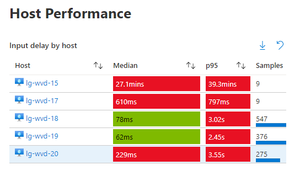
How do i go about troubleshooting input delay by host, user input delay and so forth? Im using Azure Monitoring for WVD, and one deployment are suddenly showing very high values for the different input delay values. I've tried rolling out new hosts, but seems it didnt help, and the customer are complaining about slow performance. See my picture. I would also like to find info on what the different parameters are and what the normal values would be..2.4KViews0likes0CommentsLocation in browser
Hi! I wonder if anyone have a way of change the OS/browser location so that Edge searches returns results from a chosen region? We have several WVD deployments in West Europe, but we and the customers are located in Norway. We need Edge to return results relevant to Norwegian users, not results relevant to users in Amsterdam.. I know it can be done manually for each users if they log on to Edge, but a solution with a GPO would be preferrable as there are lots of users4.1KViews1like5CommentsRe: Azure Monitor for WVD generates a lot of data in Log Analytic Workspace
breakplease Almost all of our 8GB a day usage comes from the perf counters to. I have added the ones mentioned in the MS setup article i followed. Do you have some suggestions to which can be deleted, and maybe a good and usable intervall for the counters? Thanx 🙂1.7KViews0likes0Comments
Recent Blog Articles
No content to show