User Profile

Anthony
Iron Contributor
Joined 7 years ago


User Widgets
Recent Discussions
Re: Windows 11 Insider Preview 27718.1000 (rs_prerelease) update failed
Same. I got the same green screen. I also traced it back to a registry file corruption issue with this build. I had to reformat then clean reinstall to a previous version. I know it's Canary Channel thus issues, bugs, and crashes will come up. However before a release comes out that can wipe out half of users computers within the channel with a green screen of death these "engineers" should first test out their own builds.985Views0likes0CommentsRe: Error code: Out of Memory
Same error message here too. It's just with Edge Canary which for me started with 124.0.2430.0 that I get this message with. My Google Chrome Canary browser is working just fine, Chromium worked fine when I tested that, Edge regular works fine. Plus I know I'm not out of memory nor anywhere even close to that.3.1KViews1like0CommentsRe: Title bar thickness
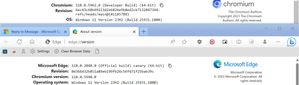
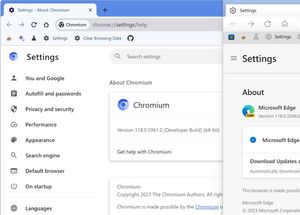
Oh, I haven’t noticed the color bug of the title bar. Yeah, I'm using Edge Canary (default browser) along with Chromium (same source code browser that Edge and Chrome and Opera and some other browsers are based off of, but Chromium doesn't have an auto updater and lacks most media player codices so not ideal for the average person.) Neat for side by side comparing though like in these cases. So I’m not sure what’s in Edge Stable version 115. The thing about Edge Canary is that even though they update every day or other day changing their Edge version of Canary (currenlty 118.0.2048.0), the Chromium version they use seems to not update for about two weeks or so. Right now at the time of this post, Edge is on Chromium version 118.0.5940.0 (been so for the last few days) while Chromium itself which updates it's developer branch builds several times a day is on 118.0.5962.0 (Chrome Canary is on 118.0.5961.0 as of today and updates daily.) So it seems if there's a bug or issue that's build into a specific version of Chromium that is being used by Edge at that time it might carry over and stay in the Edge Canary builds for a few days. tistou1.1KViews0likes2CommentsRe: 7 Reasons to Stop Using Microsoft Edge
I doubt that. I've been using Windows back to Windows 3.0. In that era Internet Explorer and Netscape Navigator were the two browsers that were popular (outside of AOL's program browser and Opera which was around since 1995 but Opera had a small user base.) I used IE and NN at that time. IE was always the superior browser to them all in my own personal opinion even when FireFox showed up after Netscape Navigator died. Fast forward to 2023 almost 2024 and Chrome is the dominate user share browser. Most browsers are based off of Chromium except Firefox and DuckDuckGo and some other possible minor barley known browsers. I tried all the Chromium based browsers and I don't like any of them except Chrome and Edge. Edge has the Chromium feel, but with it's own amazing features like Bing Chat and a nice smooth user interface. To me it runs super fast. I have no problem running the same sites that run on Chrome or Chromium. Edge Canary is my default used browser. Outside of Edge Canary I use Chromium itself as a backup or alternative at times (sometimes to side by side compare) with a created auto updater tied into Task Scheduler as Chromium doesn't have a built in auto updater. (Chromium isn't Chrome. It's what Chrome and Edge and other browsers are built off of.) I used Chrome Canary up into a year ago. Prior to Windows 10 I more or less just used Internet Explorer and sometimes Chrome as a backup. I think Edge is just fine. Better look and feel then other browsers and the old Legacy Edge which was blocky to me. Only thing I never liked about the current Edge is their current newer logo which looks way too much like an upside down version of the FireFox Nightly logo.1.1KViews0likes0CommentsRe: Dev Channel update to 117.0.2033.0 is live
cqdemal I don't know. I'm on Edge Canary and Bing Chat (and it's bar) works perfect (on Windows 11 Canary Channel Build of Windows I'm on.) No issues at all. Maybe it's just this Dev version or just your end. Right now I just use Edge Canary and Chromiumn (with a self built auto updater tied into Task Scheduler.) Edge Canary being my primary browser.13KViews0likes0CommentsRe: Windows 11 Taskbar
The taskbar isn't meant to be small or large so that's why when the taskbar is made smaller in size the clock is displayed awkward. Yes, true, that one can registry edit the taskbar to be smaller or larger but it either was an unfinished option Microsoft opted not to continue with or it's possible to be done but because of the coding of Windows 11 the sizing doesn't work properly and Microsoft optioned to not work on it or continue to work on it. There could be other reasons why it can be done too (left over code from Windows 10, who knows the reason why it can sort of be done in registry edit but not in settings). In other words, if Microsoft wanted it to be officially changeable they would of put an option like a toggle switch in the taskbar settings to make the taskbar smaller or larger without having to back door it with a registry edit. Maybe in future builds we'll see this option in Windows 11, but into then registry edits like making taskbar smaller or larger or moving taskbar to the top of screen is just an unofficial way of using these options thus can have problems, issues, bugs, unstableness. It's why it's not advice to use registry edit for such stuff. I tried for the experiment of it the taskbar larger, smaller, top of screen registry edit on one of my older computers that I didn't care if it crashed and while the options did work they came with unstableness and features that didn't properly work (such as registry editing the taskbar to be on the right or left of screen causes Windows Explorer to currently crash in a loop).58KViews1like3CommentsRe: Windows 11 Spinning Circle
Yeah, I just think it's a work in progress issue. It's not yet completed in having it throughout Windows 11, but it will be by the Fall, 2022 release. I can be wrong. But with Dev builds from the Development Branch this is where we see the new development of features that may or may not be complete in the early Dev builds of that feature and will only progress with each build (if they decide to keep it in at all.) These builds are being called Nickel builds because they aren't specific tied to any specific release version of Windows and for trying out new features that probably won't be out for some time. Check this out: https://www.windowslatest.com/2021/09/03/windows-11-build-22449-is-now-available-with-new-loading-animation/13KViews0likes0CommentsRe: Windows 11 Spinning Circle
I know as of Dev Channel build 22458.1000 the progressive solid ring circle comes up when booting up Windows or installing a new update, but the old dotted ring circle is in other places such as when booting down or shutting off computer. I could be wrong, but I believe it's a work in progress that started in 22449.1000 and with each build we'll eventually see it in place throughout Windows. I believe the current Dev Channel builds right now are for testing out development branch builds that are focused on the Fall, 2022 Major Update. So we're seeing features that are in the early stages of development and not yet finished or not yet completed or not yet fully tested yet that may or may not be in the Fall, 2022 major update release.14KViews0likes1CommentRe: Windows 11 Insider Preview 22454.1000 (rs_prerelease)
If you want you can also try downloading the ISO from the Microsoft Insider Program website, and try to manual install the build update from there. In this case it will be 22454. I've done that in the past if I had an issue downloading a build. Keep in mind you can't download and install a lower build (like a Beta Channel build) only the build you're trying to update too. Make sure you pick to keep all your apps, files, settings when it asks if you want too or not. It takes a little longer to install than the update form Windows Update, but it's the alternative way to getting the update if it's failing to come through Windows Update for you. Here: https://www.microsoft.com/en-us/software-download/windowsinsiderpreviewiso2.8KViews0likes0CommentsRe: taskbar error
Yes, it's an issue that's known by Microsoft. It's been reported many times on here and in Feedback Hub. The issue is found in Dev Channel build 22454.1000. I'm sure it'll be fixed in the next build or build after that. Windows Sandbox is also not working properly in this build. Dev Channel builds will have bugs, glitches, unstableness as they are from the development branch of builds thus new features and/or code might be in the testing phases. So it's expected to have this sort of stuff with a bug or glitch or something at times not working happen now and again on Dev Channel builds.773Views0likes0CommentsRe: Can I install windows 11 official after joining windows 11 insider program
Windows Insider Program builds are official, they're just builds that haven't yet reached stable release. If you're in Beta Channel then you can just stay on that, it won't expire out, and you'll be slightly ahead in builds than stable release and there's not many if any issues with Beta Channel builds. If you want out of Insider Program while in Beta Channel then go into your Windows Insider Program settings, and go into "Unenroll this device when the next version of Windows releases" than you'll continue to get Beta builds into the next major release of Windows 11 comes around in which case you'll be caught up and won't get anymore Beta Channel insider builds and won't have to reinstall or clean install out of the Beta Channel Insider Program. However if you're in the Dev Channel then you'll have to either stay in Dev Channel or clean install Windows 11 when Windows 11 official stable ISO is released (or convert back to Windows 10 by reinstalling a clean install) to exit out of Insider Program. Dev builds are Development builds and not matched to any specific release of Windows 11 which is the reason their build numbers are much higher then the other two channels and stable release. I'm also referring to if you're computer meets the requirements to run Windows 11.5.6KViews0likes3CommentsRe: An error occurred while checking for updates: Failed to cache the downloaded installer
I get that same exact message on Google Chrome Canary browser. Every so often that pops up. I noticed it happens to me if I try to open Chrome up too fast or too many times within a few seconds of when it's suppose to check for an update. Same error message down to the wording and it usually takes either computer reboot and/or having to wait a short time for it to self correct. Being that error message is in both Chrome and Edge it must be something specifically tied into Chromium. Interesting to see someone else post about it, at least I know I'm not the only one that gets that error message now and again as I started to think it was an error just on my side.3.5KViews0likes0CommentsRe: Green Screens of Death build 176
I'll probably be resolved in the next build or upcoming future builds. It's really what the Insider Program is all about. Identifying these bug issues in Dev and Beta builds then reporting them so that these issue dont make their way into stable builds. Same with Edge Canary/Dev. Don't forget to report your founding bugs on Feeback Hub. Feedback Hub is located in Start Menu under All Apps.1.6KViews0likes1CommentRe: Green Screens of Death build 176
Revert back to 22000.168 if you can. Here is how (click Windows 10 tab for now which has the info): https://support.microsoft.com/en-us/windows/recovery-options-in-windows-31ce2444-7de3-818c-d626-e3b5a3024da5#bkmk_remove_installed_windows_update If you can't do that try downloading and installing the 22000.132 iso from Microsoft's ISO page, and turning off Windows Update into the next Beta Channel build is released. Here: https://www.microsoft.com/en-us/software-download/windowsinsiderpreviewiso If anything else just wait into the next Beta Channel build. Keep in mind Insider Program builds will have bugs, glitches, unstable builds at times which Microsoft is clear about: Info: https://insider.windows.com/en-us/understand-flighting1.7KViews0likes3CommentsRe: I have not got the new windows 11 clock update.
Yeah, on Beta Channel you should be on 22000.176 right now (as of 09/05/2021). That should of came through your Windows Update. 22000.160 is two back. Go to settings, then go to your Windows Update, and then go to check for updates so you can catch up to the recent update.6.7KViews0likes1Comment
Recent Blog Articles
No content to show