User Profile

rs_oakford
Iron Contributor
Joined 7 years ago


User Widgets
Recent Discussions
Re: Unable to create Azure AD user using Graph API
I think I may have worked out (part of) the answer to my question. The password I had created was 20 characters long random mix of only lower case letters, upper case letters, and numbers. When I amended the password to match the example from https://docs.microsoft.com/en-us/graph/api/user-post-users?view=graph-rest-1.0&tabs=http#example-1-create-a-user the new user was created using my Application. I subsequently tried to create a new user with an 8-character long password containing two each of: lower case letters, upper case letters, numbers, and symbols. I then see an error: @{code=Request_BadRequest; message=The specified password does not comply with password complexity requirements. Please provide a different password.; innerError=} At least that's clearer than the error I had before. However, I'm still confused as to why that original 20-character random password didn't work altogether and I'm also intrigued that the 8-character password didn't work as both of those matched the minimum requirements listed at https://docs.microsoft.com/en-us/azure/active-directory/authentication/concept-sspr-policy#password-policies-that-only-apply-to-cloud-user-accounts. 8-character password used for testing: 4k3qC$B! 20-character password used for testing: sU4NOuX3skjNQGx3Uk3n To check I wasn't going crazy, I then tried again creating a new user account with that original 20-character password and this time the account was created - great (odd it didn't work before though)! As I had run these tests on a new dev tenant, I checked and Get-MsolPasswordPolicy returns: ExtensionData : System.Runtime.Serialization.ExtensionDataObject NotificationDays : 14 ValidityPeriod : 2147483647 Hopefully at least this post helps someone else if they run into the same issues.5.2KViews0likes0CommentsUnable to create Azure AD user using Graph API
Note I'm somewhat new to using the Graph API, so please forgive me (and correct me) if my terminology is wrong 👍 As I understand, https://docs.microsoft.com/en-us/graph/api/user-post-users documents that it should be possible for an Application to call the API and specifies the required permissions, headers and body to create a new Azure AD user account. Using PowerShell, I've tried a POST to both the v1.0 and beta endpoints with an authorization token that has the appropriate permissions assigned to create a new user account, but in both cases I see the following error: Invoke-RestMethod : The remote server returned an error: (400) Bad Request. The parameters I passed are a variation of those from https://docs.microsoft.com/en-us/graph/api/user-post-users?view=graph-rest-1.0&tabs=http#example-1-create-a-user (with the user principal name amended to have the appropriate suffix for the tenant in question, and a different password). When I run the following try { Invoke-RestMethod -Headers $header -Uri $uri -Method "POST" -Body $userparams -ErrorAction Stop } catch [System.Net.WebException] { if ($_.Exception.Response -eq $null) { throw } $streamReader = [System.IO.StreamReader]::new($_.Exception.Response.GetResponseStream()) $streamReader.BaseStream.Position = 0 $streamReader.ReadToEnd() | ConvertFrom-Json } I see the "(400) Bad Request" error is apparently due to an invalid passwordProfile: @{code=Request_BadRequest; message=Invalid property 'PasswordProfile'.; innerError=} Amending the properties of the passwordProfile object according to https://docs.microsoft.com/en-us/graph/api/resources/passwordprofile?view=graph-rest-1.0 hasn't helped. If I entirely remove the passwordProfile parameter from the body of my POST I get a slight variation on the exception.response inasmuch as it says: @{code=Request_BadRequest; message=A password must be specified to create a new user.; innerError=} Having checked, I am also unable to create a new user account when using a Delegated (work or school account) to call the same API and specify the same headers and body, with the same resulting errors. Note, I am able to create a new user account using https://docs.microsoft.com/en-us/powershell/module/microsoft.graph.users/new-mguser?view=graph-powershell-beta (version https://www.powershellgallery.com/packages/Microsoft.Graph.Users/1.9.2) using exactly the same body parameters, so I have hope that the parameters are defined correctly after all Can anyone help me understand what I need to do to be able to create users using the Graph API, ideally with Application permissions?Solved6KViews0likes1CommentAzure AD Connect service critical alert reported: dn-attributes-failure
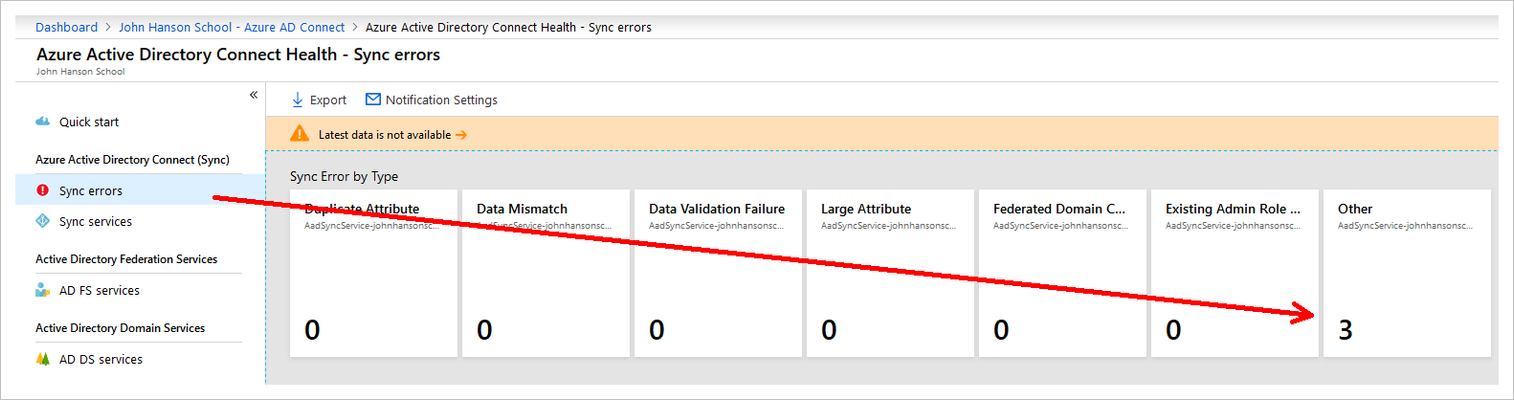
[I sent an email to askaadconnecthealth@microsoft.com with the below content a few days ago but haven't heard back so decided to start a conversation here] As per the below synchronization errors email I have been receiving, there are three cloud-only Office 365 users with “Sign in blocked” that were previously synched using Azure AD Connect. The accounts were previously moved out of the sync OU and when they appeared as deleted users in Office 365, were restored to keep their data intact. The AD users have since been deleted and cannot be restored. https://aad.portal.azure.com/#blade/Microsoft_Azure_ADHybridHealth/AadHealthMenuBlade/SyncErros There are no further error details other than the type: dn-attributes-failure There are no other sync errors and Azure AD Connect is showing success on all connector operations. I do not want to delete these accounts from Office 365. Could anyone please advise me to know which steps to take to resolve the issue causing these three accounts to be included in the report for synchronization errors? They are cloud-only and do not need to be synched with AD. Is it necessary to re-create the AD users in the sync OU and set their Office 365 account ImmutableID to sync and match their AD account (source anchor is objectGUID) so they do not get reported as sync errors? ----- From: Microsoft Azure [mailto:azure-noreply@microsoft.com] Sent: 02 September 2019 11:10 Subject: We detected synchronization errors in your directory There are synchronization errors in your directory. Azure AD Connect Sync errors detected You’re receiving this email because we have detected a critical alert on your Azure AD Connect service for errors that occurred while data was while synchronizing between your on- premises active directory and your Azure Active Directory. Title: Sync errors detected on your Azure AD Connect service Last export time: August 13, 2019 15:25 UTC Error count: 3 sync errors Service: [tenant].onmicrosoft.com Tenant: John Hanson School Report: To get more details, see Sync Error Report. To learn how to fix sync errors, see https://azure.microsoft.com/email/?destination=https%3A%2F%2Fdocs.microsoft.com%2Fen-us%2Fazure%2Factive-directory%2Fconnect%2Factive-directory-aadconnect-troubleshoot-sync-errors&p=bT0zMTQ2MjExOS1hZjlmLTQ0NzEtODljOC04YzZjNmJlOTAyN2EmdT1hZW8mbD1kb2NzJTNBdHJvdWJsZXNob290LXN5bmMtZXJyb3Jz. If you have any feedback, please post it to the https://azure.microsoft.com/email/?destination=http%3A%2F%2Fgo.microsoft.com%2Ffwlink%2F%3FLinkId%3D519357&p=bT0zMTQ2MjExOS1hZjlmLTQ0NzEtODljOC04YzZjNmJlOTAyN2EmdT1hZW8mbD1md2xpbms%3D or mailto:askaadconnecthealth@microsoft.com for any questions. https://azure.microsoft.com/email/?destination=https%3A%2F%2Fgo.microsoft.com%2Ffwlink%2F%3FLinkId%3D521839&p=bT0zMTQ2MjExOS1hZjlmLTQ0NzEtODljOC04YzZjNmJlOTAyN2EmdT1hZW8mbD1wcml2YWN5LXN0YXRlbWVudA%3D%3D Microsoft Corporation, One Microsoft Way, Redmond, WA 9805218KViews0likes1CommentRe: Enable Require Registration: For everyone
JsWee94, you can following instructions for installing/updating the MicrosoftTeams PowerShell module at https://docs.microsoft.com/en-us/MicrosoftTeams/teams-powershell-install 👍 Once you've imported the module, I would recommend simply running: Connect-MicrosoftTeams (this gives you an interactive sign in, which also supports multi-factor authentication) As for the above notes from ChristianJBergstrom regarding teams meeting policy settings, you will also need to pass the "Identity" attribute and value of the meeting policy you would like to update at a minimum (see https://docs.microsoft.com/en-us/powershell/module/skype/set-csteamsmeetingpolicy#examples), such as "-Identity Global" (the Global teams meeting policy is the default policy assigned to all Teams enabled users, but you can create additional meeting policies with different names/identities). Hope that helps 😊38KViews0likes0CommentsUniversal Print volume add-on: Windows or Microsoft 365?
What is the difference between the following offers: Universal Print volume add-on (500 jobs) - Windows ( d3ddc493-5741-4e0d-a02d-07edbb0bb72e ) Universal Print volume add-on (500 jobs) - Microsoft 365 ( cb131356-45ee-4ae2-8537-873b706c8e75 )Solved4.1KViews1like3CommentsRe: Force Teams desktop client update
ChristianBergstrom, I have also updated my Windows desktop Teams client using this 'forced' method and ongoing updates are indeed working. In my case, I did so to take advantage of a new Teams feature (7x7 grid) a few months ago when selecting 'Check for updates' in-app wasn't updating to a newer version while my colleagues already were using a newer app version (and downloading a new installer directly from https://www.microsoft.com/en-us/microsoft-teams/download-app wasn't making any difference either). For completeness, as this post doesn't yet mention it, I thought it might be helpful to reference https://docs.microsoft.com/en-us/microsoftteams/troubleshoot-installation#troubleshoot-update-issues, which explains some troubleshooting steps related to Teams app updates that you might want to try before 'forcing' an update. If the above troubleshooting steps don't help resolve the issue, I would suggest it's best to raise a case with Microsoft Support 👍138KViews2likes4CommentsRe: Force Teams desktop client update
Thank you, ChristianBergstrom Just to emphasize two limitations posted at the links you shared: "Linux users aren't able to update manually within Teams at this time." (see https://support.microsoft.com/en-us/office/update-microsoft-teams-535a8e4b-45f0-4f6c-8b3d-91bca7a51db1#ID0EAABAAA=Desktop) "Teams clients on Virtual Desktop Infrastructure (VDI) aren't automatically updated the way that non-VDI Teams clients are. You have to update the VM image by installing a new MSI as described in the instructions to https://docs.microsoft.com/en-us/microsoftteams/teams-for-vdi#install-teams-on-vdi. You must uninstall the current version to update to a newer version." (see https://docs.microsoft.com/en-us/microsoftteams/teams-client-update) The Teams desktop client may be working in VDI mode if you see the registry key HKEY_LOCAL_MACHINE\SOFTWARE\Citrix (this key may have been added by another app)137KViews0likes0CommentsManage Teams guest access
As I understand, Guest access for Microsoft Teams is currently off by default for any given tenant - see https://docs.microsoft.com/en-us/microsoftteams/set-up-guests. However, it's not clear whether a given tenant has Guest access setting set to "Off" instead of "Service default" based on the information and screenshot in https://docs.microsoft.com/en-us/microsoft-365/solutions/collaborate-as-team#teams-guest-access-settings. 1. Is it possible to check whether a given tenant has Guest access disabled (Guest access setting is set to "Off" instead of "Service default") via PowerShell or using an API? As I'm managing hundreds of tenants, I would like to know a way to check this without having to sign into each Teams admin center individually. 2. If I do have to check this manually for each tenant, how do I distinguish in the Teams admin center whether the Guest access setting is set to "Off" instead of "Service default"? I realize I can check Guest access and disable it for individual Teams as shared in https://techcommunity.microsoft.com/t5/microsoft-teams/allow-or-block-guest-users-from-a-specific-team-in-microsoft/m-p/175918 - assuming this is still current. <# Configuration Change in Guest access for Microsoft Teams MC228482 Major update: Announcement started Applied To: All We're making some changes to the default setting for Guests in Microsoft Teams Beginning on February 8th, 2021, we are turning on Guest access in Microsoft Teams by default for any customers who have not configured this setting. This will bring Teams Guest capability into alignment with the rest of the suite, where the setting is already on by default. [Key Points:] • Timing: February 8th, 2021 • Admin control: Admin center UI • Action: Review and set appropriate configuration [How this will affect your organization:] When this change is implemented if you have not already configured Guest access capability in Microsoft Teams, that capability will be enabled in your tenant. With guest access enabled, you can provide access to teams and other resources to people outside your organization while maintaining control over your corporate data. [What you need to do to prepare:] Prior to this change taking effect on February 8th 2021, if you want Guest access to remain disabled for your organization, you will need to confirm that the Guest access setting is set to "Off" instead of "Service default". Instructions for how to configure the Teams guest access settings can be found here: Teams guest access settings [https://docs.microsoft.com/en-us/microsoft-365/solutions/collaborate-as-team#teams-guest-access-settings] #>2.9KViews1like2CommentsRe: Manage Teams guest access
Thank you for your reply, ChristianBergstrom . 2. With regard to distinguishing in the Teams admin center whether the Guest access setting is set to "Off" instead of "Service default", I created a new tenant and can confirm: https://admin.teams.microsoft.com/company-wide-settings/guest-configuration shows: "Service default: Off" [can't seem to "insert photo" screenshot in post so see attached] ... now to find out whether this is exposed via PowerShell anywhere.2.7KViews1like0CommentsRe: Next Microsoft 365 Champion Call / September 16
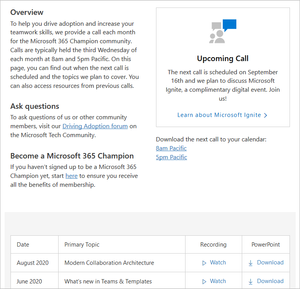
PEPA_Healthcare, could you please let me know when the September call recording has been uploaded to https://adoption.microsoft.com/champion-resources/? I'm sorry I missed the call but am looking forward to catching the "exciting nugget" 👍 By the way, that page still says the 'upcoming call' is on 16th September and the 'download the next call' links seem to be for the August call.2.5KViews0likes0CommentsRe: Teams client not updating
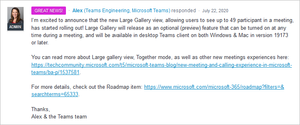
ThomasSteibl, I had a similar question off the back of a recent UserVoice announcement (on https://microsoftteams.uservoice.com/forums/555103-public/suggestions/17010055-show-video-for-all-people-in-video-meeting) that 7x7 was enabled for "desktop Teams client 19173 or later" : In the comments of the associated blog post (see https://techcommunity.microsoft.com/t5/microsoft-teams-blog/new-meeting-and-calling-experience-in-microsoft-teams/bc-p/1540827) a conversation ensued that covered two points: (a) how to get the latest client version and (b) do which features are available depend only on the client version? (a) It's still not clear to me how to download the latest client version (checking for updates in-app clearly don't trigger a download of the latest release). https://support.microsoft.com/en-us/office/what-s-new-in-microsoft-teams-d7092a6d-c896-424c-b362-a472d5f105de only shows app versions for each date on the "Desk phones" tab. Presumably, if you know which version numbers exist, you could download it directly by replacing the relevant part of the URI: https://statics.teams.cdn.office.net/production-windows-x64/1.3.00.19565/Teams_windows_x64.exe (b) It turns out, a given user's Office 365 release settings didn't have an impact on the 7x7 (preview) feature being available (even when users in that same tenant were all on "desktop Teams client 19173 or later"), and within a single tenant only select users might have the feature available. It would be great to get an official response on this - I missed the most recent Ask Microsoft Anything (AMA) and can't seem to start a new conversation on the https://techcommunity.microsoft.com/t5/microsoft-teams-ama/bd-p/MicrosoftTeamsAMA board so am adding my comment here in the hope someone from Microsoft with some insider knowledge will respond 😊75KViews1like3CommentsWhat's the difference between School Data Sync (Plan 1) and School Data Sync (Plan 2)?
https://docs.microsoft.com/en-us/schooldatasync/create-users-for-k12-and-hed#prerequisites-for-sds mentions among the "perquisites to enable SDS for user creation" are School Data Sync (Plan 1) or School Data Sync (Plan 2). Microsoft Partners have access to documents that explain Office 365 Education Plan A1 includes School Data Sync (Plan 1) while both Microsoft 365 and Office 365 Education Plan A3 and A5 include School Data Sync (Plan 2). However, I can't find any details about the differences between the SDS plans on: https://www.microsoft.com/en-us/microsoft-365/academic/compare-office-365-education-plans https://docs.microsoft.com/en-us/office365/servicedescriptions/office-365-platform-service-description/office-365-education, which doesn't even mention SDS https://docs.microsoft.com/en-us/office365/servicedescriptions/office-365-platform-service-description/microsoft-365-education https://www.microsoft.com/en-us/education/buy-license/microsoft365/ [EDIT] https://www.microsoft.com/en-gb/licensing/product-licensing/microsoft-365-enterprise?activetab=m365-enterprise:primaryr7 mentions "School Data Sync Plan 2 (plan details can be found https://docs.microsoft.com/en-us/schooldatasync/)" - but there are no details about the plan there Does anyone know what the distinction is between School Data Sync (Plan 1) and School Data Sync (Plan 2)?SolvedUpdates to https://docs.microsoft.com/en-us/schooldatasync/ section
There doesn't seem to be an option to comment on the docs section https://docs.microsoft.com/en-us/schooldatasync/ as there is for example on https://docs.microsoft.com/en-us/office365/servicedescriptions/office-365-service-descriptions-technet-library. School Data Sync (SDS), https://docs.microsoft.com/en-us/schooldatasync/ (published date 09/30/2017) says: "School Data Sync (SDS) is a free service in Office 365 for Education that reads the school and roster data from a school's Student Information System (SIS). It creates Office 365 Groups for Exchange Online and SharePoint Online, class teams for Microsoft Teams and OneNote Class notebooks, school groups for Intune for Education, and rostering and SSO integration for many other third party applications." And https://docs.microsoft.com/en-us/schooldatasync/frequently-asked-questions (published data 04/15/2018) still say: School Data Sync is a free service in Office 365 Education that reads the rosters from your SIS, and creates classes for Microsoft Teams, Intune for Education, and third party applications. ... SDS allows you to automatically create Class Teams within Teams for Education (There are likely more references to SDS creating Teams that could be found) - perhaps someone could update these references in light of https://docs.microsoft.com/en-us/schooldatasync/whats-new-with-school-data-sync (published date 03/26/2020) and https://docs.microsoft.com/en-us/schooldatasync/improved-class-and-roster-sync-for-teams (published date 04/14/2020) to explain the difference between the ways Teams are provisioned for sync profiles created before and after 3/26/2020?904Views0likes0CommentsRe: Teachers of multiple schools
Simon Youngand Paul Leach - did you ever get an answer to your questions? A quick search on https://docs.microsoft.com/en-us/schooldatasync/ doesn't seem to address your scenario of "duplicate" teachers. Maybe consider adding a suggestion to https://edu.uservoice.com/forums/602512-school-data-sync/?2KViews0likes1CommentRe: OneNote 2016 Desktop Black Theme Dark Mode
Ricardo VianaI have monthly channel 12130.20272 - dark mode works but as Steve G mentioned "when I switch it on the pages' background remain white/bright color and no way to change it... How To get real dark mode with black background pages ?" Ditto that question - the only page background options are pastel colors, no dark alternatives, and leaving the option 'no color' just keeps the page background white.25KViews2likes4Comments

Recent Blog Articles
No content to show